
Most people that read this site probably know that I’m a big fan of Palm OS and have been using a Treo for what seems like forever. A couple years ago I went through a whole
nightmare ordeal buying a SprintPCS Treo 650 that was hacked to run on the Verizon network. Then I moved to Cingular / AT&T,
got GSM Treo 650 and later a
Treo 680. As for the new
Centro, I haven’t purchased one yet and am not sure that I will. Why? Well, I seem to have found
my way back into the Windows Mobile camp by way of the
Pantech Duo smartphone from AT&T.
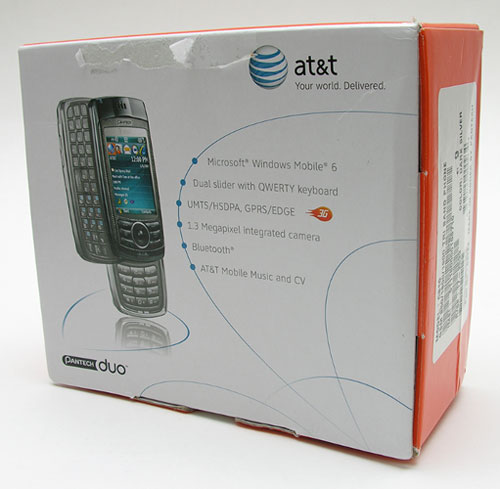
Hardware Specifications
Windows Mobile Standard (Smartphone) v6.0
416 MHz Marvell Bulverde CPU
Quad-band world phone – 850/900/1800/1900 MHZ
Dual-band domestic UMTS/HSDPA
2.2″ QVGA LCD with LED backlight
128 MB Flash ROM plus 64 MB SDRAM
Dual sliding keyboards
Bluetooth v1.2 with A2DP
MicroSD(TM) memory slot, expandable up to 2 GB
11-pin mini-USB (USB 1.1)/ audio jack in one
1.3 megapixel camera with 4x zoom
Weight: 3.88 ounces
Dimensions: 4.02 x 1.97 x 0.83 inches
Battery: 1320 mAh Lithium Ion with up to 3 hours talk time and up to 10 days standby
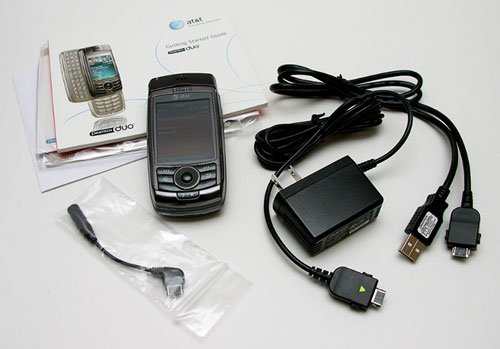
Package Contents
Pantech Duo phone
AC adapter charger
USB charging / sync cable
Earphone jack adapter cable
User manual and CDs
First of all, I just have to say that I love, love, love the form factor of the Duo. For me it is the prefect size. It is small enough to fit in my jeans pocket, coat pocket, etc. and is comfortable to hold and use.
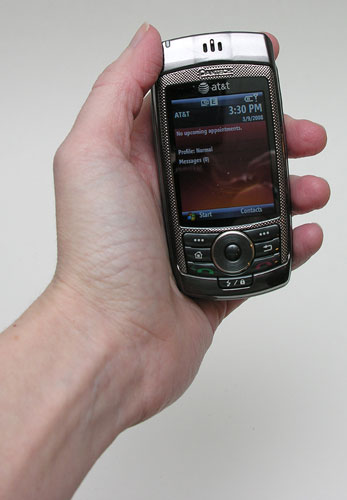
In hand it is solid, but almost doesn’t pass the gadgeteer squeeze test due to some slight flexing and creaking of the plastic
casing. Most people won’t go around squeezing their phones like I do, so I think this phone will be fine for normal day to day use. I’m not sure I’d
want to use it in environments that would need a more rugged device though. I sure wish it had a metal casing instead of plastic, as I think that would raise it to another level.
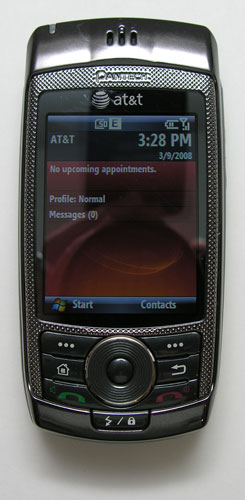
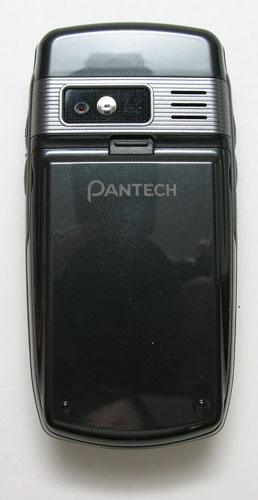
Made of shiny dark Grey plastic, the Duo is a smudge and fingerprint magnet. I
find myself constantly polishing it on my pant leg to wipe the marks off.
Most of the front surface of the phone is occupied by the 2.2 inch color display, which is bright, crisp and easy on the eyes. Above the display is the speaker and status LED. Below the display is the navigation button grouping.
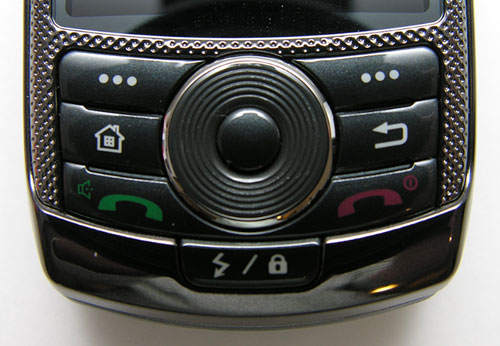
In the center of the grouping, there is a round 4-way nav pad with a select button in the
middle. Surrounding the nav pad are six small buttons with an additional button directly below the nav pad. The top row of buttons map to the functions at the bottom of the display. Under them are buttons for the home screen and
previous screen. The next row of buttons are your standard call and end/power buttons. The last button is the profiles / lock button. All of these buttons are small, but they are raised enough to allow you to easily find the desired one with your thumb-tip. They also have good tactile feedback and are backlit.
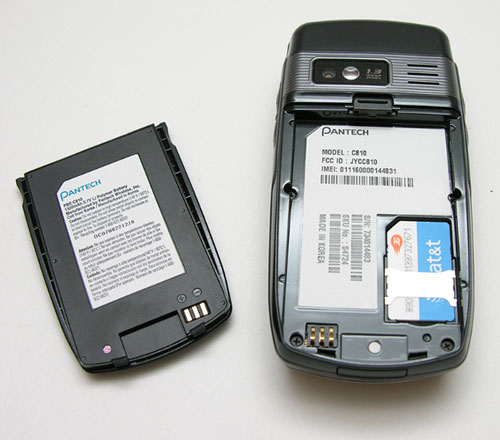
On the back of the phone, you will find the 1.3 megapixel camera lens and snap-on battery
pack.
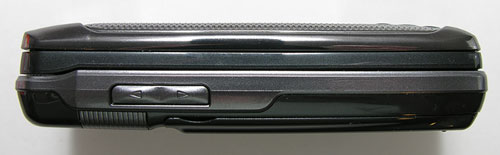
On the left side, you’ll find the volume adjustment rocker switch.
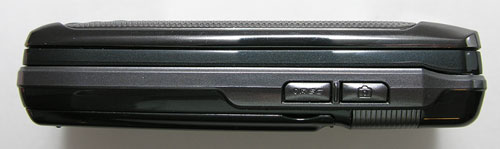
The opposite side has the camera launch / shutter button. To launch the camera application, you have to hold down the button for a few seconds. Then once the application is running, pressing the
same button will snap a picture. Below the camera button, is the voice recorder / voice command button.
The Duo has MS Voice Command software built in that will allow you to dial
numbers and launch applications without any training. You can say things like
"Call Jeanne at work" and it will repeat your request then dial the number.
It’s very useful for those times when you’re driving and
should have your eyes on the road instead of your phone’s keypad.
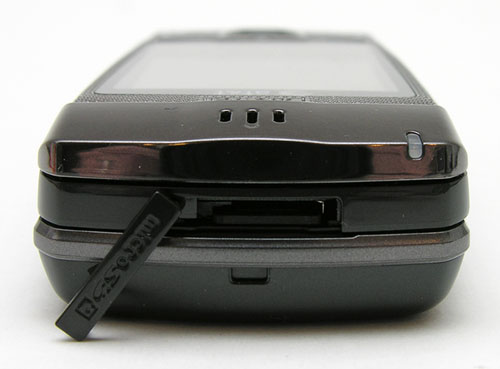
On the top edge of the Duo, you’ll find a MicroSD card slot. Unfortunately this
phone does not support newer SDHC cards, so you’re stuck
with a 2GB limit.
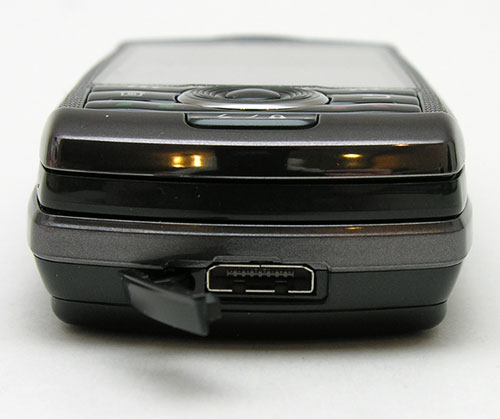
On the bottom is the sync / charge port. This is also where you plug in the included earphone adapter cable, so that you can use earbuds / earphones to listen to music.
Of course, the main advantage of this phone over other Windows Mobile Smartphones is the fact that it has dual keyboards.
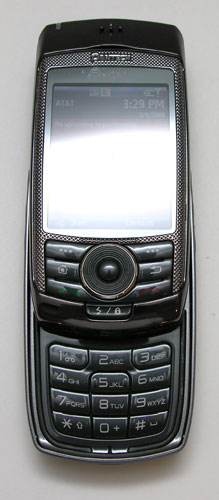
The entire top surface of the phone slides up to reveal a regular numeric keypad to use for dialing a number, texting with T9 input, etc.
The keys are relatively flat, so it is difficult to type blindly. That said, the keys have good tactile feedback and are backlit.
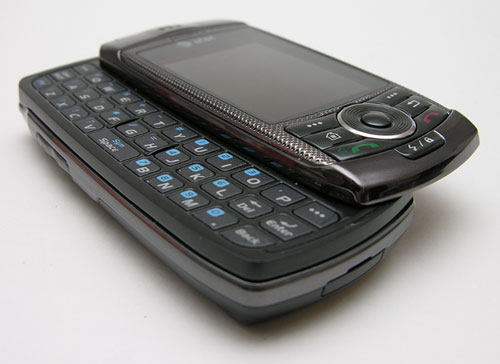
You can also slide the entire face sideways to reveal a full QWERTY keyboard perfect for those times when you need to enter more than a little text. Like the numeric keypad, this one is also very flat. The keys are also small and somewhat hard to press unless you use your thumbnails. Even so, it’s very nice to have a full keyboard to type long text messages.
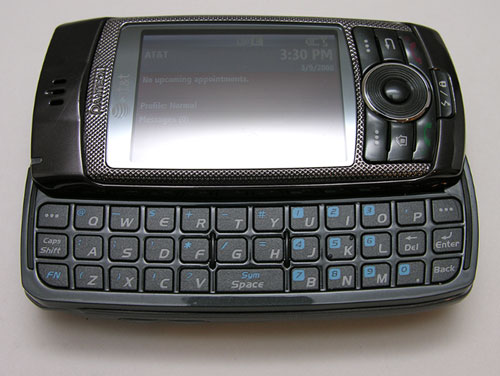
It’s amazing that two keyboards can be built into such a slim device. Opening
and closing either keyboard is a simple one-handed operation. I was impressed
how firm and robust the mechanics felt. I’ve used some sliding keyboards on
other devices and found them to be a bit too wiggly for my liking.
Another cool feature is the fact that when you slide open the QWERTY keyboard, the display will automatically rotate to be in landscape mode.
This happens very quickly with almost no lag at all. Like I mentioned above, the
display is very comfortable to view. Below you’ll see a picture that I took to
give you an idea what it looks like. I didn’t use flash and didn’t touch up the
photo.
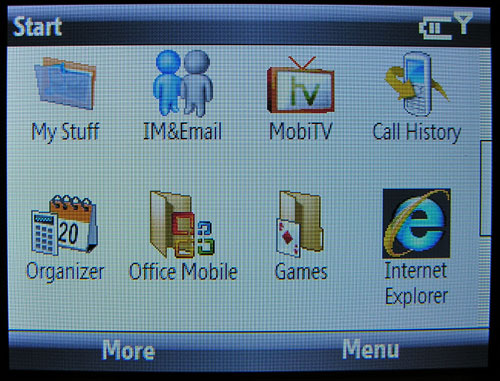
The resolution of the display is 240 x 320 and has 262k colors, which is fine
for PIM (personal information management) type activities and not so fine for
surfing regular web pages. Pages formatted for mobile devices work fine though.
I like the display so well, that I wouldn’t even mind reading a book on it. :o)
I found the overall system performance to be surprisingly snappy. Launching and
toggling between applications is quick and painless. Watching videos was surprisingly smooth and skip free.
What about battery life? From my testing, it seemed to be from ok to good. I
typically recharge my phones every night and rarely use one enough in one day to
drain it, so I don’t usually run into any problems. I have noticed it drop a bar
or so in a day where I have only used it to make a few calls and sent a few text
messages.
So, we’ve established that I love the form factor, dual keyboards, the color
display and system performance. Now for the bad news…

Click thumbnail for full-size image
The Duo’s built in camera is crummy. I mean really crummy. The images are out of
focus, with blotchy colors and sometimes the outside edges of the snapshot are warped. The
camera works in a pinch, but only barely.
The Duo does not have WiFi or a built in GPS. I guess this isn’t a shocking
revelation, but it seems that a lot of smartphones these days have those feature
as standard. I can forgive the lack of WiFi on this phone due to the fact that
the screen is so tiny that I wouldn’t really care to take advantage of that
feature anyway. An iPhone it is not.
Another thing to consider is that the Duo only has Bluetooth 1.2 instead of 2.0. Version 2.0 is more robust and allows for faster speeds when tethering the phone to a laptop. The Duo does have A2DP though, so that means you can listen to your tunes through Bluetooth earphones.
The worst problem with this phone though is call quality. When I first started testing
it a few weeks ago, I would receive calls where the person on the opposite end
could hear me, but I was unable to hear them at all. I’ve also had an occasional
dropped call in areas where the signal is typically very good. People have even
commented that I sounded like I was talking with a sock in my mouth. I’m often
hungry, but I assure you that don’t eat socks. ;o)
Software Bundle
You get the regular suite of applications that make up Windows Mobile Standard, like Calendar, Contacts, Tasks, Internet Explorer, Media Player, Pocket Word, Excel, Powerpoint, Outlook, File Manager, Calculator, etc. Also included:
Brain Challenge game
Bubble Breaker game
JewelQuest2 game
Midnight Pool game
Scrabble Blast game
Solitaire game
Tiger Woods PGA TOUR 07 game
Google Maps
Java VM
ClearVue PDF viewer
World Time
Also included are a few apps from AT&T that require an extra fee to use. Some of them include:
XM Radio (monthly fee req.)
AT&T Music
MobiTV (is pre-installed (monthly fee req.)
Cellular Video
MyCast Weather (trial version)
TeleNav Maps (link)
XPress Mail
AT&T Mall
MySpace Mobile
I don’t have any real complaints about the software other than I wish the trialware and payware apps weren’t installed by default as I would not use them and they just clutter up the applications listing.
As a non-Windows person, I used MarkSpace’s MissingSync to sync the Pantech Duo with my Mac. It works great and is a must have for Mac users.
Bottom Line
The Duo phone was a loaner from AT&T and I have to admit that even with the call quality issues, I am very sad to have to pack it up and send it back to them. I have really enjoyed having a small smartphone that can easily fit in my hand and pocket like this Duo. I guess I can hope that the Duo will become so popular that Pantech might decide to come out with a better version in the future… But more surprising than liking this phone, I also found that I missed using Windows Mobile. Yes, it’s true… I guess I’m just getting bored with Palm and its overall stale OS, that WM feels more fun and interesting to me. As I finished this review today, I was going through my draw o’phones and decided to pull out the HTC Excalibur to use for awhile. Hi Windows Mobile, glad to be back (if only until something else piques my interest…).
The price listed is for a phone without any contract. You can get better deals through AT&T with a 2yr contract.



Gadgeteer Comment Policy - Please read before commenting
Thanks for another good review. I’m wondering if you thought that your poor call quality might have been due to using a loaner phone – aren’t those typically “well used”? Just a thought, while Pantech isn’t a household name in the US, it apparently has a pretty good reputation in Asia.
Anywho – don’t forget that the upgrade to Windows Mobile 6.0 has been released for your Excalibur. It’s a free upgrade from HTC (I think you have to register for their club on the support website) but it will be a big improvement over the Windows 5.0 that runs standard on the Ex.
Mike:
It’s possible that this phone may be a ‘dud’. It seems like it would work fine for days and days and then start spitting up non-stop for awhile. Maybe it had the flu ;o)
Yes, I am aware that there is an update for the Excalibur. I registered at the HTC Club site last night, but couldn’t find the update. I’m going to grab it today for sure.
I’m not sure what the attraction of a dual-sliding device is. The HTC S710 (Vox) has a better form factor, larger display, ever-present numeric pad, good Wifi, decent camera and similar side-sliding keyboard. If you like the Pantech 810, then you’ll probably like the HTC S710 even more.
L.B.
Larry:
I might try the HTC S710 soon. It looks great. The processor is slower than the Duo, but the same as the S620, which feels fine to me.
it looks nice, but it’s no Treo. If I’m switching out my 700p, I want something with GPS, a 2+MP camera and no loss of all the things I need. Once I got a qwerty keyboard, that was it- I can’t go back!
Thank you so much for ALL of this information. I was debating on purchasing the Pantech Duo C180. My biggest concern was how the reception would be in my small country town. My old pink Razor Chrome edition picks up amazing reception compared to a LG Shine I once had. My family has better luck receiving signal when using candy bar phones. *crossing fingers* Hope I enjoy my soon to be Pantech Duo. I’m feeling excited reading all about it from your review. Thank you 0:-D
How do I get T9 word when i have the phone the vertical way?
Hi! I was wondering how to lock the phone so only the people on your contacts can call or text you, please help!!!
the phone is great, until one of my friends got ahold of it, and played a NASTY trick on me. She locked the phone and now it is asking me for a password when I turn it on. Does AANYONE know a way to “reset” this phone, so that I can USE it again? I’m so sad, my mom just bought me the phone like 2 months ago, and now it’s completely unusable.
Any ideas? Thanks in advance!
the phone is great, unfortunately no wifi.
I´ve had this phone for a while and is great, the only down side is that is a little slow and have no wifi.
Ok. To be honest this phone is the WORST PHONE I HAVE EVER -IN MY LIFE- HAD. Its horrible ! My battery dies so fast, even when i don’t even use it. ! I can’t delete my text messages for some crazy reason.! and i get text messages hours after when they actually send it. !!!!! It’s so frustrating, i would never EVER would reccommned this phone to anyone, especially if your always on the go and have no paitience like myself . plus, my camera takes forever to load and actually take the picture. sheeeshhhh!- They AD this phone as the “best”, no it’s crappy.
@Chula I actually liked it a lot and I didn’t run into the problems you mention.
Hello All,
I am in Thailand and would like to know if anyone knows how to unlock an AT&T Version of this phone?
Hello All,
I am in Pakistan and would like to know if anyone knows how to unlock an AT&T Version Duo C810 Pantech!!!!! reply me plzz plzzz pllzz plzzzzz my emain i.d is ([email protected])
Hello All,
I am in Pakistan and would like to know if anyone knows how to purchase a batery on an AT&T Version Duo C810 Pantech!!!!! reply me plzz plzzz pllzz plzzzzz my emain i.d is ([email protected])
My pantech c810 wont turn on. Please help me turn it on and what is the issue with it. help meeeeeeeeee.
Hi I a from Bangalore India, pantech c810 when i switchon the mobile it will show Download Ready Ver 1.0 but noting will open. please tell me how to on this phone
Hi Mr. Julie I am a Nigerian, I bought a second hand pantech C810 by the time I put my sim card it show me. Network PUK insert unblock code and I did not know these code if possible please help i will loke to use this phone in my country Nigeria.
Nura, I’m sorry, but I don’t have that info. The review is 11 years old and I no longer have the phone.