
I don’t know about all of you, but the first thing I do after getting seated on a flight is to open the seat back pocket to find the latest issue of the Skymall catalog. I didn’t change that habit on my last trip when I went out to San Francisco for MacWorld Expo. One of the more interesting items that I saw in the catalog was the tiny iwave cube portable microwave from icube designs. Coincidently, a few days after returning from the trip, I was contacted asking if I might like to review this mini appliance. Of course I said yes. Let’s take a look…
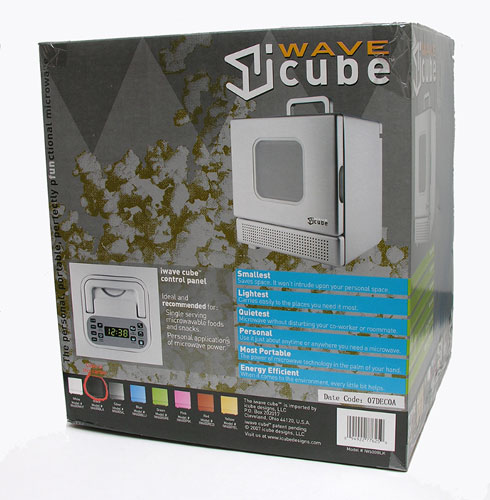
Available in eight colors including White, Black, Grey, Blue, Green, Pink, Red and Yellow, I was sent the Black model.
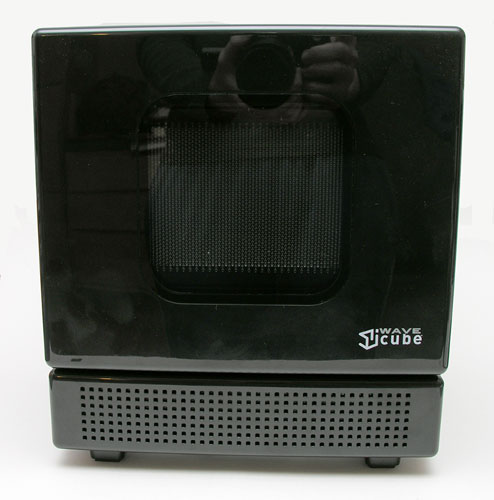
With a footprint of 10.5 x 12 x 10 inches, the iwave cube takes up less than one cubic foot of space. It is definitely a little microwave, making it perfect for a dorm room, office cubicle, etc.
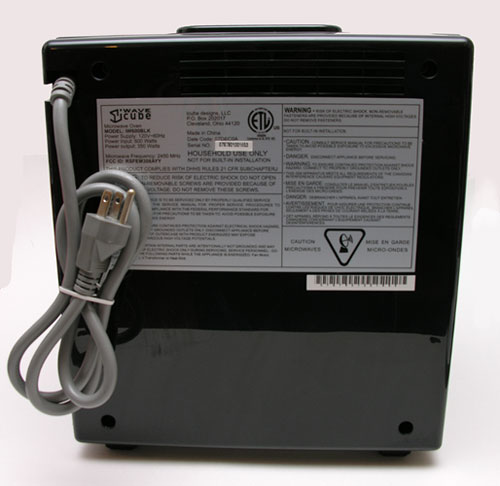
It weighs 12 pounds and has an output of 600 watts. The grounded three-prong power cord is about 42 inches long and is attached at the top back corner. Not sure why it’s attached at the top instead of the bottom. This causes you to lose about 10 inches of cord length, if you need to plug it into an outlet below the device.
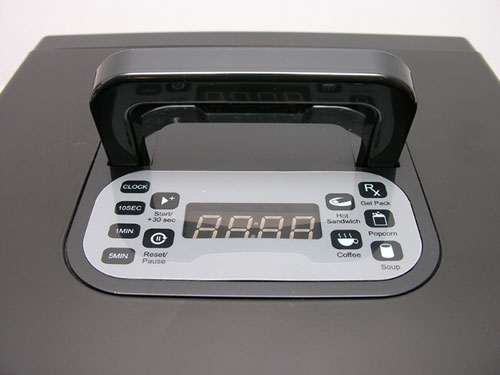
The user interface is located on the top of the iwave, along with a convenient handle. The location of the buttons may make placement of this microwave a bit problematic as you’ll probably not want to put it on a shelf above eye level. Doing so will make it really difficult to see / press the buttons.
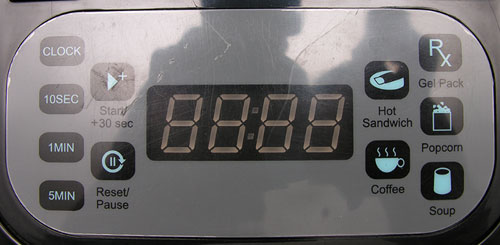
As you will notice, the interface is simple and user friendly. You can’t punch in a specific time such as 1 minute and 23 seconds. Instead, you can press the 10 second button several times to a maximum of 1 minute. You can press the 1 minute button several times for a maximum of 5 minutes and the 5 minute button twice to give you a maximum of 10 minutes. There are also buttons preprogrammed for items such as hot sandwiches (can you say Hot Pockets?), Popcorn, Coffee, Soup and Gel Pack. The times associated with these items are:
Hot Sandwich – 4 minutes 30 seconds
Gel Pack – 1 minute 40 seconds
Coffee – 5 minutes, 6 minutes (press the button twice to toggle between the two settings)
Soup – 5 minutes, 6 minutes 30 seconds (press the button twice to toggle between the two settings)
Popcorn – 4 minutes 30 seconds
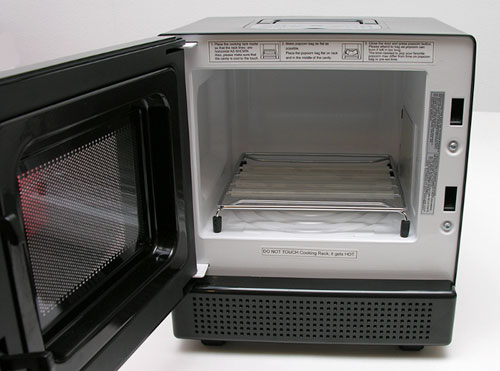
When you open the door, you realize just how small the iwave cube really is. With the accessory rack in place, the heating area is only about 8.5 x 8.0 x 5 inches (0.30 cubic feet). I think the metal rack is really only needed for popping corn, but the instruction booklet doesn’t make that clear.
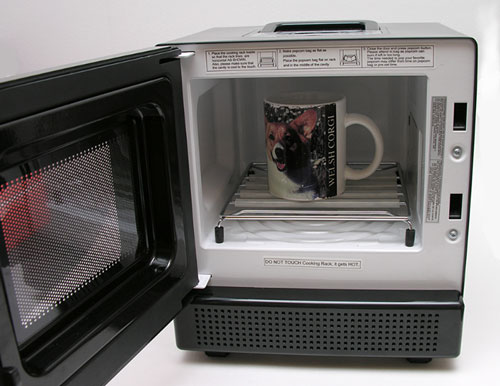
You won’t be cooking a whole chicken in this little guy as it’s basically for small items such as heating your coffee (or for me, tea), single serving snacks, small bowls of soup, etc.
When the door is open or while you are cooking, there is a small light that shines from the top of the interior of the microwave so that you can see the activity inside. Depending on the size of the item placed inside, you may not be able to see the activity though.
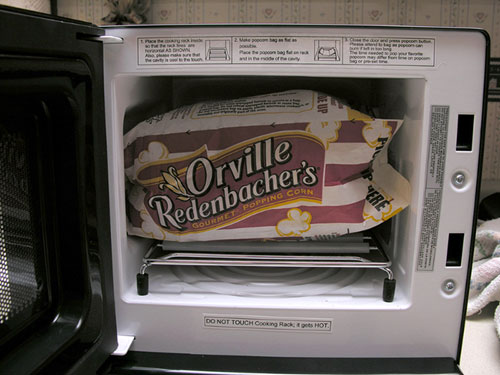
I was pretty sure that I would not be able to use a regular sized package of microwave popcorn in this device. I didn’t think there would be room once the bag expanded. I decided to go ahead and give it a try and I was wrong, it worked fine.
In use, I found the iwave cube to be surprisingly quiet while cooking. Besides the fan noise, it will beep with every press of the keypad and when the cooking time is complete it will beep several times. It’s not overly loud, but I do wish there was a setting to turn that off.
There are a couple of downsides to this product that I would like to point out. Since this device is only 600 watts, it will take longer to heat up items compared to regular full size microwaves that might be 3 or even 4 times more powerful. There’s also the fact that you can buy a smaller regular microwave for less than half the price of the icube wave. I found an 800W Oster microwave with a foot print of 17 x 13 x 10 inches on Best Buy’s site for $50. So if you have just a little more space, you can save quite a bit on a mini microwave purchase.
Other than those issues, the iwave cube is super easy to use, portable, cute as a button and perfect for small spaces. If you must have the smallest microwave currently known to man, then this is the one for you.


Gadgeteer Comment Policy - Please read before commenting
Any word on the safety of this? I’m not sure how comfortable I’d be sitting 3-4 feet from a live microwave on a regular basis 🙂
Jonathan:
I don’t think I glow in the dark – yet 😉
Cool I want won.
Where can I buy one since Sharper Image no longer exist?
@Lois Hoffmann: You might call the folks at icube designs: http://www.icubedesigns.com/
hi, where can i buy this iwave cube Portable Microwave ? since no more sharper image
also no one in this web site
http://www.icubedesigns.com/
thank you
I just found one on ebay. There was another available, too.
Here is the original manufacturer website where you can order it from as well:
http://www.iwavecube.com/
I bought mine on ebay, because seller was rated very high
Comes in some awesome colors! 🙂
Once mine arrives, I will post some feedback.
@Soozn Let me know how many watts yours is and if it does very good at heating up frozen items. I’m still using mine, but it’s only good for warming or heating up food that is not frozen.
Julie
Got my Icube and it says it is 600 watts. I bought it to save space in my kitchen, so don’t plan to use it much for defrosting–only heating up coffee, soup, leftovers. I wish it came with a glass tray, rather than the metal rack. I wonder how it compares to the old Sharp Half Pints? This one looks way nicer, though.
@Soozn You have the exact same model as I do then. I think they have one with 800 watts now. Let us all know what you think of it once you have a chance to use it a bit. I still use mine almost every day here at work to reheat my tea or microwaveable lunch packs.
Julie, do you still have yours? I’ve gone deep down the rabbit hole in search of a very small microwave, enlisting Perplexity AI in my search… and I was perplexed to find that *no one* manufactures mini-microwaves (none even available on the Chinese sites). iwavecube has been out of business for a decade. And according to AI, there hasn’t been a listing on Facebook Marketplace or eBay in a very long while.
I’m going to embark on an extended truck camping trip and I would just like something to quickly defrost and heat up small portions…
So I’ve had a thought that I would ask you if you would like to sell yours! That is if you’re not using it anymore and it’s just sitting somewhere in your attic or basement or wherever you stash abandoned consumer items…
Just a shot in the dark, as I am highly-committed to conserving my space!
Well I should’ve read the rest of the comments before I posted… but now I know that they’re a safety hazard and that they probably don’t last more than a year or two! So you can ignore my previous comment 🙂
No, I no longer have it. Sorry.
Julie–I checked the icube website and they do not make an 800 watt model. They do have an upgrade with an inverter that you can use when there is no electricity, but it is still only 600 watts.
For my needs so far the 600 watts is fine, but it doesn’t work too well for defrosting large items.
http://www.iwavecube.com/moreinfo.aspx?pid=icecube&cs=/sproducts.aspx&ai=M
This little thing is soo cool. i just got one at BJS for $89.99.
I ordered one from company 8 weeks ago and still have not received it. Phone is no longer answered, just a message to contact them via email. SO I cancelled but probably never get my $$ back.
I noticed this is now available on Amazon.
Marilyn,- I just sent an email to the company asking something and they responded right away. So they may respond sooner than you think.
Question for anyone else who has this–mine seems to develop a lot of moisture when heating–anyone else notice this?
@Soozn Yes, moisture is a problem. I’m still using this same microwave and I usually wipe it down after every use. I think the problem is that internal cooking area is so small, that there’s no where for the steam to go. I’ve also noticed that it makes strange noises now. I think the fan having problems.
Julie– mine makes odd noises every once in awhile, too. when it does this, I turn the microwave off and then start the heat cycle again and it usually stops. I like the size, but am concerned it won’t last as long as a conventional microwave.
@soozn I have no doubt that it will die a young death. It’s just a question of how young? Mine gets daily use and is already over a year and a half old. I won’t be too disappointed if I have to replace it in 2-2.5yrs.
HOW DO YOU ORDER THIS MICROWAVE. I HAVE BEEN SEARCHING FOR OVER 3 MONTHS AND NO ONE KNOWS HOW TO ORDER IT OR THE STORES THAT ARE LISTED ON THE WEB AS HAVING THIS HAVE NO IDEA WHAT I AM TALKING ABOUT. CAN ANYONE HELP ME????
Where can I buy an iWavecube in Barcelona or in Spain?
just got off the phone with mr. davis himself – the company will be accepting orders on their website – theiwavecube.com towards the end of june 2010.
email [email protected] so that he can contact you as soon as ordering is available.
ICube Designs LLC Location: Cleveland
Contact: 216-281-2771; icubedesigns.com
Sent many emails and finally got a response from Phil Davis, CEO, iCubed International, LLC, http://www.theiwavecube.com who said it would be available at Office Depot. Called all the Office Depots in Hawaii and none of them have it nor do they sell any microwaves. I thought I really, really, really HAD to find one, but reading the comments thus far….maybe it’s a blessing that I haven’t found one.
I am the owner of one of these clever gadgets. It will not work on popcorn….each time I have used it, it has popped about 20 per cent of the bag….and half of that was burned. Totally worthless for popcorn. Nor will it thaw frozen foods. It is incapable of warming a small bagel. It is perfectly in tune with modern society: All show and no go.
@James I used the one I reviewed for several years and found it to be so-so. I never used it to heat something frozen. I would bring cold items to warm up and although it took about 3-4times longer to do this than a larger microwave, it did work and took up far less space on my desk at work. That said, I ended up buying a cheap/small 700w microwave from Walmart a year or so ago and find it to be much easier/faster.
We ordered on and it did not seem to work at all. We tried a variety of items and waited quite a while but it did not heat them up.
We knew they had sent us a used item instead of a new one, even though we ordered a new one from the web site. They did not respond to our multiple attempts to contact them. Their voicemail box is always full and they do not respond to email.
We sent the microwave back immediately after receiving it, but they have so far refused to refund the money.
comment on oster footprint is 3 dimensions; “footprint” is only 2 dimensions…
can i heat up a microwave proof glass bowl without the rack inside the microwave.
where can i get a uk plug for my iwavecube microwave, i bought it not knowing i would not be able to use it. there was nothing to say this on ebay it has a us plug on it
You Can Get It Here.
http://www.prunedanish.com/product-p/iwa-iw600wht.htm
Cheapest Place i Found It.
Hi All- I last posted about this microwave in December 2009. Last week I had to throw mine away- since this microwave does not have a glass tray as most microwaves- instead it comes with a metal grill on rubber/plastic/silicone feet.
One of the feet melted on me a while back, then the microwave would spark inside–last week it had a little fire inside & an entire corner turned black from the fire.
A very poor design with the metal grill inside. It was cute and served its purpose- but sadly lasted only 4 1/2 years with minimal use. You are never supposed to put metal in a microwave. Also due to the moisture build up–the paint on the inside top kept peeling– this could be health hazard.
I am replacing it with this Whirlpool model which will actually fit a much larger diameter plate and has a glass tray, plus it it is 750 watts! the best price I found was from Home Depot online- plus, the shipping is free
http://www.whirlpool.com/-%5BWMC20005YD%5D-1003176/WMC20005YD/
We’re do you buy one ther are no details how to purchase one
You can still find them on Amazon or Ebay- but it appears the manufacturer no longer supports- his facebook is not active and website no longer works. I would not buy another for safety reasons
WERE CAN I GET IT OR HOW CAN I GET
I don’t think they are selling them anymore.