
At the end of 2006, I had the opportunity to review 2 digital audio players from Best Buy’s house brand of products: Insignia. I really liked both of these players and was happy when I was asked if I was interested in taking a look at their latest version of the NS-DV video player. Let’s see what has changed…
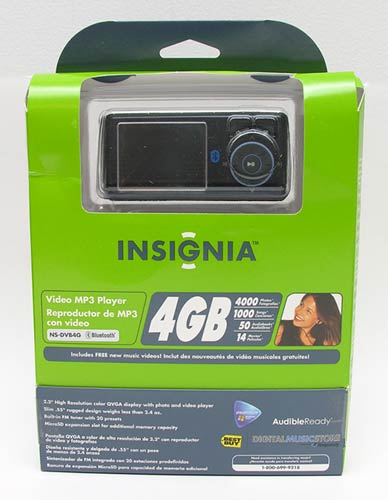
Hardware Specs
2.2″ resolution LCD color display
4G Flash memory
Bluetooth enabled
Photo formats: BMP, JPEG, TIFF, GIF, PNG, PCX, TGA, FPX, and PCD
Music formats: MP3, WMA, WAV, and RA
Video formats: AVI, MPEG-1, MPEG-4, DVD(*.VOD), QuickTime MOV, WMV, and RM
Built-in FM tuner with 20 presets
microSD expansion slot
Rechargeable lithium-ion battery
Size: 4.0 x 1.8 x 0.6 inches
Weight: 2.4 oz.
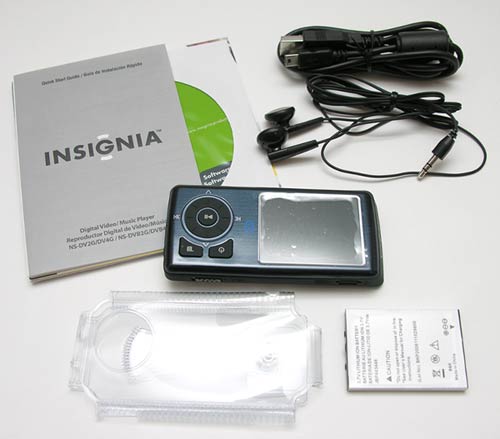
Package Contents
NS-DVB4G player
Replaceable Lithium Ion Battery
Earbuds
USB charge / sync cable
Clear vinyl case
Quick Start Guide
Software CD
Coupon for 1 free Audible.com book download
Coupon for 2 free months and 5 free downloads of Rhapsody access
$2 off Best Buy coupon for music CDs (specific CDs)
Out of the box, the NS-DVB4G looks pretty much identical to the NS-DV2G. The only physical differences between these two devices are a Bluetooth logo on the face, a Blue backlit ring around the scroll wheel and Play/Pause button, and a dark Blue (instead of Black) shiny face. The display is the same size and has the same great picture. The buttons are all in the same places and have the same functions.
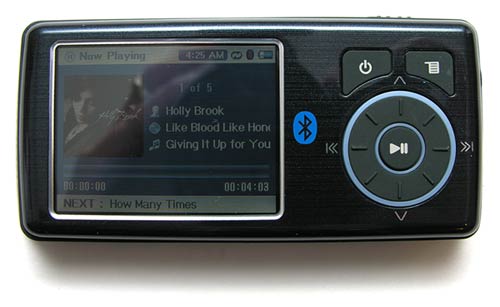
Let’s go ahead and take a quick tour of the device. A large round wheel with the raised ridges physically rotates and is used to scroll through menus, lists and adjust volume levels.
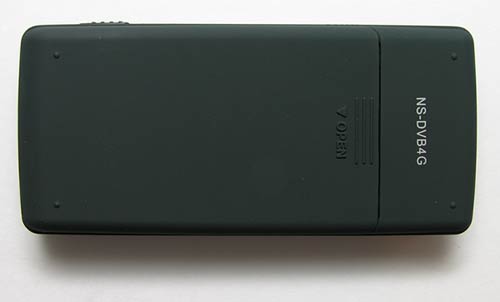
The back of the player is plain except for the snap on battery cover.
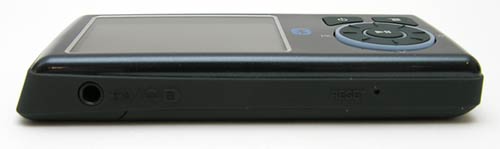
The NS-DVB4G has two 3.5mm earphone jacks, just like the prior version. There is also a reset switch on the bottom edge of the player.
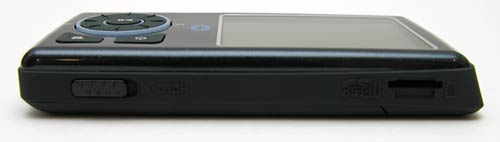
The top edge has a hold switch and a MicroSD slot so that you can increase the storage capacity.
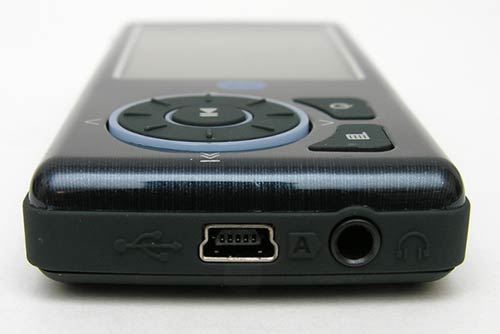
The Right edge has an earphone jack and a mini USB connector which is used for charging and transferring files to the player.
At this point, I suggest that you go read my review of the prior model as it goes into detail about the menu system, converting video files, etc. I don’t want to rehash all that info in this review because nothing has changed with this new version.
Besides the minor physical changes that I mentioned above, the main new feature of this player is that it has Bluetooth. It doesn’t come with a set of wireless stereo Bluetooth headphones though… Yeah, that kind of bummed me out too… But luckily I have several pairs of Bluetooth headphones that I was able to test with this player. Here are the ones that I used:
Bluetake’s i-PHONO mini BT450Rx
Plantronics Pulsar 260
Etymotic Research’s ety8’s
I had no problems pairing any of the headphones with NS_DVB4G. Upon pairing with the first set of test headphones (BT450Rx), I immediately learned that the only way to adjust the volume levels is with the headphones, and not the player. This was a problem for me with the BT450Rx headphones because the lowest volume setting is too loud for me. This wasn’t an issue with the Pulsar 260 and ety8’s. I was able to adjust the volume to a comfortable listening level with both of them.
I really enjoyed listening to music with this player wirelessly. Sound quality using all three headsets was terrific. I’d have to say that the Insignia NS-DVB4G player is a better value than an Apple nano because it can play video files, had a built in FM radio*, and transmit music wirelessly to Bluetooth headphones. It’s even $40 cheaper than the same capacity player. The only down side is that if you want to take advantage of the Bluetooth feature, you’ll have to purchase a set of headphones separately.
* FM radio only works with wired earphones as it uses them as antenna.

Acer Nitro V 16S AI Gaming Laptop | AMD Ryzen 7 260 Processor | NVIDIA GeForce RTX 5060 Laptop GPU (572 AI Tops) | 16" WUXGA IPS 180Hz Display | 32GB DDR5 | 1TB Gen 4 SSD | Wi-Fi 6 | ANV16S-41-R2AJ
(as of June 9, 2026 03:43 GMT -05:00 - More infoProduct prices and availability are accurate as of the date/time indicated and are subject to change. Any price and availability information displayed on [relevant Amazon Site(s), as applicable] at the time of purchase will apply to the purchase of this product.)
acer Nitro V 15.6” FHD IPS 165Hz Gaming Laptop, Intel Core i5-13420H, NVIDIA GeForce RTX 5050 with 8GB GDDR7 VRAM, Win11H, w/Mouse pad (16GB RAM, 512GB PCIe SSD)
(as of June 9, 2026 07:55 GMT -05:00 - More infoProduct prices and availability are accurate as of the date/time indicated and are subject to change. Any price and availability information displayed on [relevant Amazon Site(s), as applicable] at the time of purchase will apply to the purchase of this product.)Product Information
| Price: | 159.99 |
| Manufacturer: | Insignia |
| Retailer: | Best Buy |
| Requirements: |
|
| Pros: |
|
| Cons: |
|

Gadgeteer Comment Policy - Please read before commenting
Post your comments on the Insignia NS-DVB4G Video MP3 Player review.
http://www.the-gadgeteer.com/review/insignia_ns_dvb4g_video_mp3_player
Just click the POST REPLY button on this page.
That’s a slick little device. Incidentally, is it eligible for a giveaway slash garage sale item? 🙂 I’d even be happy with the old version…
Tyler:
I have a super duper contest coming soon. I may include the original version as one of the many prizes. I think I will keep the Bluetooth version a little longer 🙂
Cool beans! Can’t wait for that 🙂
Does this mp3 player support gapless playback?
gmontem:
If It does support gapless playback, I don’t see an option for it in the menus or any mention in the quick start user guide.
Hello, sorry to bring up a dead thread, but I wanted to raise awareness of my issue.
I bought the Bluetooth version of the MP3 player bundled with Logitech FreePulse headphones for 200$ (60$ off) and I love it. But when I connect the Headphones to the MP3 player and listen to music, it pauses sporadically at the beginning of songs and skips momentarily sometimes anywhere in the music. It can get annoying, but its ok. Also, I noticed dust under the screen casing so I took it apart and dusted it, I have already done this 2X and I think I’ll just have to buy a nice case and live with it. I really wish that there was a way of converting movies for it on a mac, I cant do it on my aunt’s pc and I am using a Mac. Thanks.
While researching the Insignia NS-DV4G I came across your review on the NS-DVB4G. However, I can not find the NS-DVB4G on Best Buy’s site. Is it still sold? I like the idea of it having Bluetooth and being able to handle a wider variety of picture and video formats.
Thanks
Eric
Eric:
Strange, I can’t find it either!:confused:
Hey everyone
With all the iPod craze these days, I don’t know if anyone noticed, but the new lineup of Insignia players is out!
The players are now divided in two versions: Pilot and Sport.
The Pilot version is available in 8GB and 4GB, for $189 and $139 respectively. They feature a 2.4″ high-resolution LCD display, have a built in digital FM tuner, are Bluetooth compatible and can be expanded using SD cards (not micro-SD). Oh, they also play music and videos :p What I don’t know is whether or not they also work as a recording device (I guess that feature was only available in the NS-DV2G). The Pilot is only available in black.
The Sport version is available in 2GB and 4GB, for $99.99 and $119.99 respectively. The main differences from the Pilot are the smaller display (1.7″), smaller size, more colors available (black, blue and pink, or as they call it, ‘Dark Cherry Red’) and they use micro-SD cards for expansion. Otherwise they’re pretty much the same.
More about them here
http://www.bestbuy.com/site/olspage.jsp?_dyncharset=ISO-8859-1&id=pcat17071&type=page&ks=960&st=insignia&sc=Global&cp=1&sp=&qp=crootcategoryid%23%23-1%23%23-1%7E%7Eq696e7369676e6961%7E%7Ecabcat0200000%23%237%23%2310%7E%7Encabcat0201000%23%231%23%238&list=y&usc=All+Categories&nrp=15&iht=n
Patricia:
I’ve been impressed by the Insignia players and hope my Best Buy contact will consider sending me the newest models to review. 🙂
I finally gave in and bought the 4GB Pilot version today. Ever since the first Insignia player came out I’ve been thinking about getting one, and I have to say I’m impressed! This is actually my first dedicated portable media player, before I used my Palm Zire 72 to listen to music and watch videos, but I’ve been looking for a smaller player for some time now.
The Pilot is quite thin, it’s pretty much the same size of my Motorola SLVR phone. Feature and usage wise it’s very similar to the previous players. A noticeable change is the new dedicated rate song button, that let you sort which songs you like or not as you listen to them.
Sound quality seems pretty good, although I think my Zire 72 is louder. On the Zire I used PocketTunes as my music player, and I enjoyed being able to make playlists on the go, which is something I miss on the Pilot (maybe I just haven’t figure out how to do it yet)
I don’t have a pair of Bluetooth headphones so I can’t comment on how well Bluetooth works. On a side note, the FM tuner still needs wired headphones so it can use them as an antenna.
My first impressions with the Pilot are really good, maybe I wish they were available in more colors other than black, but so far I’m happy with it. 🙂
Patricia:
Thank you for the review!!! 😀
has anyone ever used Meizu miniplayer? It’s competing ipod on the market. check it out.
Se puede configurar el Insignia NS-DVB4G Video MP3 Player, para que lea documentos .txt ?Por lo demas es excelente reproductor con excelente audio y video. Podran enviarme una respuesta a mi E Mail? [email protected]
Saludos
[Edited at February 25, 2008 12:10:49 PM.]
Although a nice product at first glance, I would not recommend buying this [discontinued] player at any price. For that matter I wouldn’t recommend making any purchase from Best Buy.
I’ve had a NS-DVB4G since April 2007, and have had continual random shutdown problems with the unit. Additionally, as time wore on the rotary selector control became quite erractic in its operation … more like roulette than select.
Finally becoming fed up with these problems, I contacted Insignia Tech Support (800.699.9218); they wouldn’t do anything since it was discontinued, and was told to “take it back to the store” where I bought the unit. I couldn’t find the store since it was rather virtual, being purchased online from Best Buy, so I called the number for http://www.bestbuy.com (888.237.8289); THEY wouldn’t do anything since it was discontinued, and was told to “take it back to the manufacturer” of the unit. So you can see where this was going, and went.
The unit is within the Manufacturer’s 1-year warranty, and both parties refuse to honor it. [For any snoops out there, this is illegal, and you’re both responsible as manufacturer and proprietary reseller.] You think they would issue at least a lousy pro-rated credit, but no.
So if you want to take your chances with these guys, go ahead. For those that do, give Best Buy a further vote of confidence and buy the extended warranty for the product; that will give you a ticket for the priviledge of arguing with them when something breaks. As for me, I may go to the California Dept. of Consumer Affairs.
A usability note for happier NS-DVB4G owners: Julie’s review states “FM radio only works with wired earphones as it uses them as antenna”. That’s true in general, but you can get by with a 4″ lead connected to one of the headphone jacks. If you have an old pair of headphones which no longer works (and I have plenty courtesy of my cat), just cut the wire lead extending from the miniplug to 4″ in length (maybe a bit longer if you need more gain) and use that. I found that a right-angle type connector plugged into the secondary headphone jack (on the player’s long side) is most convenient for keeping this “whip” antenna out of the way.
[Edited at February 27, 2008 12:24:05 PM.]
Hi I have the same type of Insignia player ..I am having trouble formatting my sd cards ..it s says unable to format external memory