
If you visit dictionary.com and look up the word security, you’ll find that the top 3 definitions are:
1. freedom from danger, risk, etc.; safety.
2. freedom from care, anxiety, or doubt; well-founded confidence.
3. something that secures or makes safe; protection; defense.
We all want to believe that the safest place is our home. But have you ever felt scared to be alone at night? Or maybe you have a large home and can’t go back to sleep when you hear a bump in the middle of the night. I’ll admit that I’ve had those feelings on occasion. As a result, I jumped at the chance to review the SimpliSafe 1500 Home Security system.
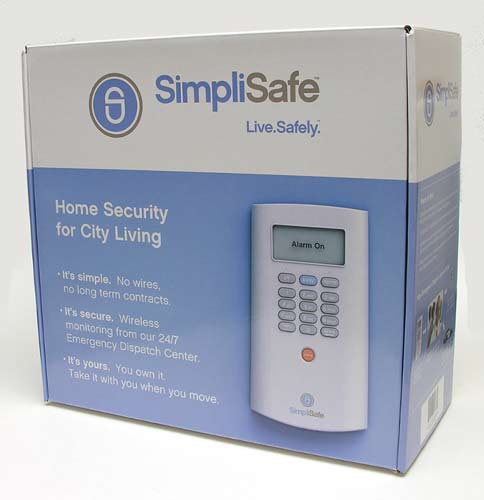
SimpliSafe systems are marketed for city / apartment dwellers due to the fact that they are extremely easy to relocate if you ever pick up and move to another home.
Before we go any further, I want mention that I reviewed the SimpliSafe without the 24/7 Emergency Dispatch subscription enabled. This is a $15 per month service that does not require a long term contract. Without that service, the SimpliSafe will still provide audible alarms, but it will not notify authorities when these alarms are sounded.
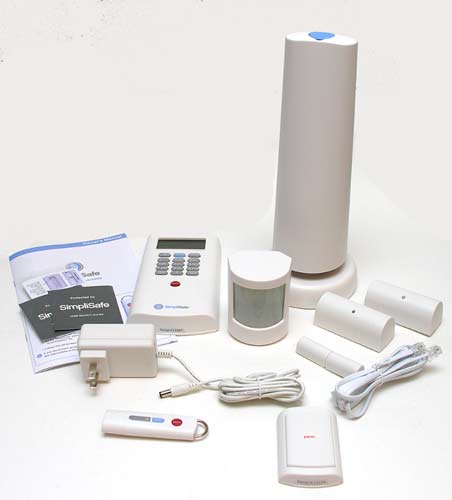
Package Contents
Base Station
Keypad
Keychain remote
2 Entry sensors
1 Motion sensor
Panic button
Owner’s manual
Extra adhesive strips
SimpliSafe stickers
Phone line
AC adapter for base station
Let’s take a look at the individual components that make up the system…
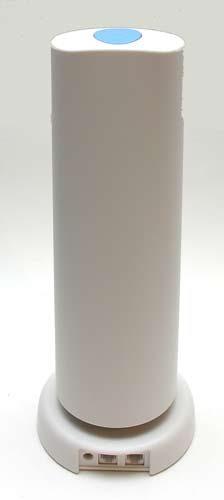
The base station is a White plastic tower that has 4 connection points.
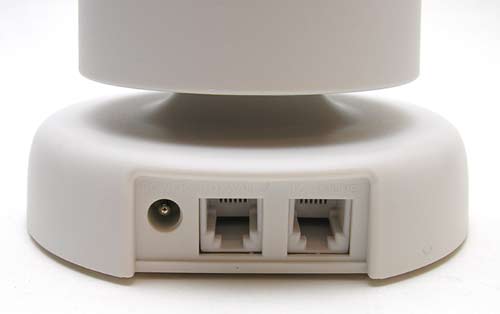
Three of them are on the back, an AC adapter connector and phone line in and out connectors. I didn’t connect the phone line to my review unit, since I did not have the 24/7 dispatch subscription service enabled.
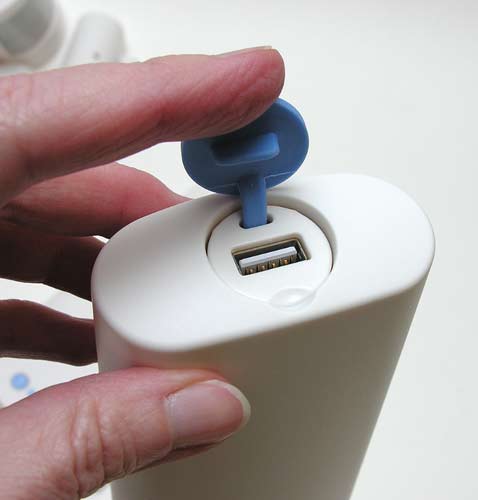
There’s also a USB connector on the top of the base station. This is used to easily program the alarm settings with the include USB remote control. More detail about that in a bit.
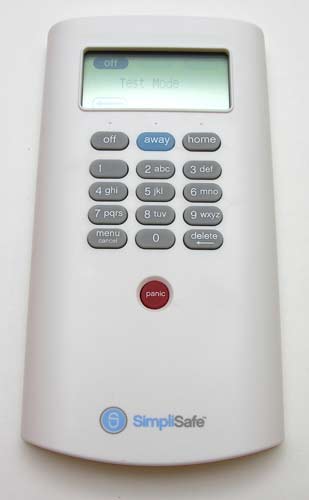
The wireless keypad module has a backlit LCD display and 15 buttons.
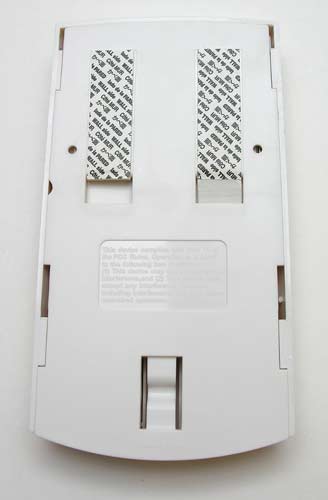
It’s designed to stick to a wall. On the back are two adhesive strips. These are special strips that can be removed without damaging the surface that they are stuck to. If you need to relocate the keypad, extra adhesive strips are included for this purpose.
The other components in the SimpliSafe system are the sensors, of which there are 3 types.
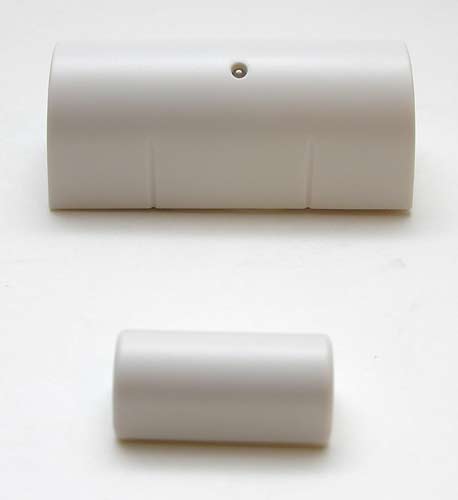
Entry Sensors (2 are included in the 1500 system) are two part magnetic modules that stick to doors or windows and sound an alarm when the two pieces are separated by more than 2 inches.
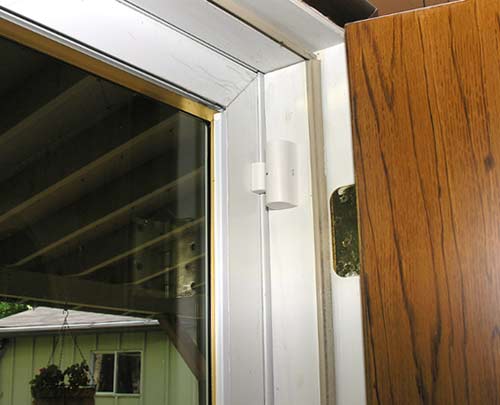
They are really easy to install, with peel and stick adhesive backs. Here you can see that I’ve placed the entry sensor so that the large part (with the small Blue LED) on the door jam and the smaller part on the actual door. When the door opens the magnetic seal is broken and an alarm is sounded. I installed one sensor on my front door and one on my sliding patio door in my basement.
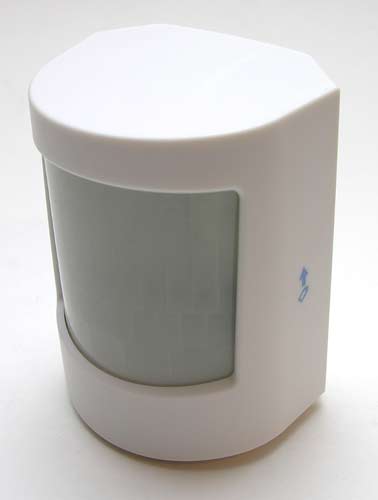
In addition to the entry sensors, there is also a motion sensor that can detect movement up to 20 feet away and 45 degrees to the left and right. It even works in a room full of windows and will not be tripped by people walking by a window (unless the window is open). The motion detector is also pet friendly and should not detect pets that are under 30 pounds as long as they are unable to come within 2 feet of the sensor. I placed the detector on a shelf in a bookcase in my basement.
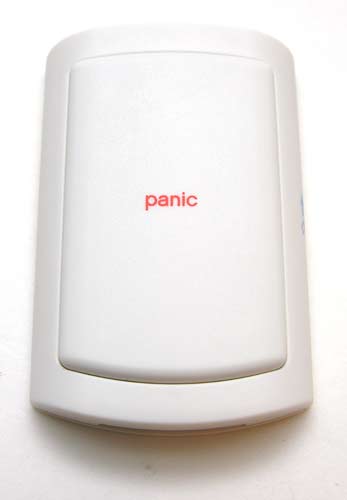
The 1500 system includes a panic button sensor. This can be stuck on a wall or just placed on a night stand in a bedroom. The top is one large button, making it super easy to press without even looking at it. Pressing and holding the button for more than 1 second will immediately cause the 85 dB siren located in the base station to sound.
The wireless range for the Entry, Motion and Panic sensors is about 400-500 feet with a direct line-of-sight. Of course they will also work also fine between walls and floors.
In addition to the panic button sensor, there’s a panic button located on the keypad as well as the keychain remote control.
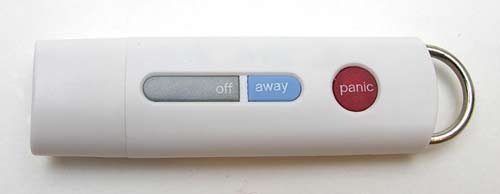
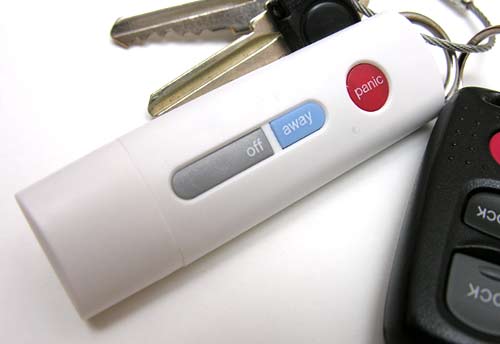
The keychain remote has three buttons: Panic, Off and Away. The Panic button works just like it does on the larger Panic sensor as long as you are within 50ft of the base station, the off button will disarm the SimpliSafe system immediately and the Away button puts the system in Away mode.
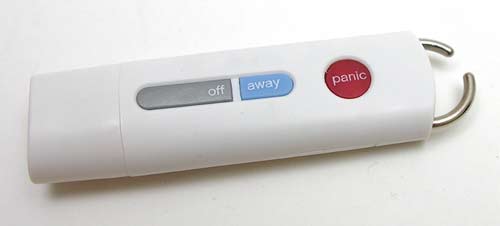
There’s a heavy metal ring on one end of the keychain remote that can be turned to reveal an opening so that you can add it to another keychain.
Besides having a hand held controller for the SimpliSafe, the keychain remote can also be used to program the system. The cap pulls off to reveal a USB connector. When you plug the keychain into your Windows PC, it will auto load a wizard program that will allow you to customize different sensor settings.
You can use the program to add and remove sensors, designate when a sensor will be active. Entry Sensors can be enabled or disabled. Motion Sensors can be enabled during both Home and Away mode, only during Away mode, or disabled. Panic Buttons can be enabled, disabled or set to silent alarm. Keypads and Keychain Remotes can be enabled, have the panic button disabled, or be fully disabled.
For example, if you have a friend with a large dog visiting your apartment for a few days, you may want to disable your Motion Sensor (set it to be “disabled”) during her visit. When she leaves, you can change it back to the previous setting (the default is “Away mode”). If you have a large dog and will likely never be using the Motion Sensor at all, you can select “Remove” to remove it from your system. You can always add it on again later by going to Manage Components and then “Add Component”.
The wizard software (which does not have to be used to setup your system) will walk you step by step to setting up all the components.
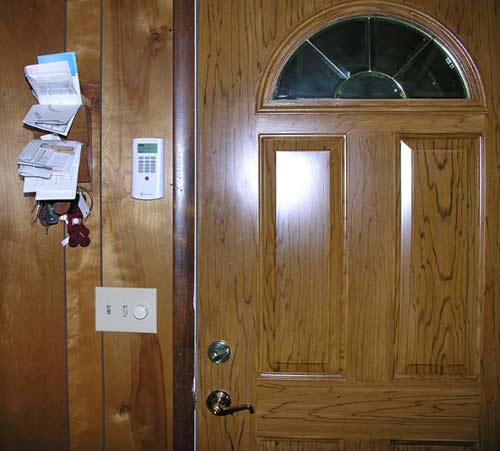
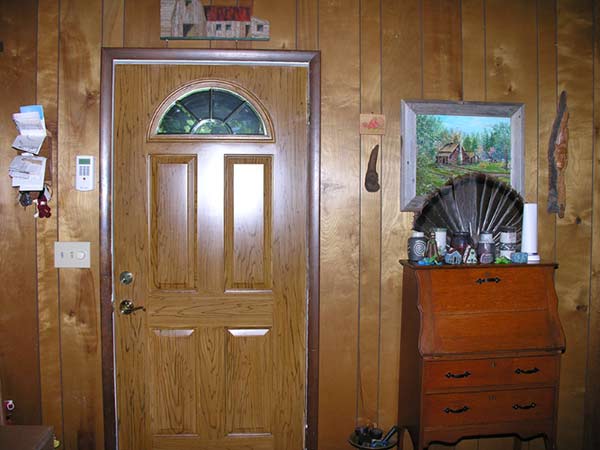
I placed the keypad next to my front door.
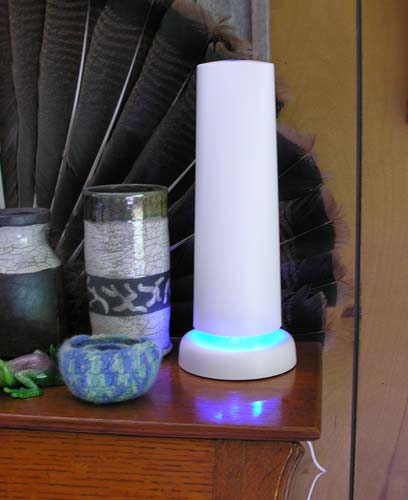
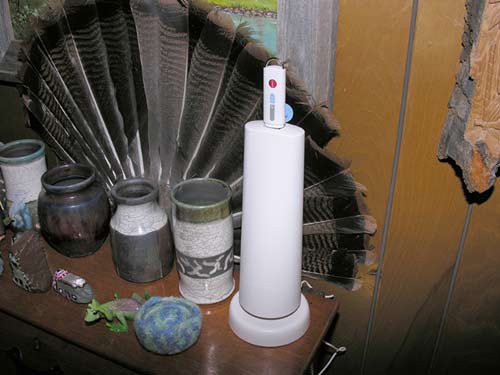
And the base station on a small desk about 6 feet away. Notice that the base of the base station is glowing Blue. It does this when the alarm mode is set to Home or Away. When the alarms are off, the light is off as well. You can disable the light by using wizard program.
The base station also provides voice prompts that will say things like “Alarm On Home”, “Alarm Off”, “Exit House”, etc.
Up to 20 additional components can be added to your system, for a total of 26 components (note: the Base Station is not considered a component). The best part about using this system is that all the components are wireless. That also means that each module is powered by batteries (excluding the base station, which requires an AC adapter – but it has a battery backup as well). During setup you pull out tabs to activate the batteries on each sensor. Expected battery life is approximately 2 years for the Keypad and approximately 5 years for all sensors and the Keychain Remote. The Base Station batteries are rechargeable and will provide you with 8 hours of backup power. (After 5 years, you should consider replacing the rechargeable backup batteries.) The Keypad will alert you when any batteries are low so that you can replace them.
In action, the SimpliSafe system is really easy to install and use. There are 3 alarm modes: Off, Home and Away. Off mode should probably be pretty self explanatory 😉 You can immediately switch to that mode using the keychain remote. If you use the keypad, you’ll be required to type in the 4 digit pin number that you setup during the install process. While in Off mode, triggering of entry sensors (opening doors or windows) will cause a door bell like sound to play.
Home mode will cause alarms to sound when entry sensors are tripped, but will disable motion sensors. You use this mode when you’re in the house but still want to be protected.
Away mode is the one you use when you leave the house. This mode enables the entry sensors and motion sensors.
When alarms are tripped in Home and Away modes, the keypad will give you warning beeps for 30 seconds, giving you time to turn the alarm off by using the keychain remote or the keypad. If you don’t turn off the alarm, the 85 dB siren will sound for a default of 4 minutes (it can be set it for 30 seconds up to 8 minutes). At this point, if you have the 24/7 dispatch service, the system will send them an alert. They will then try to contact you to see if it was a false alarm. If you provide them with a predetermined safe word, no authorities will be dispatched. If they can’t reach you, the local police will be sent. When you press one of the panic buttons, the siren will play immediately and the dispatch will be notified.
I admit that my testing of the security system may seem limited due to the fact that I did not test the 24/7 dispatch feature. I do feel confident in the way the sensors preformed as I tested them extensively for several days and did not have any problems with them not triggering or triggering for no reason. The only issue that I had with the SimpliSafe was that the voice prompts occasionally stuttered. Instead of saying “Alarm Off”, it would say “AlarmAlarmAlarm Off”. I think I found the issue to be my painted steel front door. The weird stuttering only happened if the door was open. If you look at the image above, you can see that the door is between the keypad and the base station… This doesn’t happen all the time, so it’s hard to say.
I really like the SimpliSafe security system for its easy setup, expandability, custom setup options and ability to move with you if you relocate. I think the price for the system is really affordable when you compare it to other security systems on the market. It gets a thumbs up from me.
Extra keychain remotes are $14.99
Extra motion sensors are $14.99
Extra entry sensors are $9.99
Extra Panic sensors are $9.99

ESR for MagSafe Wallet, 5 Card Holder with RFID Blocking, MagSafe Sticker Included, Slim Magnetic Wallet for iPhone 17e/17/16/15/14/13/12 Series and Selected Samsung Devices, Not for 13/12 Mini, Black
(as of May 7, 2026 15:37 GMT -05:00 - More infoProduct prices and availability are accurate as of the date/time indicated and are subject to change. Any price and availability information displayed on [relevant Amazon Site(s), as applicable] at the time of purchase will apply to the purchase of this product.)
Apple iPhone FineWoven Wallet with MagSafe – Black
(as of May 7, 2026 15:37 GMT -05:00 - More infoProduct prices and availability are accurate as of the date/time indicated and are subject to change. Any price and availability information displayed on [relevant Amazon Site(s), as applicable] at the time of purchase will apply to the purchase of this product.)Product Information
| Price: | $249.99 |
| Manufacturer: | SimpliSafe |
| Pros: |
|
| Cons: |
|

Gadgeteer Comment Policy - Please read before commenting
Good review, Julie.
However, what I would like to see in these home security systems, is an option where the system can be programmed to dial the police, then play back a canned message without requiring the monthly service.
@John Obeto My guess is that there has to be some kind of third party involved to verify that the tripped alarm is a real emergency. What if you had the feature you described and your system went berserk for some odd reason and it dialed the police over and over without you knowing about it? You would probably get fined.
Yes, you more than likely would get fined. I used to work at a 911 center and, after the second false alarm, fines would be assessed. Nuisance alarms cost a lot of time, manpower and resources as well as tying up units that could attend to real emergencies.
How about a security system that calls programmable stored number (your cell phone, a friend or a relative home phone) ?
@Fred I would like that feature too. But that should probably just be a feature in addition to calling the police. Because when it’s all said and done, you the whole idea is to get someone of authority to come to your house in the event of a real emergency.
@John, Julie is exactly right. The police won’t respond to automated alarm messages and you could certainly get fined if your system called too many times and tied up their resources.
@Fred, there are systems available that can call you and play a message. We studied that option carefully and decided against including it. It just didn’t provide sufficient security for our customers. Too often the person receiving the automated call isn’t available or doesn’t properly report an alarm, so the police can’t get there quickly, if at all.
Also, keep in mind that with our service your monthly fee includes a wireless connection to the Dispatch Center. That cellular connection is an important feature. Even if the system was contacting you directly, you would still have to pay for connectivity. You could easily spend more each month to keep a landline phone around than you would on our service.
Chad Laurans
SimpliSafe, Inc.
Just curious, does the base station “chirp” when the alarm is disabled and someone opens a door? That’s a feature on many other alarm systems. We live in a big house that’s oddly quiet, someone can come in and I’d never know it. Wouldn’t mind hearing a little beep to let me know when a door is opened 🙂
This sounds like a fantastic system and something I’d want to look into for my place. And it’s good to point out the base station doesn’t need a landline to call for help, that’s a wonderful feature (well assuming we have coverage out in the boonies)
@Tim Yes, it does chirp when you open a door that has an entry sensor on it and the alarm is off. I like that feature too!
I love my system so far. I looked into other systems that claimed to be better and saved money without having monthly monitoring service and would contact people on your list. But what if if is 2am and they dont answer their phone? That did not make me feel better. In addition they did not even save money! I had a few issues getting my sensors placed properly but with a little tenacity a thinking outside the box I got them placed just fine. I am thinking about adding 3 more window sensors even though I have motion sensors in those rooms. I have two kids and so when I have it set on home mode I have three windows that are not protected. If I set it on away, when my kids wake up and wander in those rooms in the morning to watch tv the alarms would go off. I like this system because along the way you can figure out what works best for you and your lifestyle and make changes as needed. Tech support is super patient and easy to works with. Chad spent a good 15 min. on the phone with me to help. Dispatch is super patient as well when you are testing your system. You can test 50 times a day and they are happy to help. So far I could not be happier. You cannot put a price on peace of mind and the ease of use and helpfullness of everyone is such a bonus! Oh! and I love you don’t need a landline. We use vonage so if our internet goes down for some reason so does our phone service. So as long as the base station is placed anywhere you would get a good wireless signal you are good to go! No worries about an intruder cutting any lines to disable your system before trying to enter your home. I watch alot of Forensic File type shows and what not so I have become super paranoid. LOL Also watched the show It takes a Thief. And they are ex theifs that show you exactly how it is done and what they look for. One more thing to add, we are military and move every 3-4 years, so being able to take this with me wherever we go was another great selling point for me. Love, Love this system so far. Sorry to be so lengthy but wanted to get my points across to anyone thinking about this system. Thanks for your time and patients.
@Pamela Thank you for your post! How long have you been using the SimpliSafe?
Hi. The main review mentions that you didn’t connect the phone line to my review unit, since you did not have the 24/7 dispatch subscription service enabled,
The phone jack is there just as a backup option, the base station actually uses a wireless connection to the dispatch service as another poster mentioned.
Just to confirm, if the system is tripped; I am called on my cell phone (as I don’t have a landline) to verify the password BEFORE the police are called? Correct?
@Lydia You provide them the number to call, landline or cell. I don’t believe it matters.
no mention of having more than one keypad…….can it accomodate more than one as do regular systems….??
and do sensors work in lower temperatures like in garages….say zero degrees…..answers please….
If I decide not to use the monitoring. Can I change the phone number the base calls to my cell phone number?
@Scott No, this doesn’t appear to be an option.
System is simple & great. One big piece missing is contact-closures: Inputs (to expand existing or “legacy” systems) and outputs (enabling the system to trigger presets on other home systems such as lighting, automated window shades or DVR/cameras. I would call this an excellent start!
Does this system include a fire monitoring option?
@Maria at this time, they do not offer a smoke detecting module.
Does this system have an option to automatically contact
the police without first contacting the homeowner for the safe word?
That is the option I need.
@Jim,
I work at SimpliSafe and caught this question and wanted to just answer it for you. You have two options for immediate dispatch
1. You can program a Duress PIN, which will shut off the alarm, but notify dispatch that you are being forced to. They will not call your home to verify, but will instead send the police immediately.
2. For immediate dispatch on all alarms, you can set up your monitoring so that we do not verify alarms and go to immediate dispatch.
Hope that helps:)
Are you still using SimpliSafe? How is it going with the system? Thanks.
@Jack Yes, I’m still using it just to monitor when doors are open. It’s still working fine in that regard.
Seriously considering this alarm system! It sounds great, but I have one question..
Can you add more than one phone contact? We don’t have a landline, so we would use our cell phones to be contacted for the safe word. What happens if we use my husband’s number for contact, but I’m the only one home? Would we be able to list more than one number?
I don’t want the base station to beep or chirp for 30 seconds when the motion sensor detects activity. I want the siren(s) to go off right away. Can this be done with programing to the base unit, if so how much of a delay is required?
Also are there any problems with everything working properly in very cold conditions like sometimes below zero. Please let me know. Thanks
I just got the SimpliSafe alarm system. It took less than 30 minutes and have not had any problems. The siren is loud and the motion detector works very well. Keypad is very easy to use. For the money it is well worth it, money well spent for our security.
Here is what I wish to know: Do you have to use this at a residence? I have a storage unit in a storage place and would like to set it up there.
By the way Clark Howard just gave rave reviews to this on the radio yesterday. That is how I found out about it.
@Kev As long as you have access to power, you can use it anywhere you wish. Now you don’t even need an analog phone line as it uses cellular technology to make calls.
I live in a rather remote area outside Atlanta where cell coverage is not great. What cellular carrier do you use and is there some way I can find out how their coverage is at my house?
I have been in the alarm industry for many years, and I have seen companies like this come and go. I do not bash any of my competitors; I simply inform my customers in the value they are getting from my company vs. any other company out there, and educate them on the industry/products/service. It does upset me that there are companies like this that mislead customers into thinking they are offering a quality product, and shortly there-after they are out of business because of a few lawsuits and/or crooks themselves running the company.
Lets take a thorough look at this system:
1) Monitoring: There are over 800 monitoring stations in North America alone. Only 18 of them are qualified to handle high-security situations (Like monitor commercial fire in NYC.) This is clearly not one of them. Notice how there is no information on their site about their central station, or certifications/qualifications of the people monitoring your home/business. Make sure your alarm company provides you with such credentials.
2) Equipment: There is a reason why when you go into a bank or a jewelry store, you would never see mickey-mouse equipment like this. The “brains” of the system (the long white piece) is what provides the connectivity to central station, as well as the interior siren. If you are a even faintly successful burglar, as soon as you break into someones home, you head to the “thing” making noise, and you make it stop making noise. Adios alarm.
3) Service: More reputable companies provide a service call “crash and smash”. This is a patented technology that buffers an entry delay signal at central station so that if someone is smart enough to get to any control panel/brains BEFORE the system goes into full alarm, the police can still be dispatched. Ask the company that you are looking to do business with if they offer a crash and smash feature, and ask them to show it to you in writing!
4) Installation: Companies that provide self installation systems make me cringe. Why do you think that Jewelry stores/banks’ insurance companies require professional UL installation? We are talking about the safety and protection of your family!! Not buying a pair of tennis shoes! You wouldn’t have a plumber operate on your daughter’s appendix. Why leave this to chance? What if something goes wrong? What if the “tech support” people can’t solve your issue over the phone? I have many, many clients that have tried a self-install first (with a National company that is now out of business) and have boxed all of the equipment up and sent it back due to the difficulty.
I don’t disagree that with double-sided tape you can stick up a couple of sensors; anyone can do that. But not anyone can properly design the system. It may sound easy: “stick up a couple of door contacts and a couple of motion detectors, and I’m good”.
Really? I have had system designs that take hours to get it right with the client, in even the smallest of homes. You have to consider a multitude of different things like “I want to arm the system mainly when I am in the home” well, what value then do the motion detectors provide? Or, I have a dog and a cat, or What is the advantage to glassbreak detectors vs. window contacts vs. barrier bars vs. motion detection?
Any reputable company will sit down with you and design your system by taking into account not only the construction of your home, but your lifestyle as well.
The great part is: aside from the cost of the monitoring (you get what you pay for), my company offers a better product, better service, for far less than this company. There are companies like mine out there, you just have to search for them. Notice how I have not plugged my company anywhere in this review, I would just like to see people get the service/equipment they deserve. You work hard for your money. Why give it to a no-name, no-frills company to sub-standardly protect your home and family?
Trust me… it will be worth your piece of mind. I have many clients who thought they would go this route, but have realized the value in the company, service, and equipment just isn’t there.
I see a lot of positive reviews on here, but I can assure you none of them have experienced a break-in. I get calls from clients thanking me for the system that we designed together because without it, they would have lost their valuables, home (fire protection), or even a loved one, or their own life.
dear julie,
can this systems 85db alarm be disabled and the system still notify the monitoring company?
can the central base be located in a closet out of view and still be reliable?
how long has this company been in business and is the company private or publicly owned?
thank you for your time and your wonderful site!!!!!!
ps- we are in the construction business, and we would like the system too monitor our work sites after hours. (portability, reliability and cost major purchase factors)
I have two simplisafe systems with ATT modules. They were setup with the assistance of simply safe. They were working great for two month then they stopped communciating with the att wireless carrier. Because they are on ATT they simplisafe techs have not way of doing any remote diag. The units need to be reset locally. So this system according to the phone support was not designed to set it and forget it. It needs a human that is technical enough to monitor it and then when it stops communicating do a reset. Pull the batteries and power done for 2 min and reboot. Keep in mind the unit was working great until one day it just stopped. I wonder what SimpiSafe launches their fire version next year and in the middle of the night it stops with out notice and the house burns. The system should have an automatic reboot when it can not communicate with the response center. How hard could that be .
Dave,
Thanks for being a true security consultant. I too have been in this industry for 16 years, 10 as an owner and have seen companies like this come and go. I had never heard of it until a prospect mentioned the name.
We take a very consultative approach to your security, NOT sell equipment over the phone, much less have the owner install it. As with any electronic equipment: who is going to provide service? WHo is going to make that 3 hours emergency guaranteed service call at 2 a.m.?
and $20/ for cellular monitoring, WOW!
it amazes me that people how little people will spend to protect everything they have. Your kids will be proud of you spending next to nothing for their safety so you can afford those Ugg’s.
Without a contract? So who is holding up there end of the agreement? and yours? Companies like this will never stay in business, without an agreement, prove me wrong. Attrition too high. No accountability to either party.
It’s a disposable product, much like any type of video system from Sams or Cosco.
SPEND ONCE or SPEND TWICE.
Good review, thank you.
As of this comment, 11-5-11, it looks like SimpliSafe has been around for at least 3 years. Maybe longer. I found comments on their site dated Dec, 2008.
My system installed easily but needed a new keypad which was shipped quickly and without hassle.
I would add that the keychain remote program ran on my Mac as well as my PC.
The comment about the ATT disconnect brings up the need for periodic testing. Hopefully an automatic reboot is a planned update.
Mark / Dave – you guys are coming off threatened little sales guys who can’t charge customers thousands of dollars. Use common sense. You don’t need “certified” call centers or wired technology to make it a good system. They mean nothing. At the end of the day – you want the person at the center to simply call the police and have them report to your house. That’s it. The faster the better. I wonder what you would have thought about cell phones now a days 5 years ago?…. mickey mouse?
“qualifications of the people monitoring your home/business.” – Are you kidding?
You both sound typical of a concerned & hurt industry trying to convince people that “you get what you pay for”. I used to pay $700 for a VCR, I used to pay $700 for a cell phone, I used to pay $1500 for a security monitoring system, I used to pay $50 a month for monitoring service.
Get with the times, catch up – embrace technology. Welcome to 2011. People dont need to spend thousands for something that can easily be done cheaper.
Technology is growing and enabling and far superior than the old stuff. So in closing… as you stated:
“Notice how I have not plugged my company anywhere in this review, I would just like to see people get the service/equipment they deserve. You work hard for your money. Why give it to a no-name, no-frills company to sub-standardly protect your home and family?” …….
YOU can KEEP your BRAND NAME and FRILLS… I am more interested in the actual PROTECTION than the service & equipment.
Dave / Mark,
Security systems don’t really provide true security. Sure, they provide piece of mind but not TRUE security. They just make noise and if your lucky the police might show up in 10 minutes to fill out a police report. If the crook intends to harm you, none of these systems (regardless of cost, or planning) are going to save you or your family. The whole goal of a security system is to minimize the time a crook has in your home and to hopefully scare them away, and to wake you up so you can defend yourself.
If someone is on a budget and wants REAL security. Get a system like this that you can afford and buy a GUN. A 12 gauge is much, much better protection than 3 year contract with a “name brand” security company.
There are lots of legitimate reasons to save money and get a system like this. For one, the other systems are overpriced. Why am I paying $35 a month to a company for them to answer the phone once a year!!?
The problem I have with your comments is that you are implying people who don’t buy a professionally installed system are being bad parents or don’t care enough about their families. That is pure scare tactics.
Justin (victim of an actual home invasion)
Simplisafe,
Kudo’s for coming up with a system that provides security and cellular coverage at a great cost. Keep up the great work. Now my bio: Electronic technician for over 25 years, USAF, 2 top named alarm companies and the US Gov. Dave/Mark have some good points buts it’s more scare tactics than anything. The simplisafe system has it’s own nince in the market, that will take clients away from the top 3 industry leaders. Don’t hate Dave/Mark take the challenge and add to you profile something different. Think outside the box. I can go on and on but Simplisafe has a great idea and product, that can provide just as much coverage as a lot of hardwired/wireless system.
This system is terrible. Twice there have been instances where the alarm was tripped and the alarm sounded for quite sometime…but there was no response…after speaking to their representatives the first time we were assured this would not happen again, but it did. Not worth the risk. As a first tim homeowner I thought this was the route too go but learned that you get what you pay for… I am headed to the other guy.
I just order my system and waiting to have it installed, we will see how it works. I have a possitive outlook on this product and expecting and hope it works to its expectations. I will be writing a review after intallations and a month after. We shall see.
@Abe I look forward to hearing your thoughts.
After a week of research I have decided to purchase this system. Reason being the fact that where I am moving to, it would be useless to have a monitored alarm company any way since the house is so secluded that a burgular would already be gone by the time authorities would get there.
Justin’s comment is dead on in my situation. Simplisafe’s 105 DB siren is my hope that in case of a break in, the sound will atleast be enough to scare off the intruder and get my neighbors attention.
I have spent about 20 hours over the course of this week researching alarm companies, watching videos and getting quotes. I hope I have made the right decision with Simplisafe!
I don’t seem to find a lot of mention of cell phone jammers when looking into these security systems (even the ones by the ‘big guys’). You can very cheaply buy a cigarette-pack sized piece of equipment that will make any cell phone within a 50 foot radius (or more, depending on the box) appear to have no signal. The phone doesn’t know it’s being jammed, it just shows ‘no service’. I’ve caught people using these in restaurants a couple of times in my area (and suspect they are using them in movie theaters too). If the ‘general public’ has them to have an annoyance-free dinner, you can bet the thieves have them. Wire cutters for the land-line and this little box would top on my list of thieving equipment, and I’m not a thief… Is this system (or any other one for that matter) monitored for this kind of disconnect? If so, what would they do? And what if the cell carrier just had to turn off the local tower for a repair or something?
And what about jamming the wireless signals from the sensors themselves? I would think the base would think the battery died if it lost contact with a sensor, what does it do in that case? Again, more information that seems to be missing from their site (and, in their defense, it’s hard info to find on any site). The lack of info suggests that they don’t want to advertise the easy ways to defeat the system… I’m not sure how hard it would be to disrupt the wireless network created by this device, but I suspect it’s not really that difficult for someone that has that kind of knowledge…
I am not amused by the “professional” security system installers. There is a tremendous difference between “certified” and functional.
Been in the business for many years Alarm/CCTV/IT technician.
If it works it works. Simplisafe is a system I will try because #1 I’ve spent 20+ years on the “certified” systems, and this system has the most abng for the buck !! Sure they don’t offer “free install and $500 worth of equipment at the onset. #2 What they do offer is EASY install/setup, no “hidden charges” to add to your system later like you “certified” companies do. Just purchase an added sensor, program the base unit (by the way there’s not a base unit/panel in the industry that can’t be dissabled, no matter how proffessional”) It takes time to find it then disable it, notification has already been done. Response is local, I’ve never heard the scanner say “possible burglary at a certified location or non-certified location”.
I’m changing to this system after 20+ years in the industry and after having a certified system in my own home since 2002.
The review was AWESOME and down to earth, I’ve studied several options over the past 2 years to replace my “certified” system, and this one is it.
Could it be better, I’m sure yes, but I’m not willing to put up with the exorberant costs, I think the system SimpliSafe has to offer is ((.99% of what I need and 200% of NOT the costs I can’t afford)) !
GREAT JOB JULIE !
I’ve been a customer for a while. The system very easy to set up and to use. How much longer until fire monitoring is offered?
i have two questions about this alarm system.
1. can one adjust the time it takes to disarm, i think the default is 30sec, can it be changed to 10sec for example?
2. will this wireless alarm system interfere with my other wireless signals in the house, like my WiFi, cordless phone, RF Universal Remote.
Thanks in advance.
Ron.
One HUGE issue that those professional security guys missed is people who live in apartments.
I can’t have an actual system installed because it’s in my lease but when my apartment was broken into last month I came across the Simplisafe and ordered one. Knowing that if I ever wake up to someone in my apartment again I can just lock my bedroom door and press the panic button is great peace of mind.
This review is great. It’s actually the reason I bought mine!
This is my review of Simpli Safe Security alarm: The alarm tower that comes with it is supposed to be 85 decibels, however, one can hardly hear it when it is activated. this will not scare off a burglar but it might make him annoyed.Sometimes they get the signal when the alarm is activated and sometimes they don’t.
Customer service sucks. One rep was very rude on the phone.
If you would like to make a return be sure to send it “return receipt requested”. they encourage returns, but they do not acknowledge that they received it. I returned an item a month ago. the post office says it was delivered, but simplisafe says that they cannot locate it. I got no refund. Try another alarm company.
Hello My Friend
Loving my simply safe alarm system.
Question…….How do i install the extra siren???? I cant figure it out.
There were no instructions whatsoever.
Please advise. Thanks
This price of $269 for this Simplisafe system is bogus. they no longer sell “systems” everything is ala carte and this would cost about $700 plus and it is very confusing to order. They have 2 different types of base units now. they present theses as “systems” but when you get it you just have the couple parts that your ordered and nothing else.
Every home is different. Besides the base system, everything should be sold ala carte. There’s no one size fits all “system.”
I have a question regarding the base station in reference to one of the points Dave mentioned :
What happens if the someone break into your home and goes directly to the base station and break it before the 30 seconds I have to turn it off ?
The dispatch center will be notified ?
Thanks in advance
Dave mentioned…
“If you are a even faintly successful burglar, as soon as you break into someones home, you head to the “thing” making noise, and you make it stop making noise. Adios alarm. ”
Is this comment true ? If so , then it is really not a good alarm system since they reccomend to set the base station near a window where it can get good cell reception.
Have used two professionally installed systems over several years in different locations. Current one is Monitronics. Keep having phone calls interrupted as they use the phoneline. Have to pay to have them come out if adding a device. There is no remote activation or monitoring.
In a previous location with another national company, they tracked the burglar through the house and back out, my wife couldn’t make a phone call out and all the while the alarm was blaring. Cost a small fortune for a hardwired system and for what? Oh yes, we got transferred to another state. There was a guarantee that if the new location did not have their system, we would receive a refund on the equipment…out of state…out of luck.
Currently paying over $50 / month and we have to track down system failures, change out odd sized batteries. Phones interrupted. This new company has GOT to be better.
Im considering buying the system today. BUT I’m curious why tech support at simplisafe is NOT answering the posted questions about how to install this or that and how does this or that work. This is VERY concerning to me. Is there only sales people at the company and 1 person to answer the tech support questions. Whoever answers these questions, needs to answer this question or they wont get MY money. All the reviews in the world mean nothing if there is no support when you have a question or need help. There have been MANY valid questions posed in this forum and the only ones i see getting answered by the company are related to sales and “let us know how it works” . This is not helpful to the customers looking for answers but certainly appears that you are looking for positive feedback. Not that there is a problem with that, BUT, how about the answers to the customers questions ? Im not a security guy. I’m a prospective customer that is about to spend $600 on your equipment.. Soooooooo ?
@bevis If you are asking why they aren’t answering the questions posted here on The Gadgeteer, it’s undoubtedly because The Gadgeteer isn’t associated with SimpliSafe, and they would have no reason to monitor this site for customer service questions. If you have questions you need answered, you should ask them at the SimpliSafe site.
here they are, thats why i posted what i posted.
sorry
Melina March 2, 2011 at 10:32 am
@Jim,
I work at SimpliSafe and caught this question and wanted to just answer it for you. You have two options for immediate dispatch
1. You can program a Duress PIN, which will shut off the alarm, but notify dispatch that you are being forced to. They will not call your home to verify, but will instead send the police immediately.
2. For immediate dispatch on all alarms, you can set up your monitoring so that we do not verify alarms and go to immediate dispatch.
Hope that helps:)
Read more at http://the-gadgeteer.com/2009/07/22/simplisafe-1500-home-security-system-review/#ErOD3iJLsuXpm0gQ.99
This looks interesting. Now they use cellular service to reach the dispatch. This is a positive review and I will consider this product. It’s not cheap, but it’s nice for someone that lives in the city and can possibly move. Also very non-invasive, I like that. All I need is an alarm to wake me up so that I can get to Moka-san and the police can arrive after the fact like they always do. I just don’t want a burglar getting the jump on me while I’m asleep with Moka-san by my side ready to go. BTW, Moka-san is my Smith and Wesson M&P 9. LOL..
Something to remember about any alarm system whether it’s a $5000 system or a $200 system is that the person breaking into your home or business will be inside your home or business to set it off.and I agree there is no cookie-cutter type alarm system. They should be à la carte. I have also done research on alarm systems for a few months now and I bought a Vista’s 20 P alarm system and set it up for wireless. Well the system works very well and all the modules are very inexpensive, it is difficult to program. With these types of systems. It really is plug-and-play. If you buy a few wireless sirens, you can easily have inside and outside sirens. Something to remember is don’t have the base station sitting in the middle of the kitchen table or somewhere that’s quite obvious. I like the fact that it has both a telco and cell communications. Built in the one. Generally your system will not be defeated unless It’s a professional crook. The big systems and the small systems all use the same communications. I thought about going with an ADT system and they have all the bells and whistles that you get for free but you’re stuck with a two or three-year contract. With this system, it’s exactly the same as the big brand alarm systems and how they work.
I like this system because is user-friendly and cost-effective.
You should always have two safe words..One means its fine and dandy, the other is shut down all and make it look fine and dandy and send swat!
I love this system, and especially appreciated TC Kelly’s suggestion of buying 2 sirens, one for inside the house and one for outside. After all, usually it’s not the police that will catch thieves because even the non-professional thieves will get in and out super quick with your valuables and flat screen like they did with me, before I bought the system. But it’s my neighbors who are much more likely to take action, even if that action is just videotaping the burglar’s vehicle. But the outside siren will definitely get my neighbor’s attention, especially since I went and alerted all of them to my set up. And I think it helped to let them know that I would be quite willing to run to their aid if they needed help.
Amazingly, I asked the Simplisafe people if 2 sirens would work with the system, and they said yes, but that the siren is so loud that I probably would only need one. That told me that they were not just sales people out to score every buck they could get.
Can “cell jammers” defeat the system? Yes, but that’s true with most other security systems these days as well. Let’s face it, there is probably not any system that will keep out ALL burglars in every case, especially not the true pros. But Simplisafe is set up so cleverly that the great majority of burglaries will be foiled.
I put a “general” sign, warning that I have installed a security system, on my lawn. But it doesn’t say what brand so that potential thieves won’t be able to immediately know what system they will have to deal with and won’t be able to so easily research how it works and possibly disarm it.
To those who claimed that Simplisafe would soon be out of business and who said, “Prove me wrong”, I think that the passage of a good amount of time has definitely proven them wrong.
To Nelson who wondered if the crooks would simply destroy the base station when it was sounding the alarm: First of all, the alarm wouldn’t sound at the base station until the distress signal had already been sent. And secondly, the base is separate from the keypad. Likely thieves would destroy the keypad, thinking that would eliminate the possibility of it sending a distress signal, but they would have been fooled because the base would still send the signal. But for those thieves who have read up on the Simplisafe system who go in looking for the base, well they only have 30 seconds and mine is quite well hidden in plain site to where that 30 seconds is gonna run out before they spot it. Like I say, it’s a clever system.
The only real problem I’ve had with the system is that initially the keypad could not connect with the base. Simplisafe uses T-mobile’s system, so I thought that perhaps their signal wasn’t strong enough where I live, and especially since the recording from the base says to place the base near a window, which to me indicated that the signal might be fragile. But then I checked with T-mobile here: http://www.t-mobile.com/coverage/pcc.aspx/ and found that there is a “very strong” signal where I live. So after a quick call to Simplisafe, I found that the SIM card had not yet been activated. A couple of hours later, they activated it remotely and all was well.
Like I say, there is no perfect system that will work in all cases for everyone stopping all criminals and crooks and covering all possible scenarios. You can find flaws in every system there is, some large and some small. But after a ton of research, the Simplisafe system works best for me, is reasonably priced, has no contract, is easily installed, and just works. As one poster said, if it works, it works. And I’ve found that to be true.
To those who predicted Simply Safe would go out of business: It’s March 2013 and Clark Howard is still recommending this system. He calls it like he sees it and accepts zero paid endorsements.
Ooooooooo ye believe me THE BEST security system(alarm system) is a GOOD DOG ,for example German Shepard I guarantee you will be notify long ago before you can realize somebody approaching you property…
O also you can combine the dog+security system….
I’ve seen that “a dog is the best security system” comment numerous times. And SofiaBG makes a good point in that a “GOOD” dog will notify you…..” Perhaps he/she means “a dog that has been trained”? However, if you are not at home, which is most often the case, then how will the dog notify you? And as one who lives in a neighborhood that has recently suffered a rash of theft, it was reported directly by one who was robbed that their dog was found hiding in a back room behind a couch, while another sadly pointed out that their dog was poisoned.
Therefore, it is my humble opinion that a reliable system that broadcasts a loud alarm to a neighborhood that has been informed of what such an alarm means (ya gotta go to your neighbors and come to an agreement that everyone will IMMEDIATELY respond to an alarm) AND which system will automatically call the police via a monitoring station is the best way to go. The system should also be easy to use ( I have one keychain remote for my wife and one for me which makes it very easy), and the recurring cost should be reasonably priced.
By installing one Simplisafe siren inside and one outside, I think I have the best protection short of hiring a 24 hour security guard, which I would never be able to afford. Having searched through quite a number of alarm companies, I’m gonna have to agree with Clark Howard that the all around best deal is Simplisafe.
The down side with Simplisafe is that you gotta pay the cost of the system up front. But even that is manageable because you can start small and add on as money comes available.
Simplisafe uses Amcest monitoring (www.amcest.com) and I was told that by Mike in Customer Support.
Every alarm company has good and bad reviews, for various reasons. Simplisafe offers a high level of protection/service for a lot less money than other alarm companies. I just do not see paying $30+ a month for monitoring and be under a 3 year contract when it just isn’t necessary.
I have this Simpli Safe System. It has it’s little flaws which mostly it loses one sensor here then another there. They have ben extremely nice and helpful but I have a long house and not everything will work at once not matter what I do. The only other problem lies with the people who do the monitoring. they call when the alarm triggers and I am there (hands full of groc) they hang up on the second ring and call the police before I can get them back on the phone even though the code has been entered correctly after the trigger. I do not understand why they hang up without talking to me. We now have had several warnings from the police about false alarms that they have sent when we were home and no alarms were triggered. They did an upgrade and had us in the wrong time zone. sent the police 11pm when we were sleeping.
one final note. our police do not know what to do with duress alarm. It was an accident that I did it but the police came, I was then in the shower, they sat outside, never talked to me. when I called the dispatch to find out why police were down the street they said they were watching a house that had triggered an alarm. If I was being harmed I could have been dead. They pulled away as soon as they saw me outside without talking to me or making sure it was me. I called dispatch back to ask what they usually do with a distress signal and they had absolutely not idea what I was trying to tell them.
Have the system for 1 week. Love it. Have done all kinds of tests. No false alarms so far. I”ll be ordering the louder siren soon.
Couple questions:
Will this work in an area not serviced by cellular towers? I have a landline in my home but my cell does not work here, nor does anyone elses.
Is there a warranty/guarantee and, if so, where can I review it?
Thanks!
This is a very helpful review of something my wife is insisting on now that we have a new house. Thank you for your post.
The one question that was asked, but never answered is: Can you have a second keypad(control pad) with this system. As in, one near the entrance and one in the bedroom.
Another question: Can you get multiple keychain remotes?
Check out Front Point first. Beats everybody for system, support for dumb questions 24/7, pproviding anything you want in quick order. ..wven extra stickies no charge…do pay for extra equip. Replaced a keyfob for no cost. Easy to control from anywhere u can find internet. Also set up things by phone if no access.
To answer some questions. We had had our system about a year and a half. Still can’t get everything working all the time. We have two keypads because they are at both ends of a long house. The worst part about the system is the people who monitor. They just call the police, never talk to us on the phone if we delay and the thing goes off. We have given them a couple numbers to call but they will only call the home phone. We were away for two weeks, the alarm went off apparently a false alarm but they called the home and not the cell no which I made a point of telling where we would be. They called the county police who told them we had not registered our system (when I tried to register with the county and state they said they had not registration system) so the monitoring people just left us a message on our home phone the second day that we were away saying the police were not coming. We came home to find the entire system non functional and messages on our machine that the system was not longer reporting to their tests. We cannot get good cell signals in our area and with several storms the electricity had gone on and off several times. Our neighbors said they heard no alarms and we have tested previously to see if our neighbors could hear it and they hear it plainly. I have gotten absolutely no good answer for any of this. We are moving soon will try some other company when we are moved.
For those looking for more product-specific information, I would suggest going here: http://simplisafe.com/community
I was reading through these comments on Julie’s review as I am looking into going this route as well.
A couple of answers I tracked down in my own research.
You can add an extra keypad. Though it is $70
They sell extra keyfobs. I assume they can be used multiple, not 100%.
“Smash & Crash” is not an issue, since they keypad does not send the warning, but does beep for the 30 seconds. “the Base Station stays quiet while it
alerts the monitoring service (which takes just a
few seconds). Once the alert has been safely sent,
the Base Station will blast its sirens.”
I also agree with another commenter about the signage. I am looking to kick ADT to the curb, I will likely just keep their sign. No use informing the burglar as to the best way to disarm my system.
Just got mine in the mail and haven’t set it up yet. After I ordered and before I got it, I thought about one thing that could take it out of service – a cell phone jammer.
Don’t know how many crooks use them, but I don’t think I will advertise the type of system I have installed by using the included sign.
I would like to talk to the owner of the Simplisafe company. I am having problems with my alarm system and get different answers from the different tech people I have talked to. Can anyone tell me who he/she/they are and their contact information. I have had my system for over a year now and am tired of it not working and getting different answers from different people. Thanks.
Gail, what’s you problem? I’ve owned the system for about a year now and have yet to encounter a problem that has not been easily answered. Maybe I can help.
Lloyd, I have owned the system for about one and a half year(s). It seemed to work fine in the beginning, and then I had on and off problems with the “No link to dispatcher” message. I would call. They would help me reset the base station. But it keeps happening again. Several times they have called me because they were showing no signal for a week. I didn’t know it wasn’t working until they called. Then over the past few months the problem became more frequent. There has been no link at all the last couple of weeks. The service they use for the monitoring system is T-Mobile. When I tried to find out why it all of a sudden completely stopped working, the answer was that the signal for T-Mobile was weak in my area. If that is the case, why did it work in the beginning and now not at all?
Over the past 1.5 years, I have talked to support tech a number of time and have been given conflicting information. It (base station) has to be by a window. It doesn’t have to be by a window. It has to be closer to the key pad. It has to be further away. It has to be more than two feet away from metal. That doesn’t make any difference. It can’t be near electronics. I put it where there are no electronics and that makes no difference, and so on. I am really confused because the different tech people tell me different things.
They just sent me an adapter for Verizon to install and a little box to hook up to my telephone modem. I haven’t tried to install these yet. I want answers first. First, I want to know why it suddenly stopped working. Secondly, I am not convinced switching over to Verizon is going to fix the problem. I live in a rural area surrounded by lots of trees in a spot where I can’t get cell service for Verizon, or for T-Mobil. The only available service I can get for my cell phone is AT&T, but Simplisafe doesn’t use them.
I want this system to work wirelessly.
I told two tech people that having it plugged into the phone jack was not a good solution for me. I have only one room in my house with a phone jack and it is a small room where all the electronics are.
That room is also problematic since it is far enough away from the exterior doors that I cannot hear it. I am deaf in one ear and partially deaf in the ear. I need to be able to hear it, because I have it on home at night and when I am gone and leave my dog home. Sometimes I forget to turn it off when I come home and then let the dog out and set off the alarm if I don’t hear. Also, sometimes I get up in the morning and forget to turn it off and let the dog out. If I can hear the beeping noises it makes, I can get to the keypad and disarm in time.
While recently reading reviews on the system, I found lots of good reviews and bad ones. A lot of the bad reviewers are having the same problems I am having, and one reviewer commented that most of the people having problems with this system are ones living on the west coast and that is where I live.
I apologize for this being so long. Thanks for any help you can provide. Gail
Thanks for being so specific Gail. A problem I had initially with Simplisafe (SIM card activation) is not similar to your problem, so I probably will not be of much help. But it certainly seems obvious that your problem has to do with the cell signal that you are getting/not getting. Maybe it’s a little late, but have you been to this T-Mobile site to see what their coverage is like where you live?
http://www.t-mobile.com/coverage/pcc.aspx/
And here is Verizon’s coverage map:
http://www.verizonwireless.com/b2c/support/coverage-locator
Hopefully switching to Verizon will help, but even here in Austin, TX, some folks I know have had trouble with even Verizon’s signal and have had to purchase a Network Extender. See here:
http://www.verizonwireless.com/b2c/device/network-extender
But it costs $250.00!
Then too it is possible that you need a new base, but I’d put my money on “poor cell reception”, in which case you may have to use land lines. It’s just a fact that where there is poor cell reception, things that operate via the cell signal will not work well, or possibly just be intermittent.
But I do see that the vast majority of problems have been solved by the Simplisafe reps. Or you may want to visit their customer forum here:
http://simplisafe.com/forum
But having search through that already with your problem in mind and finding little more than what you already know, to me it seems that working closely with their representatives is the most successful approach.
If you do get things resolved, would you post the solution here so that others may benefit? I’m curious to know if it is a resolvable problem.
Thanks!
Lloyd
Lloyd, Thanks for the info you sent. After catching up on newspaper reading last night wherein there were some robberies and break-ins reported, I got really nervous and took the base a part and replaced the T- Mobile module with the Verizon module. Thankfully it works now and without having to plug it into the modem.
I put my address in both those sites and T-mobile shows a “very strong” signal. Verizon doesn’t show the strength, but shows coverage here. I am wondering if they go by the zip code rather than my specific location. Cell service with them both are good out here, just not my specific location. I live in NW Oregon outside of town in the country and am surrounded by very tall trees. Also, the T-Mobile cell tower is across the Columbia River on the Washington side. Could be a lot of interference or maybe the module was defective and got worse. I noticed it had a SIM card, but didn’t see one on the Verizon module.
But….it is working now, and hopefully it will keep working.
Thanks again for your input.
Gail
Thanks for the reply Gail! Glad it’s working for ya. Hope it continues. Your experience will likely be helpful for others to know about.
There are lots of robberies in my neighborhood too. Mostly smaller, easily sold stuff like big screen TV’s and jewelry. Had my TV stolen which is what led me to Simplisafe. I’m on a neighborhood watch group and we’ve been tracking the break-ins. And while this is no guarantee of anything, no one has been broken into where they’ve had a sign outside saying that a security system has been installed. So I put a sign together, but that didn’t have the Simplisafe logo on it, since that might help sophisticated criminals in their thieving. But so far, we’ve seen little evidence of sophisticated criminals. They’ve all just been kicking in doors, grabbing something quickly, and then fleeing as quickly as possible. Well, here’s to hoping that you remain break-in free!
See ya,
Lloyd
So if I understand what I have read the system does not have 2 way voice ;(, or does not send you a text when the system is armed or disarmed or when set off, is it battery back up? Does you have camera’s and image sencors? Also can I see what’s going on at my home or camp when I am not there. For example if someone brakes into my house I want to make sure the dirtbag goes to jail I want there face on camera or a video. Other wise my stuff will be gone and have no clue who did it unless someone sees them?? Please let me know since I am in the market for a system ASAP for my house and camp. Thanks
Lloyd – The system is working flawlessly since putting in the new module. I called Simplisafe today to try to get an answer as to why it completely stopped working. He said there are a number of things it could be and checked the signal for my area and said it was weak, and that there could have been some changes in T-mobiles services. He also said it could be a problem with the module as well. Sorry to hear you had to experience a break in. Crime has increased to the point of being really scary. We have neighbors in our neighborhood who watch everything that goes on, and given the crime statistics, that is reassuring.
My wife has been busting my chops to get an alarm system and I’m very interested in this setup so riddle me this..
As I understand, this unit ‘chirps’ when the doors open and close and the unit is turned off. Can this be disabled? With a house full of kids and them fanning the doors in and out all day, I really don’t want to be constantly barraged by ‘chirps’. Thanks.
Also I just seen Gails post do you use more then one wireless company for your service? Just incase T-Mobil is down or has poor service in my area. I have checked other Alarm companies and they use Verizon, t-Mobil and AT&T just incase. Witch sounds like the safest way so always have service
To J.W. I’m getting a security system for the same reason you’re looking at one. I’ve already ordered a system from SimpliSafe, but it hasn’t arrived yet. In my research and reading different blogs I’ve found that you can turn off the noisemaker– not your wife– but the door thing. The system seems to be very programmable. I’ve also gone and got my city permit(in Florida) to have an alarm system and there was no problem with the company Simplisafe uses. Permit was $10 for 2 years.
Once I get my system and it’s up and running I intend to do a blog post at my website and give an honest opinion. I’m not big on security systems– mostly for the price– but if it keep my loving wife happy… then I’m happy. There really doesn’t seem to be any hidden cost with this system. They do charge a bit more for more extra services, but it still way better than ADT or some of the other well-known operators.
I’ve read through the string and I notice several questions unanswered. My question was previously asked but not answered. I too am researching a system. I live in New England where it gets VERY cold. What is the temperature threshold that an outside siren will not operate ? This will determine if I buy or not. Thanks.
You’ll find comments about your question here EHC:
http://simplisafe.com/forum/customer-support-forum/getting-simplisafe/extra-sirens
But to save you the time, here’s the reply there under the heading:
Extra Sirens Temperature Range…..
“The siren is designed to work between 45 and 114 degrees Fahrenheit. Typically, colder temperatures simply reduce the battery life of the component. Higher temperatures, however, may damage the hardware itself. I would not recommend placing a sensor in an area that may get above 114 degrees.
Heat may also reduce the battery life, however we have seen higher temperatures more often damage our equipment than lower temperatures.
Kelley
SimpliSafe Home Security”
Also on that forum, I just asked this question: “Now we know that battery life will decrease in cold temperatures, but what is the lowest temperature that anyone actually knows of where an outdoor siren successfully and regularly works?”
I’ll be kinda surprised if anyone has actually tested their system in freezing weather. After all, who likes to do anything outside in freezing weather? But you never know. I’m sure lots of people have higher tolerances for cold than I do.
But check here for answers, should anyone post:
http://simplisafe.com/forum/customer-support-forum/getting-simplisafe/lowest-temperature-youve-seen-outdoor-sire
Wow, this has got to be the biggest piece of junk that anyone could buy!! It’s on cellular, so what kind of GSM are you guys using and which cell towers? That makes a huge difference. Also there is no 2 way voice. So false alarms could be huge. Can’t control it remotely from my iPhone either? I would never want to skimp a little money per month for an alarm system that is protecting my home and family. This is the Chevette of alarms, I think I would rather have the piece of mind owning a more safer better monitored Alarm System.
@Jesse:
You’re calling something a piece of junk that you clearly haven’t purchased or used. So you’re basing your assessment on…what exactly?
Yes, it’s on cellular, but then you ask a completely ignorant question like “which GSM are you guys using”. GSM is a communication standard, not any particular mobile company. Furthermore, if what you’re asking is “what company is being used to carry the cell signal”, that answer is easily found on SimpliSafe’s website.
Many systems, including many from common providers do not offer 2-way voice. 2-way voice is only a fairly recent feature in security systems – I’ve only seen it advertised on systems offered by the likes of Comcast. My point is that lack of 2-way voice has very little to do with false alarms.
As for iPhone control, if you’d bothered to do ANY research at all, you’d see that yes, you can control the system from your phone.
Maybe you should spend 5 minutes doing some research before you stick your foot in your mouth.
Well said Michael. Further, if it is the “biggest piece of junk anyone could buy”, why has my system worked perfectly fine for the past 8 1/2 months? Plus Clark Howard has spoken positively about the system. But for me, the price was just too good to pass up. Granted, i had to pay for the system up front, but now I own it and the monitoring is only $14.99/month, less than half of what many people pay for virtually the same thing. Junk? I think not.
I am ready to buy a security for my 2800 sq. ft. home. Will Simply Safe work. I notice that they always talk about city/apartment dwellers. I am a rural home owner. I have read a lot about Frontgate and talked to a rep.. They are rated very high but the monthly charge is $43/mo.. They are proud of their service to customers and I am getting some bad vibes about customer service at Simple Safe. Can anyone shed some light on these concerns ? Bob
I have been installing security for over 28 years. wireless systems have improved a lot over the years but when I look at this system all I can see is 1. kick in entry door. 2. when that long thing start beeping grab with one hand pull wires with other hand then drop in bucket of water. problem solved……
Tim, dude, once the “long thing starts beeping” the signal has already been sent to the monitoring company. Further, if one has added a wireless siren to his system, it’ll still be going off. You’ve been in the business for 28 years and you didn’t know that about the SimpliSafe system?
Bob, I’ve had a few contacts with the company that does the monitoring for SimpliSafe. They were as kind as can be and quite normal people. I suppose that every monitoring company on the planet may, from time to time, hire a bad apple, but I’ve not found that to be true at all with SimpliSafe’s monitoring company myself.
Do keep in mind that if you’ve accidentally set off an alarm, once that is resolved, they are probably not gonna get into much of a chat with you since their job requires quick response to alarms. But I’ve found them to be quite competent, kind, and professional.
@tim yes correct but but by the time you do so, the call center already would have called me and sent a police unit with a K9 and bite your nuts off 😉 #justsayin
The main problem with alarms/alarm companies isn’t the equipment, it’s the monitoring; which is where response time, cost and profit “collide.” If it’s cheaper, the question is, “Do they have enough people on had to answer calls promptly during busy periods, which are unpredictable.
One major company, whose name is known to all, has lowered their standards, substantially, with impunity. Sometimes they don’t answer at all. Although their ads are great, very convincing. Simply, their alarm monitoring staff hasn’t expanded, although their business has expanded.
Remember, everyone who has a monitored alarm system will rave about their provider, how good they are, until they find out they aren’t good… i.e., “the hard way.”
Also, I live in Columbus, Ohio where false alarms can cost up to $400 each; and where one risks being put on a “Do Not Respond” list if there are too many false alarms. Also, recorded calls are illegal, here & in many other locales. [Also, many municipalities require registration.]
How can you judge if your alarm monitoring station is “good?” Most false alarms are set off when the monitoring stations aren’t busy, i.e., when returning home from work, and before going to bed at night – times when burglars aren’t working in your neighborhood. So, of course, any response to an alarm is fast.
Well staffed and trained alarm monitoring stations will almost always respond to an alarm in less than a minute. And that (staffing) costs money.
P.S. “UL certified” alarm station standards are for stations that can respond to a fire call in 90 seconds or less. Last I checked, Underwriter Laboratories had no response standard for residential intrusion calls. Further, if there is an intrusion, you’re usually not home to know how long they actually took. You can tell, however, if the intruders have stayed long enough to steal a LOT.
HOW TO FIND THE BEST ALARM MONITORING COMPANY:
When asked, either by large corporations, or homeowners in remote areas, I suggest they check with SDM Magazine (Security Dealer Magazine) and find out who has received their SDM Dealer of the Year Award, the most prestigious award in the security industry. I tell them they can go back 20+ years, then find out who has representatives in their locale.
Companies who are committed to providing superior protection services, usually do so as a matter of policy, an expensive policy indeed, and are, thus, are likely to have continued to have upheld higher standards over the years. What is also interesting, is that their charges are almost always competitive.
SDM is a good starting point, at least.
How much is the monthly “police subscription fee for police dispatch” for the indianapolis, IN 46201 area?
Great article on SimpliSafe Julie. SimpliSafe is a great DIY home security option, and you explain the installation process clearly. However, we are curious to hear about you or your reader’s experience with the actual monitoring reliability (not just a test case). Has anyone had an alarm and response incident? How did that go? Please either reply to this comment or leave your feedback here: http://www.asecurelife.com/simplisafe-reviews/
Thanks!
Alex
I had an incident just this month when someone tried breaking into my home via the side entry door in the garage. Fortunately the Extra Siren is already installed in my garage so it triggered once they finally were able to get in. Dispatch called and police went to the location. Nothing was stolen. Crook panicked and ran. U.L. certified monitoring at it’s best! (under 90 seconds of trigger-response-call)
GLASS BREAK SENSOR Now available!
http://simplisafe.com/glassbreak-sensor
I was burgled on Saturday March 1st the alarm was reported on the Simplisafe control panel online, however the dispatcher didn’t alert the police. Consequently two flat-screen TV.s, a laptop, a PC, jewelery and other valuables were taken. The thieves obviously had ample time to make return visits as they cleaned me out. The dispatcher said “oops that’s weird” when I questioned him about it.
Your article is one of the main reasons I chose SimpliSafe. I ordered, installed and am now depending on this security system. I am very satisfied. I hade a problem in the beginning in that the cellular service was too weak. I live in a city in FL. I suspect the SimpliSafe unit has a weak transceiver, But the good news: when I reported this to SimpliSafe I was put on a list to switch providers and it now works fine. Since the unit also uses the hardline phone system it was never compromised.
I have set the smoke detector off twice, while cooking, and the phone call from SimpliSafe came within 20 seconds. I also had one detector that on occasion went off for no reason. I was away on vacation and the problem detector went off twice and the fire department responded– not good. The next time it will cost me a fine. I called SimpliSafe and the person I talked to disabled the individual unit and no problems since then. I will replace the unit when I return.
My wife is happy and feels safer with a security system. I am happy paying less than what most other security companies charge and this one includes cellular for no extra charge.
I LOVE my SimpliSafe alarm system. I bought the large refurbished kit, installed it myself with no problem at all, had fun playing with it and learning it for three days, and now that it’s on line, I feel GREAT! I am older with tinitus (ringing in my ears) and I sleep with a sound machine. I have always worried that I wouldn’t hear someone breaking in…now, I can sleep with confidence that everything will be fine. Also, I feel so much better when I am away from home. I just tested the system and got a phone call from a very pleasant fellow within a matter of 15 to 20 seconds. I just ordered a glass break sensor and two additional motion sensors. It’s nice being ablt to expand the system. Plus, I will be getting a discount on my Home owners insurance premium because I now have a burglar alarm installed. They will send you a certificate to send to your insurance company. I’m also happy that I could install a sensor on my detached garage! Works like a champ! I couldn’t be happier with the system and recommend it highly!
You do realize that when the “bad guys” unplug that thing from your outlet that it will no longer work? Seems like a nice do it yourself system, but I don’t think I would pay for something that can be defeated by a simple unplugging of the device. I’ll stick with my monitoring contract because at least with a monitoring contract the company has a written obligation to provide me service.
Tom: YES, it will work when unplugged from the outlet. It has battery backup in case the electricity goes out, or unplugged. It also works via the cell towers and/or the phone lines. It doesn’t sound like you have this system. If that is the case, then you are in no position to be advising those who do. I have had my system for two years and love it.
Unplugging unit doesn’t stop it from working. Keeping base unit in hidden area is the key. If base unit gets destroyed before alarm gets sent to dispatch is a vulnerability. Keypad by entry can be destroyed doesn’t matter. 30 seconds is too long for alarm to get transmitted, I have mine set at 20 seconds and can be adjusted down to 1 second.
If a criminal has a cellphone blocker, which are currently illegal, the base will be unable to call out. A cut phone line and broadband blocker will defeat the whole premise.
Bill. You’ve just described a way to defeat every electronic home security system. The vast majority of burglars don’t have this type of equipment. The alarm will still sound which is enough to send most criminals running.
The biggest problem I’ve had is while traveling in another country I had a defective smoke alarm that went off several time and the fire department responded. I received an email from the monitoring company and I was able to call the company and get that one detector deactivated. I like the system.
I have the system in my vacation home. I’m 2000 miles away and the system is unfortunately offline. I received an email from Simplisafe say that they can’t receive any signal from my system. The tell me I need to reset system by removing battery from base. Unplugging pore and perform a reset.. ” right”. since I’m 2000 miles away and my key holder is current unavailable until the weekend. Serious flaw in system. I can’t change status from my smartphone because the base is not communicating. It’s been off over a week.
Have to wait until my friend can physically reset the system.
Once upon a time, the chairman of IBM said that the world market for computers was a half dozen, at most. At that time, transistors existed only at Bell Labs. Now a common dumbphone has more computational power than all of the space shuttles. Cellular technology was invented before transistors, and the over-air system is a dinosaur because of the retention of symmetry. If the receiver nodes were placed wherever the copper is still in place, and the transmit nodes were superpower transmitters atop mountains and tall buildings, the whole system would be more stable and secure. Most burglars can read a book about cellular hacking and implement it, and there is no way they can be stopped by the current stone knives and bear skins. A continuously monitored telco-connected alarm system with human security personnel to respond is worth every penny it costs when the owner is 2000 miles away. I hope everything is still in that vacation home when the owner gets there, but I wouldn’t bet any money on it.
IS THIS SYSTEM PET FRIENDLY????????? I CURRENTLY HAVE ADT, IF YOU HIT THE WRONG SETTING, IT WILL GO OFF AS SOON AS THE PETS MOVE AROUND…..
@David I don’t use the motion detector any more, but here’s what I wrote about them in my review:
Good luck with ***. These days they only answer calls promptly (if at all) during non-busy periods. The “UL Certified” label, they brag about, only means they answer FIRE CALLS promptly, 90 seconds or less. UL (Underwriter Laboratories) has no standard for intrusion calls. *** does have really great advertising though. Alarm provider software brings fire call alarms to the front of the alarm screen by default. And ONLY fire calls: intrusion calls wait until someone gets to them, if they do.
Sandee: Who is “they”? Is that the same as the “them” in Julie’s comment just above yours?
And Bill: What is “retention of symmetry”? Were you expecting that many would know what that is? And to say that, “the over-air system is a dinosaur” seems quite superfluous in view of the fact that most everyone on the planet carries a “over the air” cell phone. We’re dealing with reality here and not what might be on the horizon if implemented by the powers that be, whether commercial or governmental.
And as for “Most burglars can read a book about cellular hacking and implement it”, the fact is that they exceptionally rarely read anything about cellular hacking. I’m mean really, for goodness sakes!
OK, if you have the Hope Diamond in your possession, you’re gonna need more than SimpliSafe. And it’s gonna be a tough call when you have vacation homes and the like. Yeah, maybe you’ll want more than SimpliSafe. But for the vast majority of us mere mortals who are usually pinching pennies, SimpliSafe is a great solution and relatively inexpensive.
Julie talked about motion detectors (incidentally, some will not “see” animals that weigh up to 100 pounds – though they still have to be kept a distance from the motion detector. However, my answer is “yes,” if you’re referring to the specific problem to which she responded.
Thanks Sandee. I was just having trouble following the conversation. I’m assuming that “they” and “them” refers to ADT.
If false alarms occur, who comes out to fix it?
LLoyd Stewart: I see you correctly noticed that I used three asterisks in describing the name of the well-known but low grade monitoring company. One prospective customer had a $60K loss in a business break-in and still chose to believe them! They still “protect” her business. Hard to believe, at least hard for me to believe, but true. Retired now, I worked for a first class company (Winner of the SDM Dealer of the Year Award, the most prestigious industry award), and ***, by their performance standards, got me a LOT of business. All I had to do was pick up the local police reports daily and look to see who had a big loss. They made it easy for me. Once a business owner realized there was just too much missing, they were ready to change.
What kind of wireless technology does SimpliSafe use? I already have to many ‘Wireless Devices’ installed in my home and I am concerned with the long term effects of all the additional RF energy beaming around.
I need three motion detectors, 8 window devices and 3 door devices. Additionally, I’m interested in the CO detector. Does it notify anyone or does it sound an alert? Why do you say your system is considerably faster than others? Do you have cameras available. What is the cost of the detectors? I’m not interested in a panic button. Finally, I have a system from Guardian. Is their components compatible with yours? My contract with Guardian expired in a few months and I am not going to renew.
Carl, we are not a retail site and do not sell this product. We are a news and review site. Please contact SimpliSafe directly.
Julie this is probably the best unboxing article about simplisafe – gave me some great tips in my research on
deciding to go with simplisafe as a DIY alternative. If your interested i also found a very detailed and updated post on simplisafe
here
that answered many of the questions in this thread. Anyways i thought someone could find it useful.
Thanks again!
Sarah