
(Read the original Gadgeteer Palm TX review.)
I purchased my first Palm T/x in September 2005. Overall it has held up well even though I have not used a screen protector, and usually carry it in my front jeans pocket in a thin-line leather case.
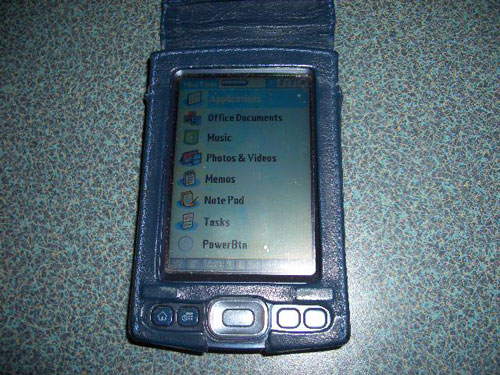
[My Palm T/x in the E&B Case]
The exterior shell has a few scuff marks, but no chips or obvious scars. Other than the power button, all buttons and external controls and jacks work like new. The pricing for a new unit is still running about $280, but they can be found used or refurbished for about $180.
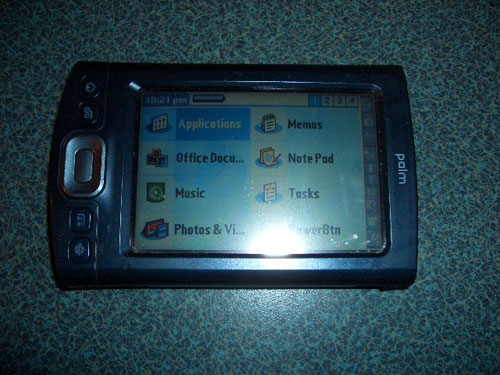
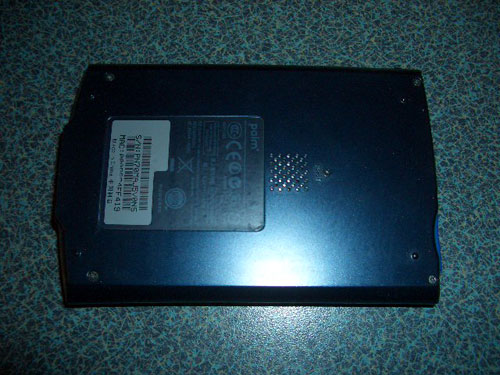
[Front and Back Views]
The problems that have come up have included:
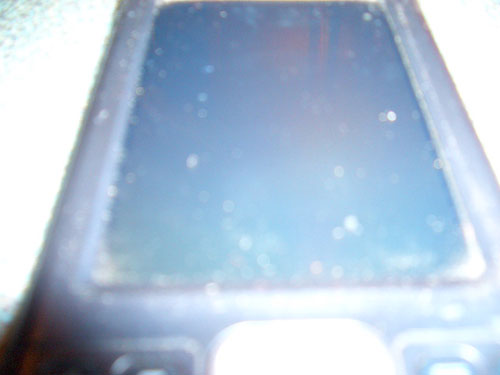
[Spots on screen (and if you look closely, some signs of the haze)
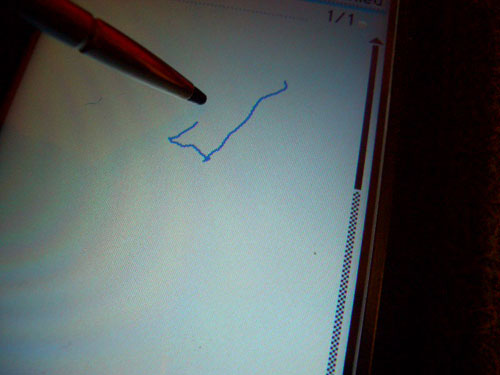
[Where the stylus points in relation to lines drawn in NotePad]
Now- I know that #1 and 3 can be the result of software- but they persist through hard resets, and even hard resets after disconnecting the battery for several days. Sometimes, they ease up for a while- but they slowly re-occur without any additional software being added. Lately, nothing I have done has made #1 any better, and #3 is getting harder and harder to get any relief from. I suspect that the power button issue is an equipment glitch, but I am willing to concede that #3 could be from carrying my Palm in my pocket. One of the possible side effects of testing software all the time, maybe.
So- bottom line: If there was a good non-Treo Palm option, I might go for it but I still use the T/x daily, glitches and all- I am generally happy with the performance. I just have to have a back-up plan that includes a good backup program and a Palm Zire 22. just in case…

GMKtec Mini PC, G3 PRO Intel Core i3-10110U (Beats 4300U/N150), 16GB DDR4 RAM (Dual Channel) 512GB Storage Drive, Desktop Computer 4K Dual HDMI/USB3.2/WiFi 6/BT5.2/2.5GbE for Office, Business
(as of June 9, 2026 01:13 GMT -05:00 - More infoProduct prices and availability are accurate as of the date/time indicated and are subject to change. Any price and availability information displayed on [relevant Amazon Site(s), as applicable] at the time of purchase will apply to the purchase of this product.)

Gadgeteer Comment Policy - Please read before commenting
My wife uses a Palm T|X and loves it, but it has major screen calibration issues which didn’t pop up until she had her T|X for almost a year – the biggest problem being that she can’t even use the built in app to calibrate her screen because the built in app doesn’t calibrate the bottom of there screen, where her T|X has it’s calibration issues (ie, the calibration is non-linear). We came across PowerDigi
http://www.palmpowerups.com/readarticle.php?article_id=5
and it solved her problems. It has a 30 day trial. See if it solves your problem. While it is terrible that we HAD to resort to buying software to make her T|X usable, it DID make her T|X usable again.
I have had digitizer issues on several Palm units over the years. So far my Treo 680 hasn’t developed this annoying malady. I’m wondering if Windows Mobile users ever see screen calibration issues like Palm users?
I’ve used a T|X for about 1.5 years now. I replaced mine under warranty due to Digitizer jumping issues just before the 1 year warranty ran out. For my needs, it would be much better if they hadn’t dropped the vibrating alarm. PowerDigi didn’t fix it, but I still use it as the digitizer wasn’t accurate on the old model, nor is it accurate on the replacement. Even with PowerDigi, the digitizer is accurate in the middle 90% of the screen, but the top and bottom 5% it reads too high/low. It is much worse without the third-party application.
Recently, the internal switch in the TX’s headphone jack got locked “on” and it only made noise when plugged into headphones. I started considerting my options for replacement. For me, there were only three appealing options, but none of them were perfect:
Get another TX. It’s pathetic that after 2+ years, there’s still no upgrade, and the TX itself was a mixed bag of upgrades/downgrades from my previous T|T3.
Get a Treo 755p. The added cost of smartphone service, smaller screen, and loss of WiFi (which I have at home and work) would have been really annoying. However, vibrating alarms and faster mobile internet might have been nice.
Get a Nokia n810. With the AXCESS emulator, this looks like a possible option, but I wonder about PIM/alarms and if they would work under emulation. The form-factor/screen/keyboard look fantastic. I wish Palm had brought out a device with these features….
Luckily, rooting around in the headphone jack with an un-bent paper clip fixed the problem, but I’m afraid to use it with headphones. I have enough trouble missing alarms with it not vibrating….
I am a massive TX fan, though I’ve moved to a Treo 700p because I wanted the phone included.
Screen calibration is a purely physcial/mechanical breakdown of the touchscreen sensing mechanism. I had the problem, then had to replace my TX due to a saltwater incident. The same problem comes up on the second TX after about a year. It took about 2.5 years to show up on my wife’s TX.
I moved to Graffitti 1 to postpone fixing the digitizer (G1 is less susceptible to problems from the failing digitizer), then installed PowerDigi to postpone it again, then to the 3-panel instead of 2-panel input. You can test digitizer failing by using the notepad program and drawing a horizontal line across the screen at constant pressure. As you draw lines higher or lower on the screen, you’ll find your line edges away from the areas that get the most use. Eventually, it will drop out and can only be drawn reliably at higher pressure. You’ll also find that these bumps in the horizontal line can be lessened with extra pressure. But that, of course, speeds the breakdown of the touchscreen.
Finally, I broke down and bought & installed the glass digitizer from http://www.gethightechparts.com. This *is* the solution to the digitizer calibration problems.
My glass-screen TX is now being used by my wife (for the past 8 months) and it’s super responsive and reliable. The second TX is in a drawer and will get a glass screen immediately, if I pull it out to start using it.
Charlie
I only recently (4 months ago) bought my TX. I found it really cheap on eBay, slightly used.
So far, so good. It’s been great. I really love it.
However, I did my homework beforehand so I was aware of the issues.
I kept my old Sony Clie NX70 as a back up.
Thanks for the info on resolving some of the problems I may face in the future. It should come in handy.
Re: Headphone jack-
The headphone issue is common in many pocket electronic devices- it hit some older models of iPod hard as well.
It is usually a simple matter of a small prong inside the jack getting bent and needing to be pulled out a bit. If you can visualize what you are doing, a small hooked tool works great.
To help someone visualize the problem, just find a 1/8″ headphone jack that is totally open and visible. A replacement part from Radio Shack, for example, will do this nicely (part #274-248 is close).
The fairly cheap jacks they use bend easily- plug a headphone in and wobbling it will often bend the prong. Some dust or lint in the workings will mess things up as well.
Re: PowerDigi-
I’ve used this in the past, and been… reasonably satisfied but not completely so. I had not thought about going so extreme as to do a digitizer replacement, but that appeals to my inner modder.
It royally ticks me off that this is such a common problem, and the Palm factory solutions seem to be to just swap your returned Palm for a refurbed unit. Sure, replacing every year-old unit with an updated digitizer might not be cost effective for them, but I wish they would at least give us the option of paying for an upgrade like that.
Of course, it is not quite so much a problem that I am really willing to sacrifice my Tx for a couple weeks for them to tinker with it, either!
When (or if) the time comes to replace the digitzer, I’ll probably upgrade to a glass one, even if it costs more.
All the info I’ve seen says this is the best option. I don’t expect any help from Palm since they seem to be uninterested in standalone PDAs these days.
I’m moved to comment because I’ve had two TXs and have had to go back to using my faithful and dependable 4 year old T3 after failures just out of warranty in each unit.
Both worked faultlessly and without complaint for about 9 months. I particularly liked the NVFS memory as I no longer had to worry about battery levels and losing all my data. The lack of a slider seemed a move up from the T3: less moving parts, less to go wrong. Built in WiFi meant that I could upload data from the likes of Avantgo and Epocrates at the start of each working day before I left home.
Unfortunately, with both of them I started finding the TX doing repeated soft resets. At first this was only once a day, then it started becoming more frequent. It became unusable when it was resetting after every other switch off, and a hard reset and restore didn’t solve the problem. In the end both of them got caught in an endless reset loop which was impossible to break out of.
I was brave (or foolish) enough after my first experience to buy another, but a repetition of the experience a year later dented my confidence. And getting user support from the local Palm importer proved fruitless.
I concluded that there must be some inherent problems with this iteration of the NVFS that Palm used in the TX. I have read of software conflicts causing such difficulties, but on my second attempt I kept my Palm running on the barest minimum of third party software, with the same results as before.
I have to admire the T3 though: it is tough and despite the occasional reset, just keeps on going. The dented aluminum case only adds to its “battle hardened” appeal!
If anyone has any ideas of resurrecting a dead TX, I’d be most interested: but one of the problems with the NVFS memory is your stuff is in there permanently. I can’t even sell them on eBay for spares because my confidential information is still lurking in there!
My T|X is holding up pretty good. I think every Palm pda I owned the power button stops working after awhile. I got it in early 2005, but I’m thinking this will be my last pda. Hope Palm comes out with a Foleo II.
Hi,
I’ve recently experienced what appears to be a hardware failure of my Palm T/X. I will admit that it has been dropped a couple of times during its lifetime and it’s last fall seemed to have some impact. The problems show up as a lockup where the unit will not turn on. The only way to regain some life is to let the battery die, and do a hard reset. During the calibration of the digitzer when the stylus touches the screen a sound is emmitted that makes me think of static discharge. If I’m lucky the unit will only remain responsive for a for minutes; maybe hours at most. Does this sould like a digitizer problem? I am interested in this glass screen mentioned above. I’ve since got a second TX, but I’d like to not have to dispose of this other one if I don’t have to. Any thoughts?
Scott
For what it is worth, my Palm IIIc is still my heavily used daily PDA (I’m on number two) and my wife uses her i705 on a nearly daily basis. If the Centro goes on Verizon (which for business reasons I’m using), we’ll probably get a pair of those. The TrÄ“os were just not really justifiable due to their cost and the fact that our current Palms work just fine with MegaWiki, DateBk5 and BigClock. We both have 5th gen video iPods, which handle media just fine.
C’mon Palm… make me want to upgrade! As it is, it sounds like many T/x users will stick with their units unless there’s a real advantage with the next Palm.
I’ve found this post helpful, for two reasons.
First, I recently purchased a TX for my wife to use, and now know what to expect. She’s never used a PDA before, I’ve been using since Palm Professional days. I’m tech support for her and I’m familiar with Palm.
Second, and this is why I’m writing, I’ve been using a Sony Clie NZ-90 since it came out way back. It now needs a new hinge and the screen has lines of bad pixels and the Grafitti area has lost sensitivity. For $138 (plus tax & shipping) Sony will fix it all. But I’m looking at alternatives.
For *me* what’s missing from the TX is a voice recorder. AFAIK, there are no current Palm PDAs with a voice recorder. I’d have to buy a T3 to get one, and I don’t know about the sound quality. The Clie’s works great. While the format it records uses an odd codec (I need to use Quicktime to play it back on a Windows devide), it still meets my needs.
The only alternative I’ve seen is to invest in 2-year old Palm technology (TX) and get a separate digital voice recorder – total cost over $300.
Anybody have a better idea?
So I’m not the only one using my old Palm. I still have a T3 from october 2003, and it’s going strong. Minimal dentage, and no digitizer issues. Have not been using any screenprotectors or hard cases. Just the screen cover that attaches to the back. I did replace the battery once, after the Warranty expired, but that was quite easy.
The only real problem is that i accidentally did a fairly deep scratch in the screen with my keys (I threw them, they hit the screen). And that was in 2004, and has not really affected the usage.
I haven’t used the slider that much though. I very rarely pull it out. The 320×352 (status bar) screen i get is quite allright.
These days I have cut down what I use it for. It’s no longer my MP3 player, Video player, primary gaming machine or webbrowser. I still use it for Calendar, Ebooks and gaming when I can’t be bothered to find my DS.
Before you go out and buy a voice recorder, check out this page: http://home.earthlink.net/~gmayhak/catalog.html
That page has microphones and links to software that uses them.
I have not bought anything from them yet, but I’m seriously thinking about it.
I longed to do something like TX, but withTreo too expensive, a AT&T $99 centro deal and no follow on device to the TX in sight I went to a Centro (from a venerable used Palm V – my second Palm V over ~5 years).
Graffiti writing issues might be helped by:
a) using fingernail to write instead of stylus = less wear on the screen
b) with clean thumbs, draw your thumbs from the top and sides of the screen down to the middle of the grafitti writing areas to redistribute the screen’s gell.
UPDATES:
A couple months ago, I tried Power Digi and was fairly happy with it. In the last couple weeks, even it is not doing that much good for me.
In the last few days the card reader is acting up. Even without changing anything, it will stop reading a card, and it takes a near-magical series of removals, reinsertions, and resets to get it to read again. I am getting rather fed up!
I have had the T/X for over two years now. It is a tool that I cannot live without. My biggest frustration has been Palm’s failure to provide an update. My screen is worn out, mostly from my not using a protector on it for a few months. I keep going back and forth with purchasing a second T/X, or an ipod touch, which has most of the same features, and also has the fortunate advantage of having a ipod doc in my Subaru.
I don’t understand why Palm has not updated the T/X. The palm screen is excellent, and I just cannot stand the phones, with their tiny keyboards and lack of a hand-writing tool in the stylus. Hopefully Palm will announce something in the coming weeks, as I am trying to hold off on purchasing the ipod touch.
James:
I don’t want to be the one to disappoint you, but in the last week or so, Ed Colligan (President of Palm), announced that Palm will -not- be releasing any new PDAs. It’s all smartphones all the time now. I’m afraid the day of the PDA has passed…
I bought one of the first available Palm T\X units and have experienced none of the problems listed in the above posts. Only thing that happened is accidental loss of my SD card (and its contents) when it popped out and disappeared. The T|X is not getting much use these days since I have the latest iPod Touch, but I really appreciated the T|X wi-fi and email features and Blue Tooth for sync – which were unique to that unit for several years.
I purchased a Rhino case for my TX- it has the same shell as the T5- and so far I have had no problems with any of the buttons, including power, and I’ve had it for nearly 2 years.
My only problem in the digitizer, which not only has lost calibration but has dead spots. I intend to replace as soon as possible.
Word to the wise, keep a grip on your sd cards when removing them; the spring inside has a lot of oomph and can launch an SD card across living rooms.
Doe somebody know where to get a replacement part for the Palm T|X Power Switch?
please shot me an email to favilar[at]gmail[dot]com
Here a site where tech us how to repair a Palm TX Power switch:
http://mark.rehorst.com/Palm_TX/index.html
good luck
I bought a tx a few weeks ago. When trying to set up the wi fi connection or scan to set up, the screen goes blank. It has to be reset to come on again. Please help.
Fernando,
You can find replacement power switches for the Palm T|X at http://www.usedpdaparts.com/PalmTX.html for $5. My understanding is that these are rated for significantly more operational cycles than the OEM part.
hi all 🙂 i bought a tx several months ago and after about 2 months and spending $22 on the messagease graffiti upgrade. my digitizer died, making the upgrade useless as it relies on precision stylus movements 🙁 so i made do for awhile untill i had an inspiration! lol i remembered that my old lifedrive had the same size screen so i swapped them out and all has been well for the last 6 months or so granted the lifedrive was quite old so the backlight has grown dimmer and the colors arent quite as crisp but i mainly use my tx for PIM so having quick and easy text input is top priority for me. so this may be an option if you have a spare. and as a bonus the screens are a breeze to swap out just a few screws and 2 button type ribbon connectors.
Like comment no. 23 above, my TX is freezing (screen going white) when I try to connect to Wi-fi. Can anyone help me?
Kathryn- you may want to post your issue on a Palm-based forum. I’d recommend one, but it has been a while now since I dropped all Palm devices and most of my old links are dead.
I have had my T|X for quite a few years. No problems until the original battery started to fade. Since replacing the battery I have performed soft resets, hard resets, discharging, recharging,… in an attempt to have the new battery up to speed. With no luck. It use to be that a charged battery would easily last me through the work day, now I’m lucky if I get ~15 minutes of use. I will receive the ‘low battery’ message, indicating less than ~5 percent of the charge is available. Turn the unit off, wait 10 minutes, turn it on, and find the battery icon is now indicating 80%. Which then fades to the ‘low battery’ message in about five minutes. Crud. Any ideas?
Lithium Ion batteries start to die from the moment they are made, not first used. When we use older proprietary battery packs, like the T/X, the pack was probably made a few years ago and gave up most of its life on the shelf.
It is indeed charging, and showing the ‘rebound’ effect when turned off, but it is not holding up to use.
There may be another issue going on, but that is what it sounds like to me.
You can search for a site that promises fresh batteries- a few do.
I have a Palm T/X. When I use the Notepad app and draw a vertical line, at one point the line disappears & reappears as I scroll down the screen. I assuming this is a digitizer problem & thinking about having the digitizer replaced with glass for about $89 including the LCD along with replacing the front & back plastic bevel for $45.
Before I authorize this work, I was hoping from any Palm T/X followers for their opinion.
For $150 you can find a refurbished modded Palm TX with a microphone. I did not see any trade-in offers but it does not hurt to ask.
I have a Palm in like new shape after years of service thanks to a metal case. The OM battery just gave out and I just ordered a replacement. The YouTube video makes the change out look straight forward enough. Any tips?
I have moved on to an Android phone for most of my organization and daily use but, I use the Palm to monitor and respond to my personal email at my desk. I also have a few retro games loaded for when I need a work distraction. How do you use your Palm?