
Just a few weeks ago, I reviewed Cakewalk’s UA-1G USB Audio Interface and I was much impressed. Today, Cakewalk kicks it up a notch with the smaller of the two of their new V-Studio packages. This combo package of a portable digital multi-track recorder, a Digital Audio Workstation control surface, a PC and Mac compatible USB audio interface, and a software package to die for seemingly combines the best of not both, but all of my little worlds. Unfortunately, right in the middle of this review I suffered a major technology breakdown, it was the best thing that could have happened, read along…
Features
Away from your computer
Record directly to V-Studio 100’s SD-card wherever or whenever inspiration strikes–without the need to boot up your computer. Take the VS-100 to your live gigs and use its digital mixer, reverb, compression, and EQ to mix vocals and other instruments. Use its SD recorder to play backing tracks that you produced on your computer. Even record a mix of your set directly to the SD-card. Then transfer your recorded audio to your computer for additional editing and tracking. When you’re done, upload it to the Internet, burn CDs, and more.
With a computer
Take control of your music production using the V-Studio 100 as a high-quality audio and MIDI interface and DAW controller. Connect to a Mac or Windows and use your favorite software such as SONAR, Logic, and so on, or the included SONAR VS digital audio workstation (Windows Only). Take your music to the next level with the VS Production Pack–a powerful collection of effects and instruments for Mac and Windows.
Hardware Specifications
Audio Interface- 8 In + Mix/6 Out
- 24-bit/96kHz quality
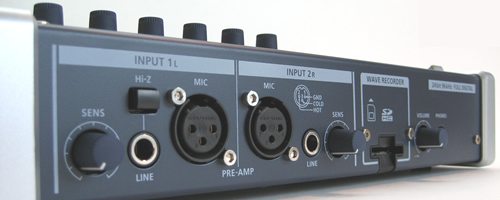
- Two XLR mic preamps with phantom power and input sensitivity
- Two 1/4″ TRS inputs
- Hi-Z 1/4″ guitar input
- USB 2.0
- MAC/PC compatible with ASIO, WDM, WASAPI, and Core Audio support
- Works with SONAR, Ableton Live, Cubase, and more
- Use with any DAW through Mackie Control
- 100mm motorized, touch-sensitive fader
- 5 rotary encoders, 11 buttons, and transport control
- Advanced control of SONAR through Active Controller Technology
- Dynamic LCD display
- Programmable footswitch
- Ideal for mixing small bands, solo musicians, DJs, home studios
- 8 input, 6 output plus headphones
- 4 types of reverb
- 6 channels of EQ with LCD plot
- 6 channels of Compression with threshold and compression meter
- Meter & FX display on LCD
- Record away from your computer
- 2-channel wave recording and playback
- Capture rehearsals and live performances or play along to backing tracks
- Play backing tracks and record your mix simultaneously
- Easily transfer audio to and from any computer via USB
- Built-in metronome
- Dedicated WAV playback volume control
- Phenomenal suite of 4 effects and 6 instruments for Mac and Windows
- VX-64 Vocal Strip
- Native Instruments Guitar Rig 3 LE
- Boost 11 Peak Limiter
- Channel Tools
- Dimension LE
- Rapture LE
- Studio Instruments Bass
- Studio Instruments Drums
- Studio Instruments Electric Piano
- Studio Instruments Strings
Package Contents
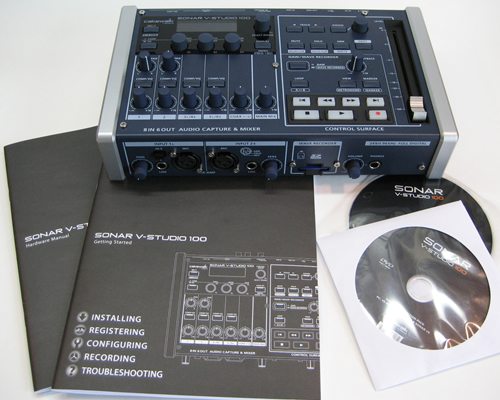
- Owner’s Manual
- USB cable
- Driver CD-ROM
- VS Production Pack + SONAR VS DVD-ROM
- AC Adapter
Initial Impressions
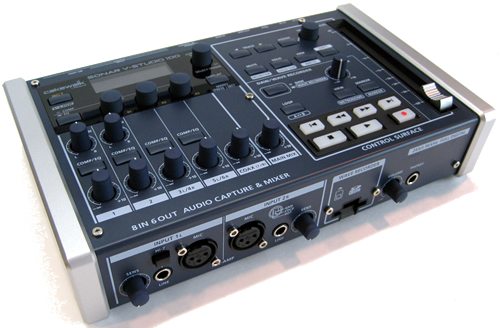
I’m big on initial impressions of any gadget. It needs to look good and feel good. And I’ve got to say that right out of the box, the V-Studio 100 looks and feels fantastic. It has the right amount of weight to it. It’s heavy enough to feel like you’re holding something solid, but not heavy enough to slow you down. I think the look is amazing, it’s sleek, compact, and svelte, but at the same time highly engineered. It’s constructed of metals, no plastic here, and machine screwed together. The knobs have that nice quality rubberized feel, and the throw on the fader is long and smooth. All of the in and out interfaces seem to be of high quality as well.
If I had to describe it briefly, it would be Refined Industrial. In my opinion, the construction of this unit exceeds expectations for gear in this price range. I’ve got a $1,200 chunk of plastic paperweight from Tascam in the form of an at the time “portable digital multi-track”, and this cakewalk unit just took it’s lunch money and gave it a wedgie in the hands on test.
Setup
Setup was a breeze. Simply start the driver CD, plug in and power up the unit, and run the USB cable to your computer. The driver installs automatically and you’re notified when it’s done. I then proceeded to install the software with all of its included add-ons and goodies. I’ve got to say, I’m a bit surprised at just how complete the production package is. With basic recording and high quality vocal processing, a string instruments synth, drums, bass guitar and keys included, along with the all important amp simulator included, this is truly a complete package.
Nothings worse than getting something like this home just to be immediately stymied due to lack of inclusion of a key component in your creative arsenal. I’ve run into this time and time again over the years, and kudos to Cakewalk for making a truly out of the box package that you can run with. Every musician, engineer, or producer has their favorite little goodies they carry with them, but I see nothing that can not be achieved with the included array of tools.
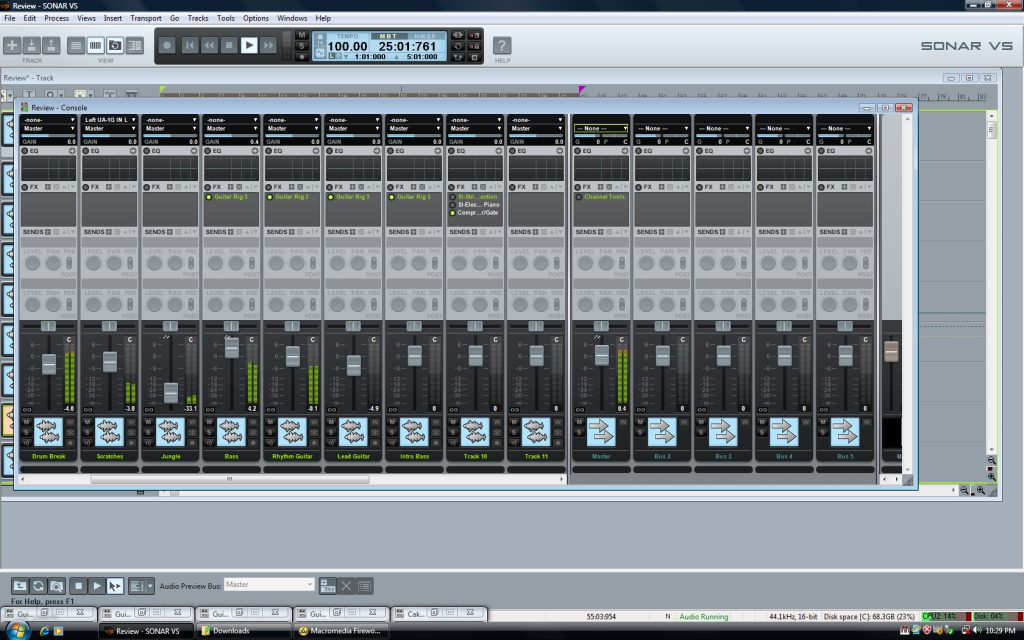
Another of my musts is a console view. I’m slowly getting used to working in the industry standard track/waveform view, but when it comes to mixdown, I still want that console view. What’s more is that with this particular package, I was easily able to assign the software variables to the V-Studio’s hardware, and utilize it as a control surface. This was my first opportunity to utilize a control surface in a DAW, and man is it nice! Mouse clicks have long been the bane of digital audio workstations, and Cakewalk delivers us from that sterile drudgery in spades with this system!
Click on the following images to see them full size.

The Ins and Outs
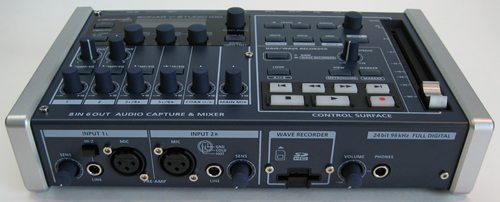
The instrument ins include two channels with trimmable gain. There’s two Hi-Z channels with 1/4 instrument ins as well on the front panel. To utilize the unit as a stand alone, you’ll need to insert a SD card with the capacity of your choosing. Rounding out the front are the headphone out jack with volume knob.
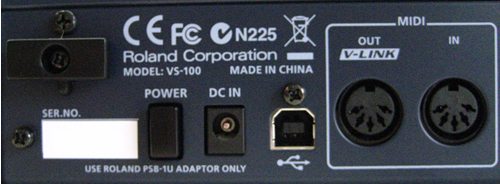
The power cord connector, power switch, usb, and midi in and out start out the first half of the back panel.
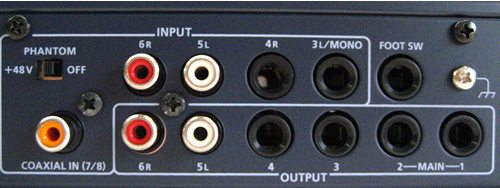
A good selection of ins and outs, as well as a foot switch for punch-in and punch-out recording, as well as a phantom mic power switch rounds out the back panel. The inclusion of the phantom power switch lets you utilize a nice condenser mic without a separate power supply, this is the kind of detail I really appreciate, no skimping here.
Performance
I believe in giving complete thorough reviews of any gadget, but if I were to delve into every aspect of this package, we’d be here a while, and few would read it. So I’m going to try and hit the high spots here while doing this unit justice.
For my test, I wanted to make sure I covered all the bases. So my intent was to utilize the V-Studio 100 as a stand-alone recorder as well as an interface into the included production software, and then use the unit as a control surface during mixdown. Being a guitar player, having an amp simulator is priority one for me, so I knew I’d be putting the included Guitar Rig software through its paces as well.
I proceeded to record two tracks in “Wave Recorder” mode with the hardware unit alone, not connected to the computer. I was extremely pleased with the ease at which this was done and the audio quality was simply stunning. With no EQ, Compression, or any other effect, my acoustic electric sounded beautiful and was accurately reproduced. I then hauled the unit upstairs to the Yamaha electronic drum kit and captured a simple beat. Again, the V-Studio 100 hardware worked flawlessly. I think the real hook to this package is to be able to haul your hardware to capture virtually anything, then bring it home for mixdown or inclusion into a bigger project. Next, I dumped the recorded wave files to my laptop and began recording bass and lead guitars.
I was just putting the finishing touches on this review, mixing down all of the tracks recorded, when my almost brand new laptop took a complete nosedive. It was completely dead, nothing, it wouldn’t turn on or even begin to boot. So currently, my new laptop, and all of the initial work on this review are with the laptop manufacturer, and I’ve got my fingers crossed.
So here I was, re-loading all drivers and software on my neglected desktop and about to pick up instruments and record again. I like to give an example of the capability of the equipment and software when I review something like this. Frustrated at losing my recorded tracks on this project I started listening to a few of the included sample loops available as royalty free goodies for you to use in your tracks. I had to check out things like “underwater winds” and “Jungle Ambiance”. I was amused. But while sampling all of the included loops I came across a drum beat that reminded me of something. I dialed the tempo down from 120 to 100 and it sounded just right. I had been thinking about a particular song that I’d written almost 20 years ago while with a band in Memphis. I had recently gotten in touch via Facebook with my old guitar player whose playing I had always loved on this song.
I grabbed up my trusty 5 string and started slapping it around. What you’ll hear is a something between bizarre and eclectic, I think, I’m not really sure. But whatever it is, it’s a really good example of not only the functionality of the V-Studio package, but its ability to be inspiring. This is about as far away from my normal thing as it gets, but it got my creative juices flowing in a different direction, so I followed along. And if there’s anything I love about my music gadgets, it’s when theyr’e inspiring. There’s not alot of time involved in what you’l hear, maybe an hour. I was under the gun, so note, there’s no EQ, not alot of time mixing down, and the only effect is a preset on the included compressor on the master track, and the sonic quality is tops. No noise, no hiss, just pure, clean, and punchy.
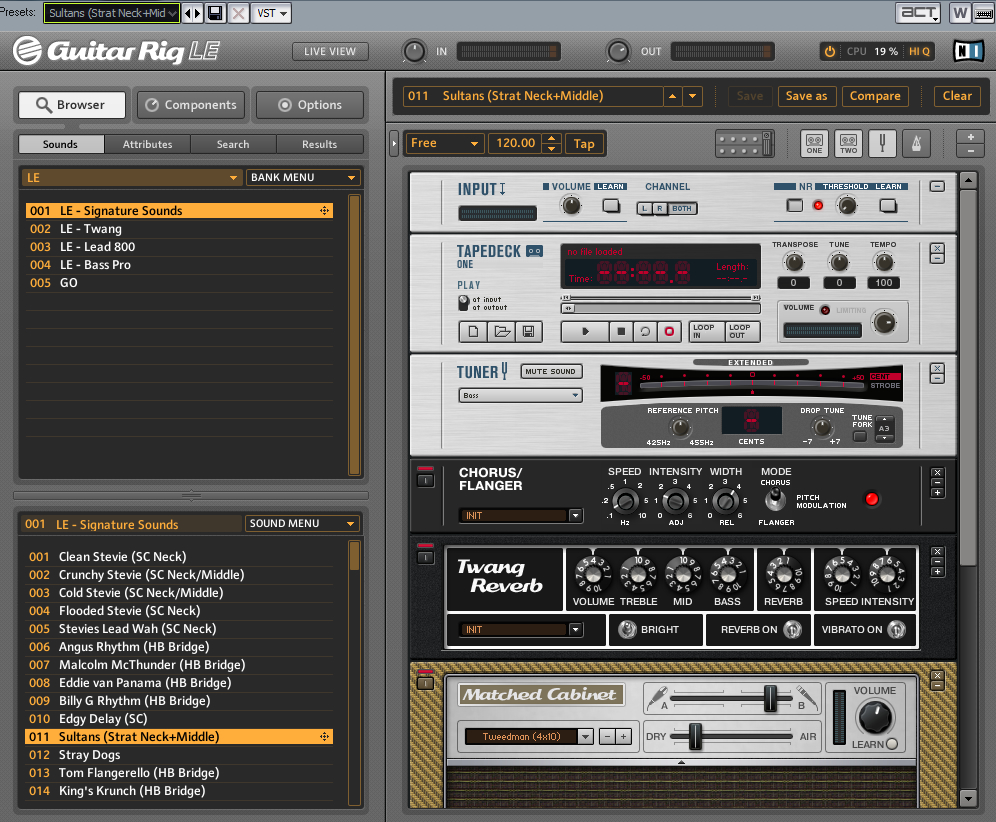
I’ve got to say that the included Guitar Rig 3 LE from Native Instruments is awesome. I dialed up two different presets for the bass with no adjustment, a rhythm guitar tone, and a lead guitar tone. Again having to work quickly, I was very pleased to see that right out of the box, this package was delivering results I was happy with. I’m an absolute tone freak, I’ve spent years pretty much trying to get the bass sound I dialed up in under 10 seconds in the included Guitar Rig! I also love the slinky rhythm guitar sound. This package far exceeds my current Line 6 Tone Port presets, by far, and the tonal quality is much better in my opinion. Even though this is the LE version, with the included presets and the total ability to customize each sound and create new ones, I’ll be wearing this little gem out. I love it!
Click on the following images to see them full size.

So have a listen at an old song with a very new and very different twist for me.
So while my notebook taking a dive on me was troubling at first, I’m really glad it happened on this project. It forced me to work quickly, and let me see just how complete this package really is, how inspiring it can be, and how many hours of pure fun I’m looking forward to as I dig further into it.
Conclusion: All That and a Bag of Chips!
All in all, I was able to successfully complete the project without a ton of time or learning involved. The ability to have the unlimited tracks and flexibility of a true Digital Audio Workstation on your desktop that integrates so very nicely with a truly portable multi-track recorder and control surface makes for a truly complete package. I found zero issues with the construction of the hardware itself, and the software package is more than enough to keep the creative juices flowing freely.
I love being able to open a box and not have to immediately want or need something to go with it. Everything’s here to complete pretty much any project you’ve been wanting to do.
You won’t plug this unit up, flip the switch and sell a million records, but if you invest just a couple of hours playing with this package and hitting the extensive manual included, you’ll be well on your way as the integration of hardware and software becomes easily intuitive. Cakewalk’s done a fantastic job of putting this complete of a package together at this price point, and it just became my main recording setup. There’s really no situation I can think of that this package won’t handle from the pure electronic sequencer crowd to the guitarists, drummers, vocalists, and anyone else for that matter. I can’t recommend it enough. This solution from Cakewalk really is beautiful.
Cakewalk covered every angle here. Go out and get it, I’ve got a few more songs I’m going to lay down with my new favorite gadget!
Product Information
| Price: | $699 |
| Manufacturer: | Cakewalk by Roland |
| Requirements: |
|
| Pros: |
|
| Cons: |
|

Gadgeteer Comment Policy - Please read before commenting
This is one of the best reviews I’ve ever read. Very complete and very helpful. Thanks!
Dont get me wrong, I really like the V-studio, and in fact on tuesday I can pick it up finally in my store,
but this is not a review. This is just summing up al the good points of the V-studio 100. What I would like to know is also the negative or limiting points of this soundcard which it will have of course just like any other.
U from Cakewalk or something?
Thanks for the review. I am currently trying to figure out whether to keep all my old and very expensive recording equipment or stick my toenails into the computer/recorder standalone/interface and control surface quicksand. Not being even a distant relative of a computer geek, I have many misleadings about this step. It seems like the vstudio 10o might be just the thing to get toenails wet without drowning in technology and months later still not having a single track. Anything out there better for me?
Thanks
Jack
@ Gis – I apologize for the long delay in my response to your comment. I did not see it had been posted. But as an answer, no, I’m not from Cakewalk. Any and all reviews I write are my honest assessment of the hardware/ gadget/software, combined with antidotal material of my experience with the equipment, or, how it made me feel.
Let’s be honest, we’re all passionate about hardware, it’s why we’re here. So if you noted a passion about this particular package, then you’d be correct. That’s my feeling about it. I like it, I thought it was well made, and it suited my purposes. To imply that I stated no negatives about it means the review is not genuine is incorrect. It simply means I found no negatives with it during the review period.
And so you know, I’ve had several people, who have actually purchased the package, let me know of a similar experience. But thanks for your comment.
I believe that reader “Gis” was just hoping for an analysis of “pros versus cons”. For example, I’ve read on some boards that there is an “issue” with LIVE mix monitoring (e.g., monitoring vocals being recorded over a composition previously recorded). Are you aware of an issue relating to hardware-based live mix monitoring? (See the relatively basic $100 Shure X2U, which provides live mix monitoring, for an example). Would live mix monitoring have to be accomplished via the DAW software, or can it be accomplished via a hardware MIX control? Are there any other “cons” we should know about? SIDE NOTE: I genuinely wish I could send this via a personal email rather than public post, because I really liked your review and I mean no disrespect. However, I believe you meant to combine your assessment with “anecdotal material” of your experience… not “antidotal material”. (Save the “antidotal material” for any poisonous crappy hardware you review in the future… where a good antidote may be warranted). 😉 Your review and any VS-Studio 100 updates are greatly appreciated!
Aha! I did not realize that you could EDIT my post before publishing it to the site.
PLEASE… after reading my SIDE NOTE (in my previous post), could your remove that SIDE NOTE (intended for YOU only) and post/respond to the remainder of the post?
I did not notice windows 7 x64 on the list of compatible op. sys. Any info on that? Otherwise, i think i like it also.
Ok. Here I am. I’d like to know good it is this interface and how bad it is also?????
I’m a beginning song recorder and i intereting on this item. Who can tell that ???
Thanks
yon
hey i wanna know if someone’s currently using v-studio 100???
Hi there, thanks for the post, I’ve just bought sonar vs 100, but how can I mix down several recorded files to one wave file without using the software interface, is there any Idea, they didn’t mention that on the user menual, please advice.
I make beats using mpc 2500 – mpc1000. I have a recording studio. Having digital track recorders. my brother inlaw enjoys sonar vs. He was working with acid pro 5.0. Music sounds very good. Subs rock. Got 3 tickets got music turned up
I own one. Inputs 1 and 2 are fine, 3 is left and 4 is right (1/4″ inputs) 5 and 6 are RCA and 7 and 8 are coax. If you have 2 guys sitting in with a guitar and mic to hook up, you’re out of luck. So to say it has 8 inputs is deceiving. Most importantly, when using the SD card, it records to one stereo channel. What’s the point of implying it has 8 inputs only to record to one channel? Anybody for a Zoom R24?