
VRJoy are LCD shutter glasses that
transform images, movies and games into stereoscopic 3D. These glasses
will work with any computer that uses a CRT monitor. They will also work with
any operating system. There isn’t any software that you have to
install to use these glasses if you just want to view images, or movies in
stereoscopic 3D. If you want to play games in 3D, that is a different matter.
I’ll talk more about that later.
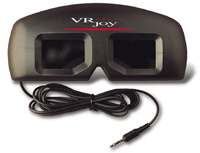
The glasses are black plastic goggles that you can wear over regular eye
glasses if necessary. They are pretty light weight and the construction is fine.
Wearing the glasses isn’t the most comfortable thing in the world, but they
aren’t too bad. I wear regular glasses and found that the VRJoy glasses pressed
down on the top of my frames causing them to press into my nose more than usual.
The glasses do have a removable nose piece. The ear pieces on the shudder
glasses press into the side of your head instead of resting on your ears.
A nice thing about these glasses is that you don’t have to open up your
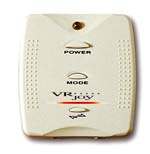
computer in order to install them. They have a cord with a connector that plugs into
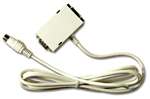
a small module. This module in turn is powered by an AC adapter and also has
another adapter that connects to your video card’s monitor output. This adapter
has a pass thru connection that allows you to plug your monitor into it. So,
setting things up was just a matter of unplugging the monitor from the video
card in back of my computer, plugging in the pass thru adapter into the video
card, plugging in the monitor cable into the back of the pass thru adapter, and
plugging in the AC Adapter. Whew! You can leave the glasses plugged in all the
time and still use your computer/monitor as usual. When you want to use the
glasses, you just press the Power button on the VRJoy module.
Ok, how do the glasses actually work? Well, the module when powered on,
switches your monitor into interlaced mode. When a monitor is in “interlace” mode,
all of the odd numbered lines
are painted on one refresh of the screen and all of the even numbered lines are painted on the next refresh.
When you look thru the VRJoy glasses, the image for one eye is displayed on the odd
numbered lines, while the image for the other eye is displayed on the even
numbered ones. The shutter glasses have two LCD panels in them (one for each
eye). They synchronize with the
interlaced monitor so each eye only gets to see the image it’s supposed to see.
The glasses come with a demo CD that has several 3D images that you can view.
I’ll admit that some of the images did look pretty cool thru these glasses. Some
felt like the images were popping out of the screen or that there was actually
space behind the objects on the screen. There are also other image gallery sites
linked from the VRJoy website. I had fun looking at these images on various
sites for about an hour. After the hour was over, I found that I had a slight
headache and my eyes felt a bit tired. One thing that I don’t like about the
glasses is that you feel like you’re wearing sunglasses. They cut the light
coming in by about half. So, sometimes it feels like you have to strain to
see things. I did find that one person’s perception of 3D is not the same
as another person’s. I found on of the demo pictures to be a particularly good
one as far as ‘feeling’ like it was in 3D. I asked my friend to look at it and
she could not tell the difference between the picture with the glasses turned on
or off. I thought that was very strange but then she told me that she has very
little depth perception.
As far as watching 3D movies, I was not able to test this function because I
didn’t have access to any movies during my review period. However, you can order
movies directly from the VRJoy website. They also sell a device that you
can attach to your camcorder that allows you to create your own 3D movies. The
bad news is that this accessory is priced at $359.
Now the reason I was most interested in the VRJoy glasses was for game
playing. In order to play games in 3D, you must run a driver program (included
on the CD) called VRCaddy. This driver only runs under Windows 95 or 98. The
gotcha is that the driver only works with a few video cards (of which mine was
not included – Diamond Fire GL Pro). The video cards that VRCaddy does support
are:
Diamond Viper770(including Ultra)
ATI Rage 128 Family(including Rage Fury)
Matrox G400
Canopus Spectra 2500
Creative Labs 3D Blaster Banshee
Creative Labs Graphic Blaster TNT
Creative Labs 3D Blaster Savage 4
ELSA Winner II
Voodoo3 cards by 3DFX
Once you run this driver, your are supposed to be able to play most OpenGL or
Direct3D (5.0 or higher) games in stereoscopic 3D. Check the supported
game page on VRJoy’s website for specific game info.
I was really disappointed that I wasn’t able to test the glasses with the
game demos that came on the included CD. For about $80, I’m not sure that
VRJoy is worth it unless you have a video card that it supports for game
playing. Looking at 3D pictures is fun, but only for about an hour.
Price: $79.95
Pros:
Will work with any computer / CRT monitor.
Don’t have to open your PC to set it up.
Cons:
In order to play games in 3D, you need a supported video card.

Samsung 14" Galaxy Chromebook Go Laptop PC Computer, Intel Celeron N4500 Processor, 4GB RAM, 64GB Storage, ChromeOS, XE340XDA-KA2US, Student Laptop, Silver
(as of June 8, 2026 12:57 GMT -05:00 - More infoProduct prices and availability are accurate as of the date/time indicated and are subject to change. Any price and availability information displayed on [relevant Amazon Site(s), as applicable] at the time of purchase will apply to the purchase of this product.)
HP Everyday Laptop • 2026 Edition • 8GB RAM • 256GB SSD • Microsoft Office 365 Included • Thin & Portable • Fast Charge and Up to 12 Hours Battery Life • Windows 11
(as of June 8, 2026 13:06 GMT -05:00 - More infoProduct prices and availability are accurate as of the date/time indicated and are subject to change. Any price and availability information displayed on [relevant Amazon Site(s), as applicable] at the time of purchase will apply to the purchase of this product.)Product Information
| Price: | $79.95 |
| Manufacturer: | VRS |
| Pros: |
|
| Cons: |
|
