
Product Requirements:
Device:
A computer running
Win98/Win98SE/2000/ME/XP
CardBus PC Card Slot
When I purchased my laptop, I sacrificed USB 2.0 ports for processor speed,
hard drive space, and a CDROM burner. I hate being on a budget. I never seem to
have enough money to buy what I really want, so I always end up scouring through
pages and pages of specs and reviews looking for the best deal. Did I mention
that I hate being on a budget?
Enough with my little rant — I could probably be rich if I hadn’t squandered
my twenties drinking and partying too much. OK. You called me on it – this
socially unacceptable behavior actually extended on into my thirties, but by my
32nd birthday I was an outstanding citizen. Anyway, I don’t have much
money and this resulted in a lack of USB 2.0 ports on my laptop. Bear with me
while I try to get back on track here.
I noticed that Brando had some PC Card adapters that provide USB 2.0
capabilities to devices with CardBus slots. CardBus is a 32 bit PC Card
standard. From what I have read on the web, these have been standard equipment
for years, but it seems that electronic vendors have only recently begun to
manufacture devices that take advantage of the additional bandwidth.
Julie asked Brando to send us one of each of the three USB 2.0 CardBus
adapters that he had listed on his site (I noticed today that he has added
another one). He sent them to us and I have tried them out. Unfortunately, only
one of the three ended up working for me. Of the other two, one failed to
automatically install the necessary drivers and actually locked up my laptop
until it was removed from the PC Card slot — no real harm done, but a scary
moment, nonetheless. The other one seemed to install the driver, but it would
not recognize USB devices when I plugged them into one of the two ports on the
card. I had Julie try these two cards in her laptop, as well as another machine,
with pretty much the same failures all around. I will list the two bad cards
here:
Quick Win PCMCIA USB 2.0 CardBus
CL PCMCIA USB 2.0 CardBus
The third time was the charm. When I inserted the
Syba PCMCIA USB 2.0 CardBus
into the PC Card slot on my HP laptop, the drivers installed automatically.
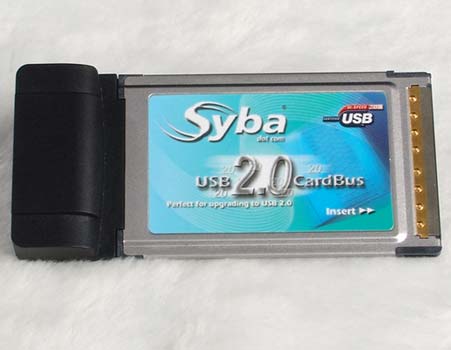
The card has two integrated USB 2.0 ports.
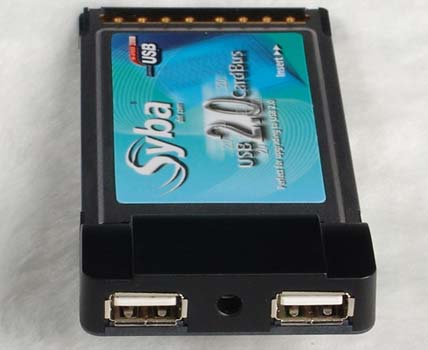
I plugged a variety of different devices into both USB 2.0 ports and Windows
XP was able to consistently connect to all of them, both 1.1 and 2.0 version
devices.
My speed testing yielded somewhat inconsistent results. The Syba card does
not seem to provide a consistent write performance increase (e.g., copying files
from the laptop to an external hard drive). I mainly use USB 2.0 to copy picture
files from my camera’s memory cards or my external hard drive over to my laptop.
At home on my desktop I frequently have other uses for USB, but on the road I
have not needed use USB to out put files from the laptop. This limitation does
not really bother me.
The card does provide a very significant increase over USB 1.1 when it comes
to transferring external data into my laptop – but it does not quite equal the
speed of the USB 2.0 ports integrated into my desktop at home. For example, I
can copy 4.4 GB of pictures files from my external hard drive onto my desktop in
6:30. This same copy takes 16:30 from my external hard drive using the Syba card
and my laptop.
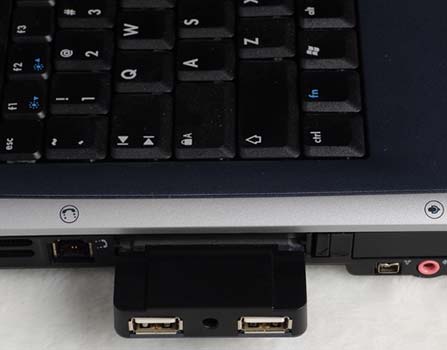
Some or all of this decrease in performance might be attributed to the slower
hard drive in my laptop as compared to the high speed 160GB Maxtor hard drive I
recently installed in the desktop. At any rate, it is still a great deal faster
than using the native USB 1.1 ports in my laptop. This same 4.4 GB copy showed
an estimated time for completion of over 2.5 hours in the copy progress dialog
box when I used the same external hard drive cabled to a USB 1.1 port on my
trusty HP Pavillion. I wandered off after about thirty minutes, so that time is
an estimate. Let’s just say that it was a lot faster and I will continue to
carry the Syba card until I can afford a laptop upgrade.
Here is a photo of the card with my
Hotway Hotreader.
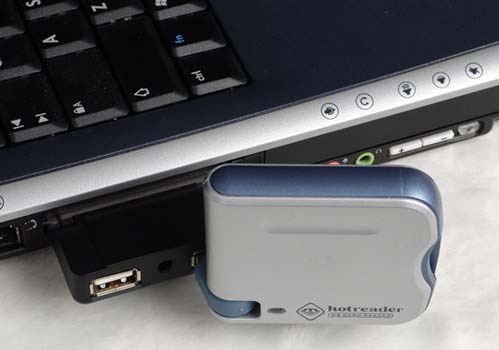
The Syba PCMCIA USB 2.0 CardBus
is available from
Brando Workshop USB page. Brando has recently
added a new card, the ACG PCMCIA USB 2.0 CardBus, as well as another card by the
same manufacturer that provides IEEE 1394 ports. I haven’t had a chance to test
this one yet.
Price: $35
Pros:
Affordable way to add USB 2.0 ports to a laptop
Easy to install and use
Cons:
Inconsistent write performance

2-Pack LED Video Light Kit, NiceVeedi Studio Light, 2800-6500K Dimmable Photography Lighting Kit with Tripod Stand&Phone Holder, 73" Stream Light for Video Recording, Game Streaming, YouTube
(as of June 8, 2026 12:59 GMT -05:00 - More infoProduct prices and availability are accurate as of the date/time indicated and are subject to change. Any price and availability information displayed on [relevant Amazon Site(s), as applicable] at the time of purchase will apply to the purchase of this product.)
ALTSON 60 LED Portable Selfie Light Video Conference Lighting with Clip & Camera Tripod Adapter Rechargeable 2200mAh CRI 97+, 3 Light Modes for Phone iPhone Webcam Laptop Photo Makeup
(as of June 8, 2026 12:59 GMT -05:00 - More infoProduct prices and availability are accurate as of the date/time indicated and are subject to change. Any price and availability information displayed on [relevant Amazon Site(s), as applicable] at the time of purchase will apply to the purchase of this product.)Product Information
| Price: | 35.0 |
| Manufacturer: | Brando |
| Pros: |
|
| Cons: |
|

Gadgeteer Comment Policy - Please read before commenting
Post your comments on the Syba PCMIA USB 2.0 CardBus review.
http://www.the-gadgeteer.com/syba-usbcardbus-review.html
Just click the POST REPLY button on this page.
I have the Syba PCMCIA USB 2.0 CardBus and it freezes my computer when I insert a USB device into it. I’m assuming it’s because it didn’t automatically load the drivers for it? Do i need to be connected to the internet the first time I connect the card, for drivers to load? Or how can I get the drivers? Thanks a lot for your help on this. ([email protected])
– john