
Julie’s comments are in black, Judie’s comments are in italicized blue.
Wristwatch technology sure has come a long way since my first timepiece. When I was a kid, I remember being so proud of my Buffy and Jody watch from the show Family Affair. Remember the twins, Mr. French, Uncle Bill and Sissy? Am I showing my age here? ;o) I learned to tell time on that watch.
I learned how to tell time on a Disney Mickey Mouse watch. Later came Swatch watches, which I would wear in multiples on my arm depending on mood or outfit.
This was way before the assortment of digital watches, GPS watches, two-way radio watches, pager watches, camera watches, MP3 playing watches and USB memory watches that are available today. Heck, back then a cool feature was a sweep second hand and a rotating date display!
Exactly. In the eighties, a complicated watch included an analog chronometer and if you were really stylin’ – dual time zones.
I’ve always had an interest in cool watches. This probably comes from the fact that my Dad always had several nice ones that he kept in a big wooden jewelry chest on top of his dresser. Sometimes when my parents would leave the house, I would take the watches out and admire their dials and buttons. Gadget lust starts early, let that be a lesson folks!
Now that I’m an adult, I am always on the look out for a watch that is both unique and fun. Such examples are the onHand PC watch, Reveal
watch, FitSense watch and Laks Memory watch reviews that I’ve written in the past. That’s why when Judie and I first learned about the Smart Personal Object Technology (known from here on as SPOT) watches in the Spring of 2003, we were both drooling over the prospect of reviewing them. Using FM technology, and a service from Microsoft called MSN Direct, SPOT watches were to have the capability to receive news, stock info, weather, sports scores, etc. And of course, with manufactures such as Fossil and Suunto, they looked really cool too. We were sure they had to be better than the Fossil Palm and Pocket PC watches that we had reviewed together the year before. We were not impressed with them at all. They looked and functioned more like a house arrest device than a wristwatch.
While I am all in favor of a larger watches – there is a major difference between a big cool watch and a watch that looks like you strapped a small PDA to your wrist with a rubber strap.
When we attended the Consumer Electronics Show in January, we had the chance to sit down with Microsoft for a hands on demo. Even though both of us knew that we’d be unable to receive content on the watches while we were home (we both live outside the coverage areas for the MSN Direct service), we found the nearest Fossil store, plunked down some cash and each purchased one of the 5 available watches.
Now I can already hear some of you asking "why would you would pay good money for a watch that doesn’t receive content where you live?" Well, the fact is that these watches are pretty cool as multi-function watches in and of themselves. I like the watch I chose based on the way it looks and the regular features it offers. If you add in the fact that it also receives content when I travel to a city with service, then it’s like getting a nice travel amenity. That’s not to say that I don’t fervently wish that I received service in my hometown, but I digress…
Before we talk about the individual watches and their features, let’s explain exactly what you get with the MSN Direct service subscription. For $9.95/mo. (you get the first month free) or $59.00/yr., you will receive personalized channels consisting of news, weather, stock info, new watch faces and instant messages that are delivered right to your watch. Right now, coverage exists for major cities in the US and Canada.
After you purchase a watch and sign up for the service, you have to set up your account info on the MSN Direct website.
By the way, you can have two watches on one account. So, if you like the style of more than one watch, you won’t have to buy two separate subscriptions. Both watches will receive the exact same content though.
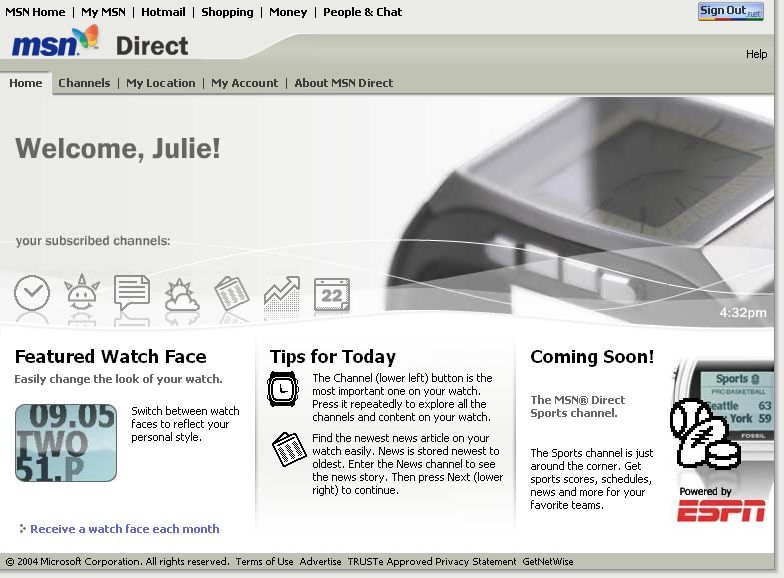
Once you sign up for the service, you can customize the channels that you want to display on the watch in Glance mode. While in this mode, content is constantly displaying and rotating on the watch face.
This is a great way to flip between content without actually laying a hand on the watch. When you see something flash by that interests you, you can stop the screen and get more information.

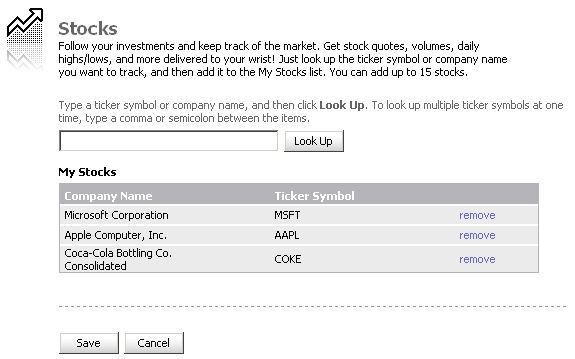
The various channels have preferences that can be set. For example, you can add up to 15 of your favorite stocks to the Stocks channel. Your watch will receive quotes every 15-20 minutes. Be aware though, not all stock tickers are available for tracking. I found this out when I tried to add Cummins, Inc. (my day job) to the channel. Cummins is a Fortune 500 company, but wouldn’t show up when I would try to do a look up on MSN Direct. I finally found out that currently there is support for about 1000 tickers from the major North American markets (both the US and Canada). The 1000 stocks were chosen based on a statistical analysis of the best parallel data that Microsoft had access to: the stocks that users tracked on My MSN and on Microsoft MoneyCentral. More tickers will be added as requests accumulate.
Here are the Stock screens you see on your watch.

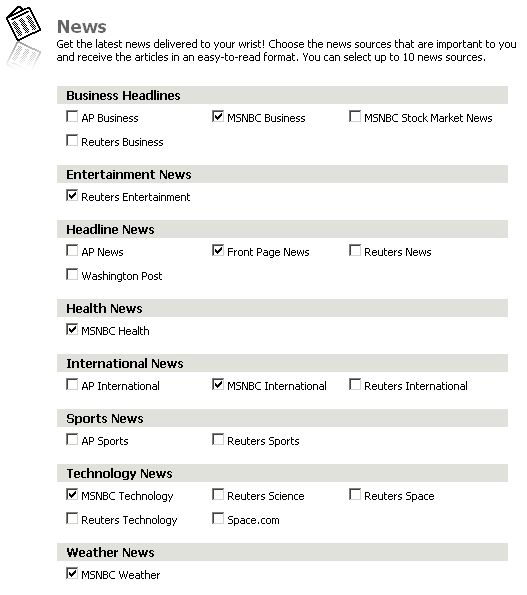
For the News channel, there is a nice selection of topics and sources. You can select up to 10 different news sources at a time.
It’s very cool to watch local and national news flashes as they appear. If you are cut off from a cell phone or TV for much of the day, this is a great way to see what is going on.
When news comes in, it looks like this:

If you want to keep track of local and remote weather, you can do that in the Weather Channel. Besides temperature info, you can also opt to display UV Index, Humidity, Wind Chill, Sunrise/Sunset times and Barometric Pressure. It’s like having a weatherman tied to your wrist all the time. Or, you can just look outside your window to see the conditions ;o)
Looking out the window isn’t the same as having a weather station attached to your wrist, though.
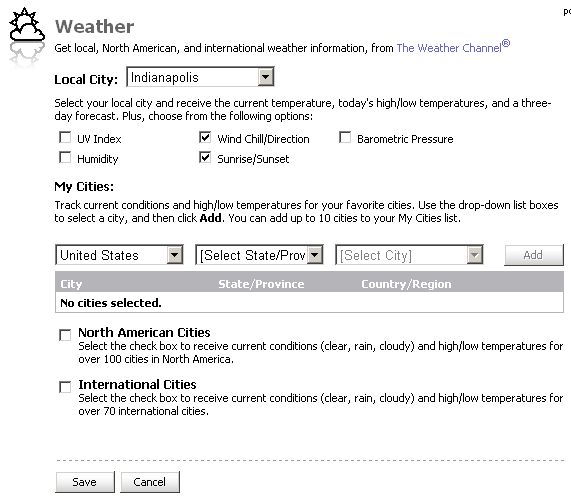
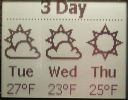
Glance at your watch to see what the current temp is.


Besides Stocks, News and Weather, you can also receive instant messages to the watch from users of MSN Messenger 6.0 or later. Now when you are away from your desktop, the user can click the Actions pull-down menu and select Send a Message to a MSN Direct Watch. If your buddies have a SPOT watch, and have enabled users to send messages to their watch, they will show up in a list that you can click on to IM. Going through MSN is the only way to IM a SPOT watch. It would be great if there was an email address associated with each watch, so that you could just send a quick email instead. Not everyone uses MSN Messenger contrary to what Microsoft might want to think ;o) Receiving IMs to the watch won’t be instantaneous, so it is important not to use this feature as a way to contact someone in an emergency.
It’s a great day to send friendly messages and brighten someone’s day…not that I would know, since it won’t work here in San Angelo!
We should mention that the Mac version of MSN Messenger does not have this feature yet. So Mac users can’t send IM’s to watches, but they can receive them from Windows Messenger users.
You can also download a special plug-in for Outlook that will sync your appointments to your SPOT watch. After you install the plug-in, you’ll see the
addition of a little clock on the Outlook toolbar.
You can use the button to manually sync the appointments, or set things up to automatically sync whenever new appointments are added. The appointments come over with alarms intact, so it’s a great way to keep you on time when you might not have your PDA with you.

I had a little trouble getting the appointment times to work when I first started using this feature. All my appointments had start times that were set 5 hours before they were supposed to be. It seems that there is a bug with users that do not observe daylight savings time. I live in Indiana, where we don’t change times in April or October. Once I switched my time zone to EST without daylight savings, my appointment times synced correctly.
Living in the middle of nowhere (at least in Microsoft’s eyes), I have not even been able to play with this feature.
Here is another area where Mac users are left out in the cold. This is a Windows only plug-in.
Sports fans will be happy to learn that soon there will be a Sports channel available. Scores, schedules and team news content will be delivered to your watch. I can hardly wait! Not! ;o)
I think it would be a good way to get people who think that they have to watch "the game" out of the house. Of course, those people probably are the same ones who have to see every play and wouldn’t forgive themselves if they missed a particular score, foul, or wreck. Maybe this isn’t such a useful feature after-all. ;0)
Of course, all these content options are just hunky dory if you happen to be in one of the coverage areas for the MSN Direct service… but when Judie and I purchased these watches we were sure that we wouldn’t be. Well, guess what? One of us was wrong… I happened to be the lucky one. My watch does receive content… well, at least it does when I’m at home. It doesn’t receive anything when I’m at work during the day though, which is generally the only time I really wear a watch anyway.
This seems totally backwards to me, since Julie lives in the middle of nowhere and works in a medium sized city.
The reason why I decided to go ahead and buy the watch anyway was because I knew that regardless to the fact that I would or would not have coverage, that it would always work as a watch, that it had different faces that I could choose from, including a dual time zone face. Although I don’t travel more than 4-5 times a year, when I do, I want a watch that shows the time zone at home, and the time zone for the location that I’m currently in. All of the SPOT watches have at least one dual time zone face.
Speaking of timekeeping in general, it’s important to note that MSN Direct uses an atomic clock to accurately sync the time. So, you do not need to set the time manually as the watch will automatically receive the correct time and remain accurate. Even better is the fact that when you travel to another time zone, your watch will update to the correct local time, as long as you are within an MSN Direct coverage area. However, if you are outside the coverage area, you can set the time manually. I should also mention that for those of you that like to set your watches a little fast, there is a time offset feature that allows you to add 5, 10, or up to 15 minutes to the current time.
Performing strictly as a watch only, SPOT watches have most of the common features that people come to expect in a watch. They have a chronometer, timer, and an alarm feature. But they are unique because they each have over 5 faces that you can choose from to customize the watch. Is this feature enough to justify the price though?
Probably not, for the average consumer because there are plenty of less expensive watches that can perform the same functions.
One thing that most people who get Spot Watches won’t be used to is having to charge their watches. Depending on the settings you have chosen for your watch, how much content you are receiving and whether or not your radio is even turned on ( in my case), then you will have to charge your watch every two to three days. There are some people that will not have any problem with slipping their Fossil watch onto the charging stand or attaching their Suunto watch to the charging cable every night before bed. But if you are one of those that likes to sleep with your watch on your wrist, then you will have issues. If you go out of town and forget to pack your charger, then after a couple of days you will be stuck with a dead watch. This is not a watch to pack when you are going to a place without electricity for more than a day or so.
When the battery is low, the watch face will switch to something like this:
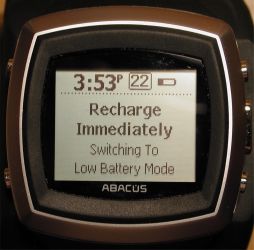
As far as overall reliability, I’ve read that these watches are susceptible to static zap problems, where they will totally freeze and require rebooting. So far, this has yet to happen to me, which is strange since during the winter I’ve been know as a human defibrillator.
I have read that this is mostly a problem with the Abacus branded watch. I haven’t had any problem with my watch though – thank goodness.
I’ve yet to notice any problems with any of the 3 watches that I’ve been testing in the last month or so. As long as I remember to keep them charged, they seem to take a licking and have kept on ticking. Sorry, I couldn’t resist.
There are always areas for improvement, but some of the features I would like to see added would be more faces that incorporate the time with the date. I have found on my watch that the seconds and date can be shown on many of the faces by pressing the middle right button. The face will always revert back to showing just the time, though. This can be especially annoying if you are trying to use the seconds feature to time something. Of course, you can always switch to the timer function if you need an reliable second counter.
In my opinion, a major oversight is the lack of Contacts list and Tasks list. If the Outlook plug-in can copy your appointments to the watch, then they really should have included addresses and to-dos as well. I know some people might have huge address books, but even if you gave the user the ability to chose 25-50 most important numbers, having them on your wrist would be very convenient.
It’s great that new faces download ever so often, but what if you happen to get a downloaded face that you fall in love with? Then you had better quit looking at the new ones as they come in because you only get to keep one downloaded face on your watch at a time. This is something I think should be addressed – surely it wouldn’t take much more memory to allow keeping just one or two more faces at a time.
We’ve been hearing a lot of comments about these watches since they became available. There seem to be two camps: those who love them, and those that hate them. For me, I find the watches to be more of a novelty than anything. That’s probably because the information on mine isn’t updated throughout the day. But even if it was, I’m not sure I’d find the info all that useful since I’m in front of a computer all day long. So MSNBC, Weather.com and other news sites are only a mouse click away. The only time I’ve been finding myself actually reading the content is when I’m supposed to be paying attention in a meeting. So, is the total cost of a watch plus the subscription ($188 – $358) worth it to me? Not really. Am I sorry that I bought the watch and the yearly subscription? No. I still like the watch a lot, but other than the nifty dual time feature, it isn’t really giving me any info that isn’t readily available to me via other methods. I think this watch and the service are more suited to a person that travels regularly or away from a computer. What do you think Judie?
Well, without the SPOT features, I would have been happier paying something in the $120-$150 range for my Dick Tracy watch, but since it is a fun watch in and of itself I am okay with what it cost. If I could get SPOT services here in San Angelo, then I wouldn’t even think twice about the cost. I like getting instant content delivered to my wrist…but it’s not like I have had that privilege since we left Las Vegas. :0/
Me too in a way…
As of this writing, there are only 5 SPOT watch models available. Although they vary in style and price, they all have generally the same features. Here is info about each one.
Abacus Wrist Net Round $129
This is the least expensive of the 5 watch models. Made by Fossil for the Abacus brand name, the Net Round also has the plainest styling of the group. The watch has all the features of the other Fossil watches and is able to display content from all the channels. So basically, the only difference between this watch and the others is the style.
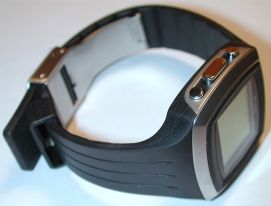
The Net Round has 12 built in watch faces. Here they are:
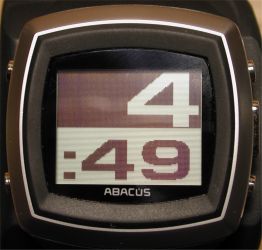
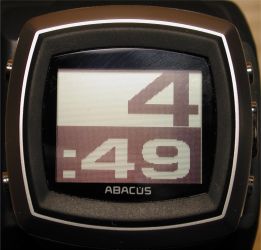
Large digital and Large digital inverted.
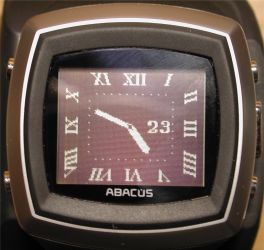
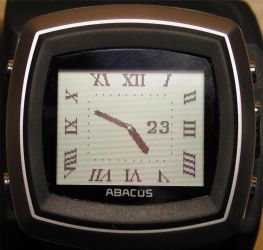
Roman numeral and Roman numeral inverted. Shows current date. Pressing the right middle button will bring up a sweep second hand. This second hand only stays on the display until it reaches the 0 second position.
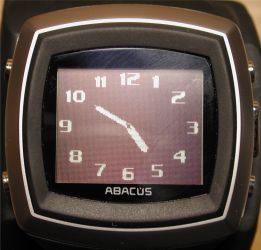
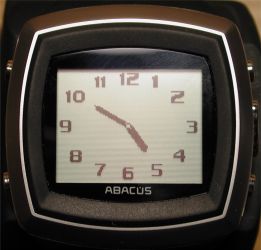
Analog and Analog inverted. Pressing the right middle button will bring up a box in the middle of the display with the date and seconds. This box only stays on the display until it reaches the 0 second position.
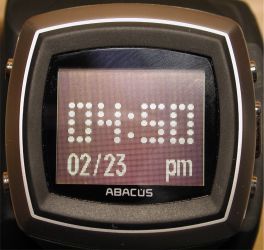
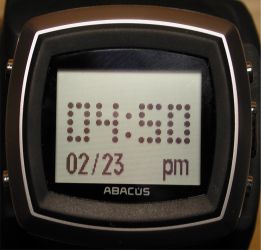
Digital and Digital inverted. Shows date, and is animated. When minute changes, the segments that make up the old minute falls to the bottom of the display while the new minute floats down from the top of the display.
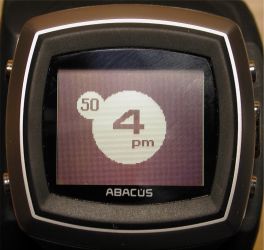
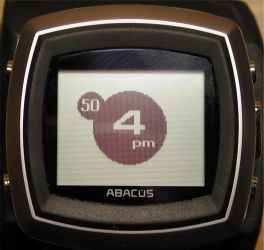
Circle and Circle inverted. Current minute slowly rotates around the hour circle.
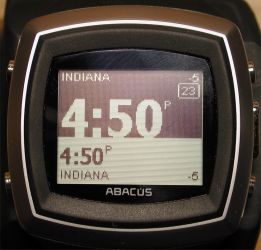
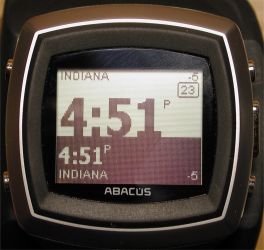
Dual time zone and Dual time zone inverted.
Like the other Fossil watches, the Abacus has the same non-removable hard rubber wrist band and induction charger stand.
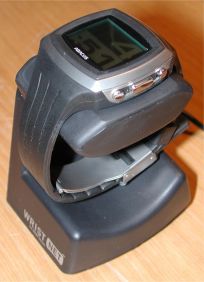
I really wasn’t interested in this particular model when I first saw the different watches. After having one for awhile, I’d have to say that the simple
style has grown on me. The watch feels smaller than the others, and does not draw as many stares. Which for some people can be a good thing ;o)
Pros:
Least expensive model
Cons:
None of the watch faces have a permanent seconds display
Fossil Wrist Net Dick Tracy $199
Okay, if for no other reason that that this was the exact watch I had wanted since I was a kid, I had to have the Dick Tracy model. The kid in me was pleased that the faces actually incorporated some of the characters from the comic strip. For times when I need to be more "grown up," there are also some less cartoonish designs. Almost every face animates in some way when the middle right button is pressed, here is a quick run down of your choices…
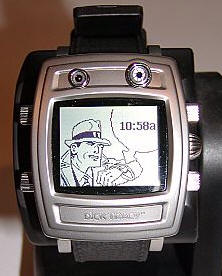
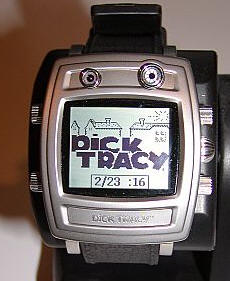
The basic Dick Tracey face shows our hero checking out his very own wrist communicator. I wonder if the image he is looking at is of Dick looking at a
picture of himself looking into his own watch, and so on. When you press the middle right button, animation appears in the form of a Dick Tracy landscape with the date and seconds
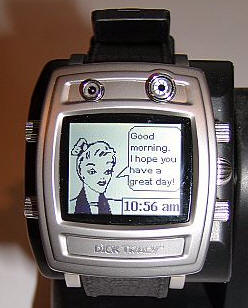
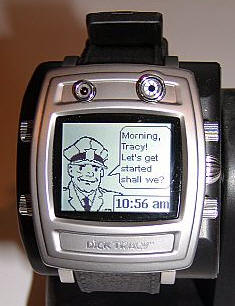
Pressing the bottom left button reveals Breathless Mahoney and a series animated captions including, to quote a few, "I am so glad you solved the case," and "It’s about time you married me, Dick Tracey" ECK. I don’t ever use this face. Pressing the middle right button while in this face does not reveal the date and seconds, instead, it shows various other characters with cartoonish bubbles filled with captions these characters would supposedly say.
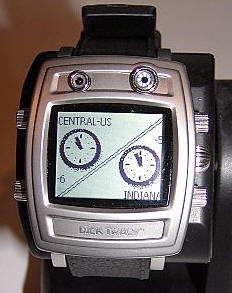
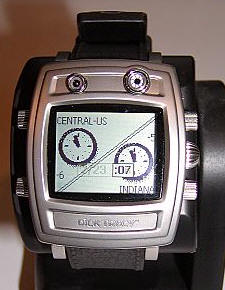
Pressing the bottom right button again reveals a dual time zone watch. Pressing the middle right button shows the date and seconds.
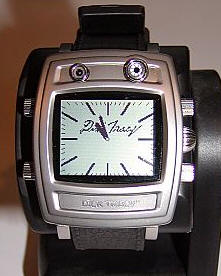
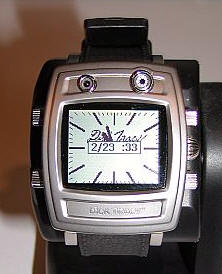
Another bottom left button press reveals an analog style face which shows the date and seconds when the middle right button is pressed.
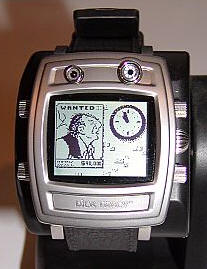
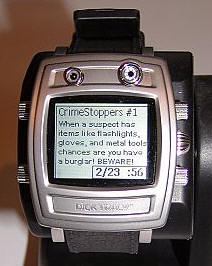
The last face is a series of "Wanted" posters tacked to the station house’s wall that show a variety of villains. A small round analog style clock is hanging on this wall, and when the middle right button is pressed a series of Crime Stopper’s tips will appear.
In all honestly, I almost always have my watch on either the Dick Tracy face or the larger analog dial.
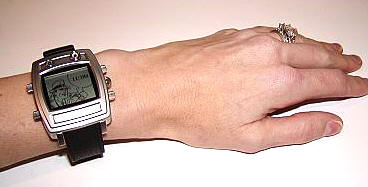
The five buttons on the Dick Tracy work as follows: the top left activates the screen light, the bottom left opens up the menu to allow changing to the various faces or screen choices. The top right and bottom right buttons work like an up and down scroll, and the middle right button functions as a select button. You can always get back to the main watch face by holding the bottom left button down for a couple of seconds.
The watch itself is a little bit on the larger side. Measuring 1.9" (4.7cm) tall by 1.5′ (3.9cm) wide by 0.6 (1.7cm) and weighing 3 ounces (85g), it is a faithful recreation of the watch I remember from the comic strip. The only differences being that this one doesn’t actually allow you to use it like a video-phone. Perhaps in the next version…
The case is composed of a matte metallic silver accented with black plastic. The slightly textured rubber wrist band is
fashioned to simulate stitched leather, and while it doesn’t look bad – it certainly doesn’t look or feel like leather.
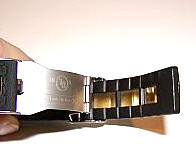
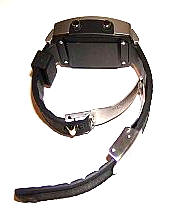
The SPOT antenna runs through the rubber of the strap, and it is only able to work when the deployment clasp is shut tight. The placement of the antenna in the strap rules out being able to switch the band out for a leather version, but hopefully in the future one might be offered.
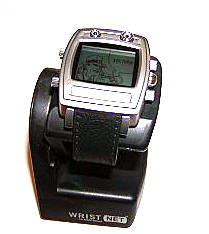
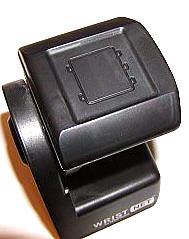
The watch uses inductive charging by being placed on a stand. The top of the stand is marked with a diagram of the Dick Tracy watch face showing the two buttons on the left side and three on the right. Keeping this in mind will stop you from putting the watch on the stand facing the wrong direction. If you like to keep your wristwatch nearby while sleeping, you can keep the stand on your bedside table.
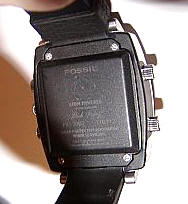
The back of the watch bears the legend, "Atom Powered" with Dick’s signature and the caution to "Wear protective equipment when servicing." Fun. ☺
I really like the Dick Tracy model, and even if it weren’t a SPOT watch, I would have bought it. I think it is a fun alternative to some of my dressier pieces, and it is an overall great everyday watch. Add the SPOT services to the mix, and it is a truly fun gadget. It makes me laugh that when I first got this watch people were speculating that this would be the least popular of the styles. I suppose that is why the Dick Tracy model sold out so quickly and also why this was the watch chosen for the cheesy Spike Lee MSN Direct Video (not that I hold it against the watch). Evidently lots of people have either a sense of humor or a sense of nostalgia about this time piece.
Pros:
Fun style with nostalgic appeal
Water resistant
Charge lasts approximately 3-4 days
Cons:
Expensive
Can’t take it swimming
Can’t travel for extended periods without bringing charger
Warranty is only for 90 days, vs. Suunto’s 2 years (!!!)
This is one of the watches that neither Judie or I had the chance to test. I was under the impression that it was the same as the Abacus, and was confused as to the price difference. Upon closer inspection of the pictures, I do see that it has different button shapes and styling. Other than that, I’m really unsure of any other differences.
This is the watch that I purchased for myself when Judie and I were in Las Vegas. Although the size is quite large (I’ve had some of my co-workers refer to the watch as Julie’s widescreen TV), it feels comfortable on my small wrist.
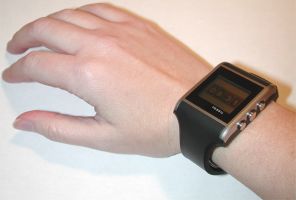
Like the other Fossil watches, the antenna for the radio is enclosed in the hard rubber wristband. Adjusting the band is not the easiest job. Judie and I were lucky in that the sales person at the Fossil store did that for us.
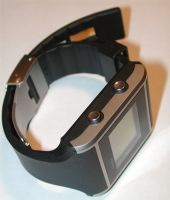
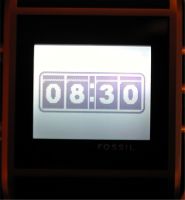
The Net Square has a large flat display which is VERY easy to see in almost any lighting condition. The display is similar to a mono Palm display. The
background is grey, while the info is black. The backlight which is very bright, stays on for 10 seconds, when the top right button is pressed.
Speaking of the buttons, like all of the Spot watches, there are 5. Three on one side, and 2 on the other. I was worried that the buttons were going to be too stiff when I initially started using the watch. Luckily, they have loosened up quite a bit in the last month.
Navigating through the various screens takes a bit of practice, but once you figure out which button does what, it’s a no brainer.
There are 16 different watch faces built into the Net Square, more than any other model so far. That’s not including the downloadable face. I wish there was more of a mixture of digital and analog style faces, but there are more analog than digital. I really like the dual time zone face and the slot machine style faces best. Here is a look at all of the built-in faces.
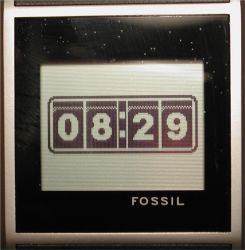
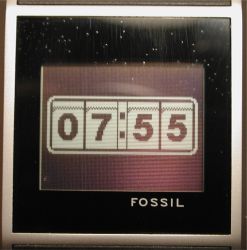
Jackpot style faces. Numbers roll when time changes.
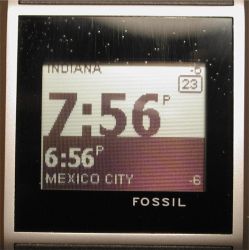
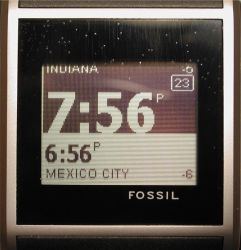
Dual time zone faces.
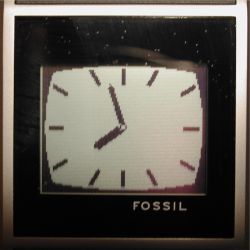
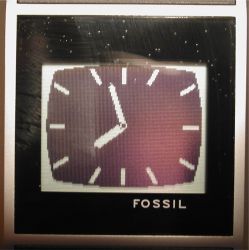
Analog faces.
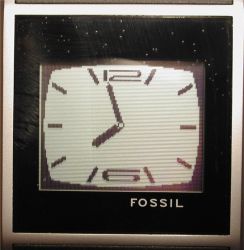
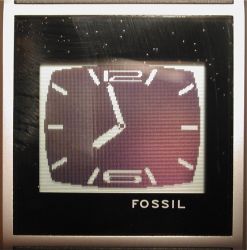
More analog faces.
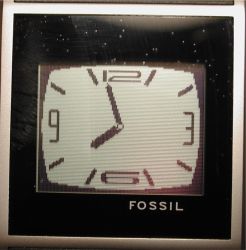
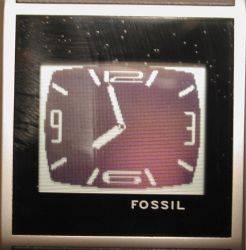
Even more analog faces.
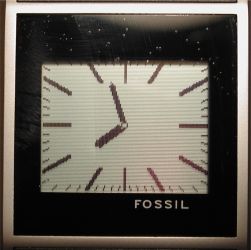
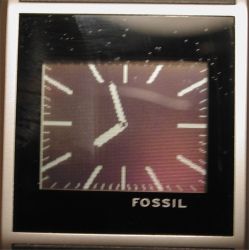
Guess what? More analog faces.
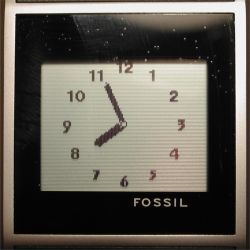
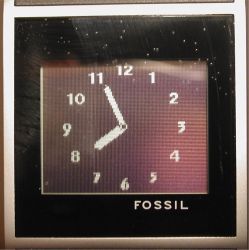
Are you sick of analog faces yet?
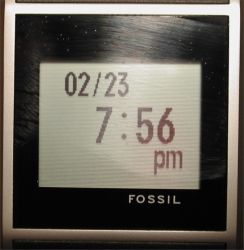
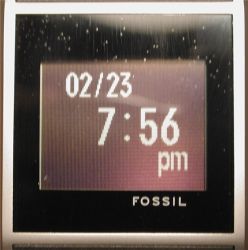
Digital faces that fuzz out like a bad TV when the time changes.
This watch also uses the inductive charging station. It’s really pretty cool that it can charge the battery just by setting the watch in on the base. You don’t have to press the watch into the dock, you just slip it on the pedestal.
Pros:
Nice unisex design
Bright display
16 different watch faces
Cons:
Might be too large for some people
Wristband hard to adjust
The N3 is the most expensive of the 5 SPOT watches. To me it has a more masculine sporty style to it.
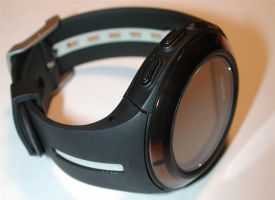
Instead of having the antenna in the wristband like the Fossil watches, it is around the scratch resistant crystal. This allows you to change out the band if you like.
The watch has only 5 built-in faces.
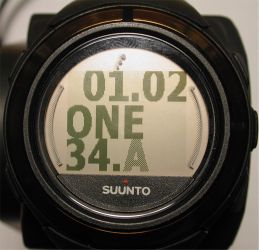
This is the current free downloadable face that went out to all SPOT watches.
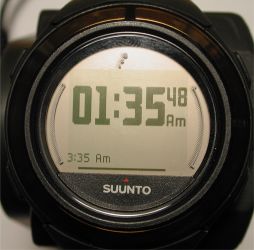
Dual time zone face with seconds.
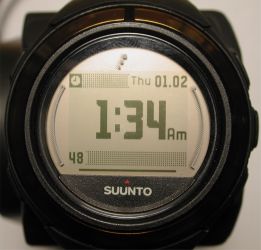
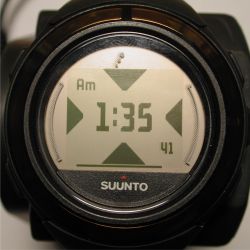
Two faces with seconds display.
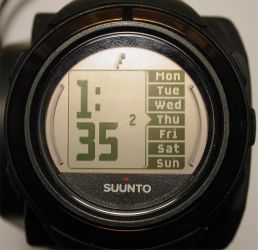
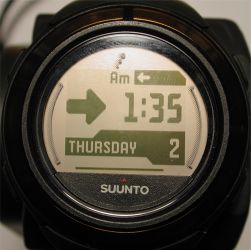
Two faces with date display.
Like the other watches, this one also has 5 buttons. The buttons are easier to press though and have good tactile feedback.
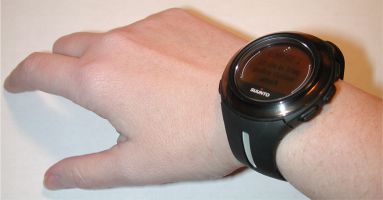
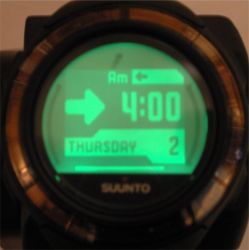
The display isn’t quite as bright as the Fossil watches. It has more of an amber cast to the background. The backlight is also inverted, which I don’t
really care for as it is hard to see unless you are in a really dark environment.
Some other differences between this watch and the others is the fact that it is water resistant to up to 330ft / 100m. The other watches are just splash resistant.
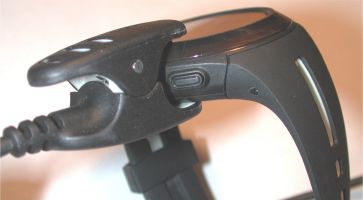
The Suunto also has a longer battery life. Instead of 2-5 days for the Fossils, it has 5-7 days. Charging the battery can be done through the included AC adapter, or through USB. The special grip connector cable has a USB connector on one end. You can either plug it into your PC, or into the AC adapter. This makes the Suunto much more convenient to travel with. You won’t need to pack the bulky inductive charging dock.
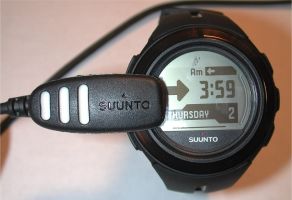
As far as time features, the N3 has 3 programmable daily alarms instead of just 2. It also has an interval timer and stopwatch with lap and split times.
At $300, I’m not sure the differences justify the price difference…
Pros:
Easily adjustable and replaceable wrist band
2yr warranty
Longer battery life
Water resistant
Cons:
Expensive
Only 5 built-in watch faces

ESR for MagSafe Wallet, 5 Card Holder with RFID Blocking, MagSafe Sticker Included, Slim Magnetic Wallet for iPhone 17e/17/16/15/14/13/12 Series and Selected Samsung Devices, Not for 13/12 Mini, Black
(as of June 8, 2026 18:53 GMT -05:00 - More infoProduct prices and availability are accurate as of the date/time indicated and are subject to change. Any price and availability information displayed on [relevant Amazon Site(s), as applicable] at the time of purchase will apply to the purchase of this product.)
KRTALS Stronger Magnetic RFID Leather Mag-Safe Card Holder for iPhone 16 Series, Mag-Safe Accessories Stick on Series of iPhone 17/16/15/14/13/12 and Pro/Promax, Black
(as of June 8, 2026 16:42 GMT -05:00 - More infoProduct prices and availability are accurate as of the date/time indicated and are subject to change. Any price and availability information displayed on [relevant Amazon Site(s), as applicable] at the time of purchase will apply to the purchase of this product.)Product Information
| Price: | |
| Manufacturer: | Fossil |

Gadgeteer Comment Policy - Please read before commenting
Post your comments here on the SPOT Watch Review.
http://www.the-gadgeteer.com/spot-watches-review.html
Just click the POST REPLY button on this page.
Hmmm, I learned on a Captain Crunch watch….which is was a real horrible watch to learn on…the minute hand was curved at the end…so do you go by where it most of the hand was pointed at or where the tip is kind of at?
While, I’m into gadgets of all kinds….I’m into mechanical watches….though they can cram into self-winding mechanical watches to neat they are to me.
I just find that with digital watches being so common…it is much more gadget like to have a non-digital watch that does lots 😎
The Dreamer.
I am actually a watch freak, but I’ve said it before, and I’ll say it again; somebody please shake me back to sense if I ever purchase a watch that needs to be recharged every few days!
And yet… I cam about this close to buying one a few weeks ago, when I discovered that I live and commute through and work in a coverage hole; my house is about 3 miles from the edge of coverage, work about 10.
I also have a pager that has a news update feature that has far better coverage than MSN Direct, and I only have to replace the battery once a month, so I think I’ll stick with that.
Like Judie said in the review, if you don’t wear your watch to bed, it’s not a big deal to just set it on the charger instead of setting it on the nightstand. Seriously, there is no plugging in involved at all. The only time the charging aspect would bother me is when I travel. I would have to pack the charger…
I don’t like wearing any watch to bed, so that would not be an issue with me. Strangely enough, my current watch was given to me as a gift by a close friend along with two pairs of socks. Up until then I had never had a watch last more than a year. I was fully expecting the socks to outlast the watch, but here I am replacing the battery for the second time in 15 years. Even more amazing is that I still have one pair of the socks. (Thanks Vicki, you know who you are! )
:love:
Back on topic, the charging would not be an issue, as I already charge my PDA nightly (well, most of the time even though it does not really need it). What would be an issue is duplication of services. All my info is already on my PDA which I am never without (except at Cedar Pointe), and my pager can get updates even in my underground office. Still, it’s a cool concept.
Well I’ve had one of these watches for a few weeks now (started with the Abacus and ended up returning it for the Suunto because I wanted something more water resistent.) The novelty of the service has kind faded for me. The biggest problem for me is the way the stories are delivered. They’re just not detailed enough. Sometimes a news flash is only one sentence and it’s not enough to get even the smallest gist of the story. I realize the content has to be limited but it’s almost not worth it at all.
I had a watch just like this a year or so ago.
It was called the Timex Internet Messenger. You could send stocks, news clips, daily weather reports, and messages to it. The time synced automatically (my favorite feature).
And the battery lasted for 2 *MONTHS* a pop. Oh yeah, and it was water resistant.
It wasn’t as flashy, but it was only $49 with a year’s service free and you got your own 1-800 number from SkyTel.
Still, how much are you willing to pay for something so gimmicky in the first place? Do you really want to read the New York Times on your wrist?
These watches are a showcase of interesting technology, nothing more….
😮
I just went to my local computer store and saw a whole assortment of these “things”. The screen is too small to pack much information – all that scrolling!, I wouldn’t remember what had passed 15 seconds before. But the real drawback is this: if you wear long-sleeved shirts, you will quickly ruin your cuffs, and personally I think they are all pretty awful looking. Philippe Radley
Sounds like the AvantGo version of USA Today!
Excellent review as always, ladies!
I’ve had my Fossil Square for about a month now, and so far I love it. Yes, the news snippets can be inscrutable at times, but for the most part they are more than enough to keep me abreast of events in the world, and if there is something on my wrist that bears further scrutiny, I can always look it up online later – something that I might not otherwise think to do. Ultimately, though, I find the weather reports and Outlook syncing are the most useful features, and I have come to rely on them in a way that I didn’t think would be possible given that I own a WiFi enabled PDA. Yes, folks, there are times when it’s inconvienient or unacceptable to carry/check my PDA, or go through the cumbersome and laborious (and expensive) process of looking up information on my cellphone. As for the messaging function, until it’s opened up to include Yahoo and AIM, it’s little more than a novelty. I don’t know a single person who uses MSN Messenger. The news alerts are handy, though. The stock feature is nice, though with a 15-minute delay, you won’t be doing any day trading with this device. Still, the week-long activity chart is a nice resource to have handy.
Is there room for improvement? Of course there is. This is v1.0, so a few bugs are to be expected. But, for the most part, these devices work as advertised. Sure, longer battery life would be nice, but I can go four to five days on a single charge, which is more than enough for a long weekend at my countryhouse. And c’mon, how hard is it to place the watch on the charging stand at night? Personally, I don’t sleep with my watch on my wrist, so this is a non-issue for me. Interestingly enough, I have a rotator for my automatic watches that is far more “labor-intensive” when it comes to mounting my timepieces.
From an aesthetic perspective, it really is a matter of taste. Personally, I love the look of the Square, and judging from the comments I receive regarding the watch on an almost daily basis, quite a few others seem to agree with me. I have actually received more compliments on my Square than I have on my Rolex, Omegas, Doxa, or even my negative-display Phillipe Starck (a digital “fashion” watch from Fossil that most closely resembles my Square). I won’t deny that it’s large, however, which is a shame since more than a few women have said that they would purchase this watch if it were sized for their wrists.
In the end, this technology isn’t for everyone, but if you’re an avowed gadget-freak, they do make for a nice adjunct to your PDA. Also, we can look forward to real-time sports scores, customized traffic reports and movie times in the near future. As more “channels” are added, the value of this service will increase considerably.
Just my $0.02
– Adam
PS – It does help to live within a solid coverage area. 😉
PPS – As for the late and lamented MessengerWatch – I had one of those too. IMO, there really is no comparison between the two
I love technology and consider myself a true gadget hound. But I have to say that the size of the watches are truly ridiculous!
On a large person these things look huge, on you ladies they look like the proverbial ball and chain 😀 I mean these things are cruel and unusual punishment.
Judie with your great fashion sense I can’t believe you would be caught dead wearing one of these!
Looks aside the described functionality is very limited, perhaps down the road when there are more services, better coverage, and a more manageable size, it would be worth looking into.
Thanks for another great review!
Thanks, I think! 😉
But remember – clunky watches are in style – as long as they look cool. I think the Dick Tracy watch looks cool – and since it occasionally garners compliments, I guess it looks cute on me.
Judie :0)
http://www.pocketpcthoughts.com/articles.php?action=expand,24932&sid=320cda5e272f5678147f54c9e88165fb
This is probably the most exhaustive review I’ve seen on Spot technology.
Yes, I meant it as a compliment 😎
Julie, I noticed you got rid of yours right away on Ebay, not quite right for you? Care to comment?
Julie sold two of the three models she had…so she still has the original one she bought with me in Las Vegas…unless she sold it while I was away on vacation…hmmmm, I’ll have to look. 😉
I still have the one I bought in Vegas. I sold the others because I don’t need 3 SPOT watches 😉
I watched ‘Family Affair’ all the time. Grin.
As far as learning to tell time, I was hideously behind everyone else. It didn’t come easily for me. Sigh.
Anyway, in the review, Judie says, “…there are plenty of less expensive watches that can perform the same functions.”
Would you mind naming a few names?
By the way, I want an atomic watch, but their looks throw me off. I happen to like Timex watches that offer Indiglo light. I have two of them. I’d like a Timex atomic watch with Indiglo, but haven’t found any yet. Am I missing something?
Craig,
I was referring to Julie’s previous sentence when she mentioned the watch’s chronometer, timer, and alarm features. She then asked if the added faces would justify buying the watch if you didn’t have access to the SPOT features and the watch was performing “strictly as a watch only,” which is what I was replying to. Sorry if I wasn’t more clear.
Judie :0)
Thanks, Judie.
I’ve have a Abacus Wrist Net watch which I purchased new on Ebay for $110 about 3 weeks ago. I’d like to add my comments since I also had a Beepwear watch. Overall I like the watch. The new messages are much better than on beepwear. They are more informative since I believe they are longer and much easier to read since they fill up lines instead of just scroll along the bottom like on the Beepwear.
What seems to be really good is that it seems like you never miss a message. The service must be constantly be broadcasting your message for a quite a few hours and ignores the message if already recieved or grabs it if not. I have not missed a message yet of the 12 or so I have sent myself!! Quite surprised to discover this. However the messages are much slower to be recieved than the beepwear. They seem to take from 5 or 10 minutes to one which took 7 hours probably because my watch was sitting out of range. I would say the average is something like 15 minutes, but it varies greatly. With beepwear in 2 to 10 minutes you either rec’d your message or you never did at all.
The special alert news messages are good. You get about 2-4 per week. Not too many or too few. The watch band is terrible as many others have described. I am mechanically inclined so I had no trouble adjusting it initially but I find it very uncomfortable to wear (too stiff) and time consuming to put on since you have to tuck the extra end under a plastic loop.
I had the watch reset twice, where it went balnk and lost all data and started at 12:00 again. Took about 1/2 hour to get the time to reset itself again and all my settings done on the watch were gone. Don’t know what that was all about.
I am having some reception problems, especially in my house. Sometimes it doesn’t seem to work at all and other times it works perfectly even if I have the watch in the same location. Nice that it has a diplay that shows signal strength although a pain to access to display.
It seems such a simple idea to have different watch faces but I really haven’t seen it done before and the Beepwear didn’t do that, so I have to really give them credit for it. However quite a bit of the software operation leaves a few things to be desired. Hopefully it will be updated in future versions. I am kind of disappointed that you can’t connect this watch directly to your computer. I’m sure if you could, and MS allowed you to update it, people would make all kinds of programs to increase useability just like on the Palm. They’ll have a real winner when and if they do that.
My complaints about the software:
Some of the menu orders are very poor. Under watch settings are listed things which you change only once or not at all like ‘time zone.’ But ‘watch info’ which I use all the time for signal strength and battery life is way down on a scroll list. ‘Watch Info’ should be at the top of the list or even a separate category similar to ‘Settings.’ You should be able to choose a watch face and have it stay there. I am forever pushing buttons to navigate around and end up changing the watch face by mistake. Navigating around could just be easier than it is. When displaying the news headlines you should be able to select whether to browse with just a few words as it is now or to display all that will fit on one screen. You can do that now if you browse backwards but that is a hastle to do if you want to read the whole message. Displaying stocks works well but you should be able to display the listing order (even if you have to select it from the web page). I haven’t tried syncing the calendar feature with outlook. None of the watch faces seem to be able to permanently display seconds.
One final comment-make it three times the watch reset. One time now when I just was picking it up and writing this review. Moving it around doesn’t seem to be the cause since it never has happened when I was wearing it or when pushing the buttons so I am baffled as to whether this is a software or hardware problem. I suspect software. So far I can live with it’s shortcomings.
After looking around the forum at PocketPCThoughts.com I found this comment: My biggest gripe is that the watch would lose connection every other day. It worked at my home one day, then lost connection for the whole next day… then worked again the following day. Sounds like my experience.
And the reviewer had the reset problem I was experiencing. Someone mentioned it as a static problem and that would seem logical to me since it only seemed to happen right after picking it up. I’m going to email Fossil and see what they say.
After looking around the forum at PocketPCThoughts.com I found this comment: My biggest gripe is that the watch would lose connection every other day. It worked at my home one day, then lost connection for the whole next day
Do you know that first Jura watches are far from having been masterpieces. Those of Daniel JeanRichard, very rare today, were “bulky and heavy in appearance; they had, with their engraved brass case, little to seduce collectors ”. But they worked.., . In short, we can say that the Jeanrichard watch is characterized by great robustness and very satisfactory walking qualities, but also by an absence of any artistic cachet, if we compare it to the masterpieces of the great master watchmakers of Geneva by example. And as if Daniel JeanRichard and his first followers rafiqsonsonline(.)com/product-category/rado/ had deliberately decided to leave it to them to delight the aristocratic and foreign clientele that was that of the time, they turned to the clientele of artisans and bourgeois, essentially local or regional, to which were added at most, according to trips as rare as adventurous, some monks from the convents of Franche-Comte.