
Product Requirements:
Device:
Any touch screen device
The Sensa PDA Minx is a cool little pen/stylus combo that has a couple unique features that make it stand
out from other styli. The Minx is available in either Black or Silver and can be found at
StylusCentral.
In 1985, Boyd Willat, of Day Runner fame, made the decision to create a completely ergonomic writing instrument. Ten years later, in 1995,
the SENSA was introduced. Since then, several different SENSA pens have been created
as well as the new PDA Minx.
The body of this pen is made of an aeronautical alloy which was selected for its weight and balance. The pen weighs
.08 oz (23g) and feels great in your hand.
It has a solid feel that I really like. What I like best is that it doesn’t rattle at all.
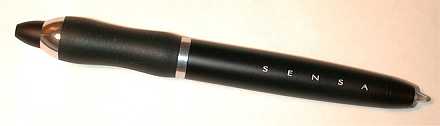
The Minx is thicker and shorter than a typical pen/stylus combo. It also
doesn’t have a clip and as a result, the Minx can just roll off your desk.
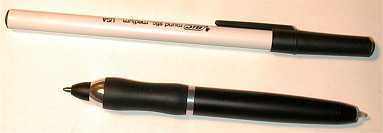
One of the unique features of this pen is the grip. A material called Plasmium is used for the section where your fingers actually hold the pen. This material molds itself to your grip and is very comfortable. Personally, I find it MUCH more comfortable than the
Cross Digital
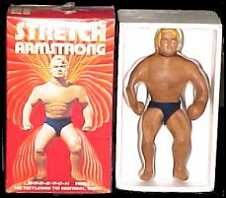
Writer Duo Morph pen with its Morph grip. The Sensa Minx reminds me more of the same material
that was used to make Stretch Arm-Strong dolls. Or for those of you that didn’t grow up in the 70’s,
it feels like the same stuff that those rubber
squeeze stress balls are made of.
According to the Sensa website, this grip reduces the overall stresses normally incurred through writing by over
50%, and I’d have to agree with them.
It really feels great to write with.
When I first received the Minx, it took me forever to figure out how to
extend the ballpoint pen tip. I twisted, pulled and squeezed with no results. I
finally found that you had to turn the very end (stylus tip end) to extend the
tip. The mechanism is smooth and totally quiet. The tip can be extended using
one hand by holding the pen with your pinky and ring finger, while turning the
top with your thumb and index finger.
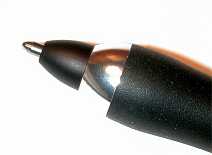
The black ink pen writes very smoothly. And well it should, as it uses the
Fisher Space refill. The ink doesn’t skip or glob.
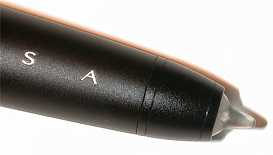
The stylus part of the Minx is made of a high-impact resin – it is actually
almost transparent in color. The tip is quite hard, but it writes smoothly on a
PDA screen. The only thing that I don’t like about the stylus tip is that it is
always exposed. There isn’t a cap to protect it when it is not in use. I also
found that the barrel of the pen tends to overshadow the stylus tip so that it
is somewhat hard to see what you’re writing on the PDA screen. This also might
be because the stylus tip is clear. A solid colored tip might not have this same
problem.
Bottom line, I like the Minx a lot. But, I like it better as a pen than as a
stylus. It works fine as a stylus but I wouldn’t want to use it as my only
stylus.
Price: $39.95
Pros:
Comfortable grip
Balanced
Small size
Smooth ink pen
Cons:
Stylus tip exposed
Rolls off your desk
L39 Ultra Slim UV Protective Filter for Leica Q3 43 Q2 Camera with Moisture-Proof Case & Removal Tool 19 Layers Mulit-Coated UV Ultraviolet Filter 99.3% Light Transmission Water Oil Scratch Resistant
(as of June 8, 2026 23:37 GMT -05:00 - More infoProduct prices and availability are accurate as of the date/time indicated and are subject to change. Any price and availability information displayed on [relevant Amazon Site(s), as applicable] at the time of purchase will apply to the purchase of this product.)
Ruilogod 32" 2-in-1 Light Mulit Collapsible Disc Reflector 80cm Silver Gold
(as of June 8, 2026 18:42 GMT -05:00 - More infoProduct prices and availability are accurate as of the date/time indicated and are subject to change. Any price and availability information displayed on [relevant Amazon Site(s), as applicable] at the time of purchase will apply to the purchase of this product.)Product Information
| Price: | $39.95 |
| Manufacturer: | Sensa |
| Pros: |
|
| Cons: |
|

Gadgeteer Comment Policy - Please read before commenting
One thing to remember when looking at projection screen TVs….
They work a lot like a laptop. Theire viewing area is not from all angles. TVs on display at the stores are usually set higher than they will be in your home. This is done so that they look relatively good while you are walking by.
I had a Sony Vega Tube TV that was replaced with an RCA 61-inch projection…My wife used to lie on the couch and watch TV. With the projection screen, if she does that, the picture becomes darker as she is no longer in the ‘optimal viewable’ area.
However, I do love my TV. You just have to get used to not being able to watch it from the sides. 🙂
Oh, and also, remember to use your convergence (may be named differentl on different TVs) feature once every couple of weeks. Convergence re-aligns the CRTs that make up the full picture restoring the projected image to the proper clarity and color. If you go too long without ‘resetting’ it, your pictures may start to look fuzzy, or ghosted.
RCA says you should only need to do it once every couple months, but if you are picky about your images, you will find yourself doing it every couple weeks to once a month.
Thanks for the tips! I keep wondering that if I end up with the Hitachi, that it will be ‘more’ TV for me than I need. Not in size, but because it is a wide screen, and I watch most of my shows off the network channels. Movies are probably only about 10-15% of my weekly viewing.
Julie:
I have actually been using a widescreen video projector with a 100″ diagonal as my regular TV for the last 6 years…would never trade this one in…:-)
In order to answer your first question: Since the Hotachi uses CRTs and not LCDs or DLPs that require a lamp, it should “behave” like a regular TV as far as lifetime is concerned. Could be that the life of such a highpower CRT is somewhat shorter than the one of a regular CRT in a TV set, but I would not believe that this should be really a dramatical difference. Whereas with the lamps.. (I had a Sony LCD first, and since January I own the wonderful NEC HT1000 DLP projector)…you are entitled for a new lamp every 2000 hors or so…the way I use it this leads to $500 expenses every year…but then…I save a lot on cinema tickets, and expensive colas and popcorn…lol…
re. the screen proportion 4:3 vs 16:9:
If you really prefer, you can always watch in 4:3 mode and then have two black lines at the right and the left. What I do however: I always watch in 16:9 and use the zoom mode, which blows the picture up and cuts off the upper and lower lines. This can be disturbing for subtitles at times…I don’t care…actually the Sony even had a “subtitle” mode: it would squeeze the lower third of the picture in total into the picture so you could see everything, even though distorted.
Whatever: I really feel that 16:9 is a much nicer way of viewing anything. I think the reason is that it corresponds much more to our natural way of viewing..(we see much more left to right content than up/down spread with one glance).
Whatever you decide to do: I hope you will enjoy your new TV…
Andy
That is where it gets dodgy.
Having an HDTV capable television (does the Hitachi COME with a converter, or do you need to buy separately?) can be wonderful…IF you have a way to view HDTV programming.
To watch HDTV you can do it one of three ways (this applies to me in Phoenix, AZ).
One, I can buy an HDTV antenna, which is a lot like a standard TV antenna for over-the-air signal. However, it specifically pulls for HDTV signals. Haven’t tried it, as I cannot mount the antenna properly on my roof to get the best signal. This option also is only effective if you have stations broadcasting OTV HDTV signals. My area has only three out of our eight local stations (CBS, FOX, PBS).
Two, you can opt for the signal to be delivered via cable. In my area Cox Cable has HDTV channels. You must buy a special converter from Cox in order to receive and watch the channels. However, if your TV does not have a built-in HDTV decoder, the Cox box will decode the HDTV signals. If your TV DOES have a built-in decoder, you must still use the Cox box decoder. Go figure. Again, this only provides you with the channels that they actually broadcast in HDTV. In my area that is HBO, Showtime, PBS, Discovery, and our local ABC affiliate.
Three, you can opt for satellite. Downside? You must get an oval dish, which run a bit more, as they have dual LNB (or triple depending on the model). DirecTV requires a triple-LNB oval dish to get all of its HDTV programming. This option requires a built-in or self purchased HDTV decoder. Major downside? As satellite is nationwide they claim to have no plans on offering local channels in HDTV. They currently provide HBO, Showtime, a PPV HDTV channel, and HDNet (http://www.hd.net).
I had DirecTV, so I stayed with them.
The only other benefit is from a progressive scan DVD player (non-progressive scan works too, but doesn’t look as beautiful 🙂 ), as DVDs fill the whole screen and look wonderful.
All widescreen TVs can ‘stretch’ the image to make it will the whole screen…But if you remember older movies where everyone looked super tall and thin (stretched a widescreen movie vertically to fill the black bars), TV shows tend to look squat and fat. Otherwise you watch TV with black (or gray depending on TV model) bars on the left and the right.
Hope that helps. 🙂
I’m not going to do you a favor by telling you this (a true gadget freak like anyone reading this will be in trouble):
Here’s where to get the best expert advice, bar none, on the web or in person, AVS Forum
You’ve been warned – prepare to enter a new realm of obsession.
Randy
Personally I have never been truly impressed with the projection TVs. I have never liked the image as much as a flat screen or a Sony WEGA. Plus, at least in my house, I would have to completely redo my entertainment center, which would be yet another additional expense. Right now I have a 32″ JVC that fills the space quite nicely, and a THX certified Kenwood receiver, along with the CD, DVD, VCR, turntable and tape deck. I have a nice, tasteful entertainment center that would need to be scrapped, plus the projection TV would easily take over the whole wall. Another thing to consider is children. The projection screen is easily damaged by small children who simply don’t realize what they are doing. A friend of mine actually had to put a baby fence around the front of his TV to prevent his 2 yr-old from destroying it. It already got a couple nicks and marker smudges.
I’m undecided as to what I’m going to do. I’ve gone back and forth since the weekend. I was all set to splurge on the Hitachi, but then a few things have made me reconsider:
1. I mainly watch regular network shows like ER, Friends and the like. The Hitachi is a widescreen TV. Those shows don’t broadcast in wide format, so I’d be either watching them with two bars on either side of the screen, or in stretched mode.
2. If I want to get HDTV channels, I’d have to upgrade my DirecTV receiver. A quick look showed me that a new receiver with that capability runs around $500. Also, DirecTV only has 3 channels that they are broadcasting in that format.
3. I’d have to redo my whole living room, get a new entertainment center, etc.
and
4. $1899 is a LOT to spend on a TV.
So, I’ve thought about just upgrading my current 27″ TV to a 32 or 36″ and wait till 2006 (when the networks supposedly have to all start broadcasting in HDTV) to upgrade to a wide format HDTV TV.
I’ve also thought about just sticking with my old 27″ TV till then too.
As you can see, I’m in a quandry….. 😮
I only recently upgraded to a 32″ from a Toshiba 27″ and overall I have been very happy with it. The 27″ was quite adequate, but when the opportunity presented itself for a 32″ I took a chance, and have not regretted it. The larger size really did make a difference to me. The only other thing I would have done is get a HDTV version. Not really for HDTV, since I do not watch TV that much, and the channels I do watch have no immediate plans for HDTV broadcast anyway, but for progressive scan on my DVD player.
Just my $0.02:
Sony has tube based TVs up to 40″! Very nice screens! But also very expensive… YMMV 🙂
If you really want to go nuts, go for a front projection system. We’re just completing our home theater – the screen is 110 inches!
OK, over the top, but you’d be surprised what you can do with a little research and a projector.
Randy
I, too, have a front projection system which I love to use. It’s a low-budget approach, but still very nice. It’s the NEC LT85 which is an SVGA (800×600) DLP (about $1500 at the time) which I have paired with a 45×80 16:9 Da-Lite Hi-Power manual pull-down screen (about $300). For the true movie experience, nothing beats a really big screen.
That said, based on your viewing habits, I think I’d recommend you do as you said and just upgrade to a 32″-36″ tube TV. You can get an HDTV compatible model. Or, if you want to go really low budget I would even recommend a 32″ Toshiba non-flat screen TV. I can’t remember the model number I have, but mine has amazing color and black level and I only paid about $550 for it. You’ll pay a premium for the flat screen (at the time, a flat-screen version of mine would have been about $800). I, personally, don’t believe you get any better picture quality with a flat screen and, in fact, I know the first couple of years of flat screens had worse geometry (straight lines weren’t straight). This was probably a year and half ago, so they may be much improved now.
The site mentioned above (avsforum.com) is excellent for front projection info, but there isn’t as much info about lower-cost tube TVs. A site called hometheaterspot.com deals with some of the lower cost TVs. Not sure what other forums might be out there.
Scott