
Product Requirements:
Device:
Windows 98 and higher
Repeat after me: convergence, convergence, convergence. That’s the name of
the game these days when it comes to new home entertainment and PC interaction
devices. No longer are we content to just sit in our home offices to listen and
watch the media stored on our PCs. Instead, we find ourselves looking for ways
to bring that media into our living rooms and home theaters. Products such as
the SLIMP3 and
Windows Media PC are helping to do just that, but their price and functionality
may be prohibitive. The SLIMP3 only allows you to stream your MP3 collection to
your stereo and the Windows Media PC may be feature overkill for some people…
not to mention too costly. Enter the PRISMIQ
MediaPlayer. Dubbed the Networked Entertainment Gateway, this is a set-top box
that connects to both your PC and TV to bring your MP3, Video, Image viewing,
Instant Messaging and Web surfing from your computer room, to your living room.
Hardware Specifications:
CPU/System Board: NEC uPD61130 32-bit MIPS microprocessor with
integrated MPEG decoder
Memory: 16 Mbytes of flash ROM, 64 Mbytes of SDRAM
Output Interfaces: 1x S-video, 1x Composite video, 1x S/PDIF, 2x RCA
Audio (L/R Stereo)
Network Interfaces: 1x Ethernet 10/100 on RJ45 jack, 1x Cardbus/PCMCIA
slot for Wireless (WiFi, 802.11b)
Video Formats: MPEG-1, MPEG-2
Audio Formats: MP3
Graphics Formats: JPEG, GIF, PNG
Digital Audio: 18-bit stereo RCE out and S/PDIF out
Power Requirements: AC adapter, Input: 100-250V~47-63Hz 0.4A, Output:
5V-2.4A
Dimensions: 9 x 1.5 x 5.25 inches
I’ve been on a path for that perfect solution to allow me to access all the
content on my PC in my living room for awhile now. The SLIMP3 has been a
fantastic MP3 solution, but I was missing a way to view my digital pictures. As
a duct-tape solution, I have been burning my images to CD and viewing them on my
NextBase 2
DVD player. Although this works, it isn’t the most convenient solution. So, when
I heard about the PRISMIQ, I was interested in giving it a spin.
My real test of any product is the ease of setup right out of the box. Do I
need to <shudder> read a manual to get things going, or can I just plug and
play…
Included in the box:
The PRISMIQ MediaPlayer
Infrared Remote Control
User Guide, Setup Guide, QuickStart Card, Warranty Information and Registration
Card
10′ Ethernet Cable, 6′ Long Triple RCA A/V Cable, 6′ Long S-Video Cable
Power Adapter, (4) AA Batteries, (2) AAA Batteries
CD-ROM with PRISMIQ MediaManager PC software
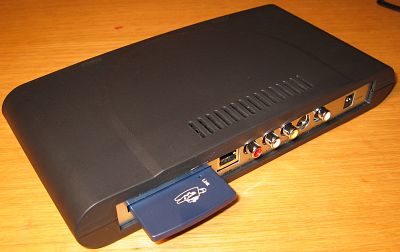

The first thing most people will have to do after opening the box is to go
out and buy a longer Ethernet cable… unless your TV is only 10 ft from your
PC. And, if that’s the case, then ummmmm…, why did you buy this product in the
first place? People fortunate to have a WiFi set up, can forego that hassle and
just install a WiFi PC card into the back slot of the PRISMIQ and they will be
good to go. Since I wanted to test the product in both wired and unwired setups,
I had to find a LONG cat5 cable to run from my basement computer room to my
entertainment center.
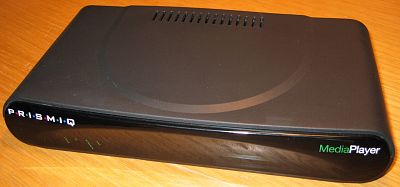
The PRISMIQ MediaPlayer is a smallish black plastic box with a PC Card slot
and several connectors on the back. A ‘display’ of status LEDs is on the front.
After you have decided if you’re using Ethernet or WiFi to connect to the PC,
you can either use S-Video or RCA cables to connect to your TV. I didn’t have a
free S-Video connection, so I had to use the RCA jacks to connect the PRISMIQ to
a free input on my VCR.
Once you run the wires, you’ll want to go ahead and install the MediaManager
software on your PC. This is a simple interface that allows you to import your
MP3s, images, and videos for viewing on the MediaPlayer. When you load it, it
will scan your PC for MP3s, JPGs, GIFs and MPEG video files. After it finishes,
you can view, and listen to the files from this manager.


PC MediaManager software [click thumbnails for full-size
images]
This application is very basic. Too basic if you ask me. Content is placed in
one large flat listing. If you happen to have your images stored in folders,
this hierarchy is not preserved when the media is imported into the manager.
There isn’t any searching functionality built in either. After the import, the
manager found 4000 images on my PC. Scrolling through this list on the PC and on
the MediaPlayer is painfully slow. One nice feature is the ability to create
slideshows. You can control how quickly the images cycle, and even assign an MP3
song to play while the slideshow is displaying.
For MP3s, you can import playlists that are in the .m3u format.
Unfortunately, Windows Media Player, what I use on my PC, does not use that
format. You can create playlists yourself through the MediaManager application.
But, if you have very many songs at all, you’ll get frustrated trying to find
them in the large list.
The next step is to connect the box to power and turn it on with the handheld
remote control or wireless keyboard (available separately). Both input devices
are IR and require a line of sight to the MediaPlayer set-top box.

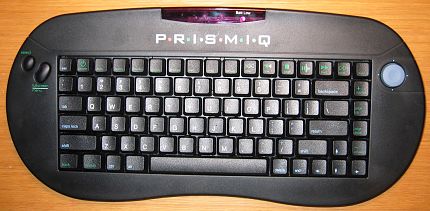
The remote is comfortable to hold and use. It would be nice if the buttons
lit up in the dark though. This remote is really only good for playing MP3,
Videos and viewing Photos. Although it has a phone style keyboard with letters
and numbers, it can’t be used (as far as I could tell) to chat or type things
into the web browser. For that, you’ll want the wireless keyboard which is a
nice size and is comfortable to type on.
When the MediaPlayer is powered on, it will connect to your PC and you will
be greeted with the Home page. This page shows your current local weather, news
headlines and stock info. This page can be customized to show the stocks that
you are interested in and the city that you want the weather info from. Problem
is, I’ve found that the weather info is never up to date, and you can’t click on
the news headlines to read actually the articles.
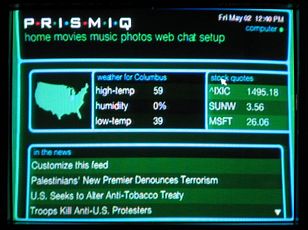
Using the keyboard or remote, you can move a cursor around on the screen to
select functions. There are also hard coded buttons on both input devices to
launch the main applications: Movies, Music, Photos, Web and Chat.
Movies
Playing MPEG-1 and MPEG-2 movies that you have stored on your PC is pretty
easy. After you have imported them into the MediaManager, they show up in a
listing on the MediaPlayer. When you use the remote or wireless keyboard to
SELECT the movie, it begins playing in a small box at the right side of the
listing. Pressing the Full screen button with put the movie in full mode.
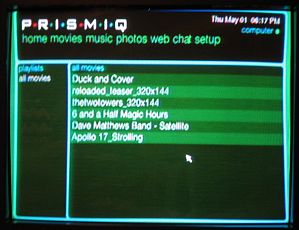
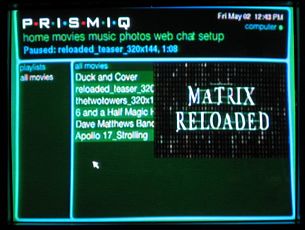

I didn’t have any full length movies to test with, but watching several movie
trailers worked better than expected (when it worked…) using both Ethernet and
WiFi. I didn’t notice any pausing at all. I did have a couple little problems
though. The first time I tried to play a file, I got the video, but no audio.
Turning the MediaPlayer off and then on again seemed to fix this problem.
The other problem that I ran into, that I haven’t resolved is the fact that
some of the movie clips that played just fine at one time, now will not play at
all… When I press SELECT to play them, it acts like it is going to play, but
then skips to the next entry in the list and plays that instead.
Of course, video quality is not DVD quality… but it wouldn’t bother me to
watch a full movie this way. I think this feature is better suited for watching
home movies or other similar content.
I would like to see support for AVIs added to the next version.
Music
Having the ability to listen to your MP3 collection in the living room can be
great experience! But doing so through the MediaPlayer is an experience that
could be a LOT better. As is, you can either listen to songs that you’ve made
into playlists, or you can scroll through your entire collection and pick songs
one at a time. You can not search for a song by any criteria. There really needs
to be a way to search by artist, album and genre.
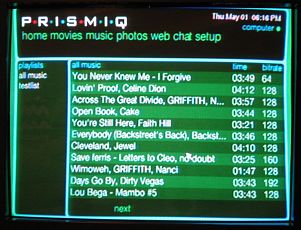
Audio quality is so-so if you’re only listening through your TV. The sound is
much nicer if you have your TV connected to your stereo.
I’m going to stick with my SLIMP3 for this feature…
Photos
Just like the MP3 feature, the Photo feature allows you to browse through
your digital photo collection on your TV. Unfortunately, just like the MP3
feature, all your images are put in one BIG list without any way to search
through them besides creating individual slideshows.
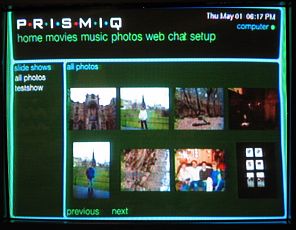

Just having the ability to preserve a folder hierarchy when importing the
photos would be a major step in the right direction. It would also be great if
you could rotate pictures to a desired orientation.
Web
Surfing in your living room is a fun past time, but with the MediaPlayer,
it’s not super enjoyable. You’ll really need a broadband connection to have it
even be half way useful. I have a Directway satellite system, and found that
surfing was almost painful through the MediaPlayer.
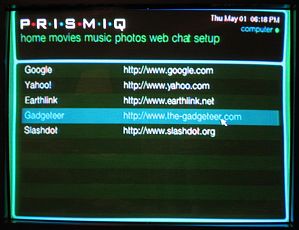

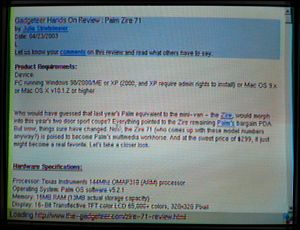
You can create bookmarks, but you have to do it on the PC side. Having the
ability to save a page on the TV side would be a nice improvement.
Image quality for reading websites is ok. You can see what our site looks
like in the pictures above. I could read articles semi-comfortably from 7ft
away. Most sites require you to scroll to the right to see the entire page.
I found that I could easily crash the browser by trying to go to my bank’s
secure login page. The browser went BOOM every time!
The browser also doesn’t appear (I tried a few sites) to support Shockwave
Flash content or Java.
Chat
Instant Messaging with the MediaPlayer is pretty fun. Just like with your PC,
when one of your buddies wants to chat, a window will popup on the display. This
can happen while you are surfing or watching a movie as you can see below.
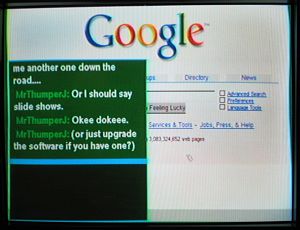
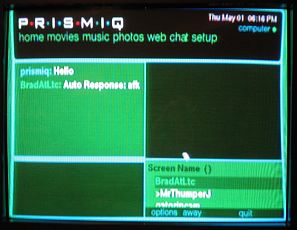
The only thing is, that the only IM protocol that the MediaPlayer uses is
AOL. So, you have to have an AOL screen name in order to chat. I don’t use AOL,
I use ICQ, Yahoo, and MSN… so I’m hosed, because none of my friends use AOL.
Also, if you don’t have an AOL account, you have to sign up for one on your PC.
You can’t do it through the MediaPlayer. You can’t add buddies through the
player either… that also must be done through the PC.
You do have the ability to set your self as AWAY, if you don’t want to be
interrupted. Also, emoticons are also supported.
As is, the PRISMIQ is an interesting device that really doesn’t shine at any
of its features. But, it does have a lot of potential… You don’t have to pay a
subscription fee to use it, it is very easy to hook up through Ethernet or WiFi
(it was pure plug and play for me in that respect) and the interface is not
cluttered and is easy to navigate. Once the software includes some advanced
features, I think the PRISMIQ will be much more attractive to consumers.
Luckily, the unit can be upgraded easily through the web.
Price: $249.95
Pros:
Easy to set up
Ethernet or wireless
Good price point
Cons:
Slow
No search features
Only supports AOL instant messaging

Dosmix Retro Bluetooth Speaker, Vintage Decor Mini Wireless Speaker, Cute Portable Small Speaker for Bedroom Desk Kitchen Office, Old Fashion Style Room Decor Speaker, Gift for Women Men Girls(Green)
(as of June 8, 2026 19:23 GMT -05:00 - More infoProduct prices and availability are accurate as of the date/time indicated and are subject to change. Any price and availability information displayed on [relevant Amazon Site(s), as applicable] at the time of purchase will apply to the purchase of this product.)
UMUST 20pcs Silicone Cable Ties,Reusable Cable Management Organizer, Wire Ties,Travel Cord Ties,Cord Organizer for Bundling Cable Cords in Home,Office,Kitchen,School(White Black)
(as of June 8, 2026 19:29 GMT -05:00 - More infoProduct prices and availability are accurate as of the date/time indicated and are subject to change. Any price and availability information displayed on [relevant Amazon Site(s), as applicable] at the time of purchase will apply to the purchase of this product.)Product Information
| Price: | 249.95 |
| Manufacturer: | PRISMIQ |
| Pros: |
|
| Cons: |
|
