
Product Requirements:
Device:
Any touch screen device
The Platinum Pen Zepher Mini Trio which is available at Stylus
Central and other retailers is a nifty little pen / stylus combo that is available in 4 different colors: Black, Red, Blue and Gun Metal. You may have guessed from the word
Trio in the name, that it has 3 tips. There is a black ballpoint, a blue ballpoint and a stylus tip.
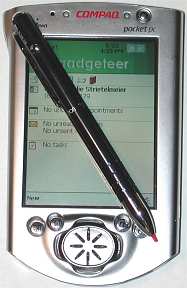
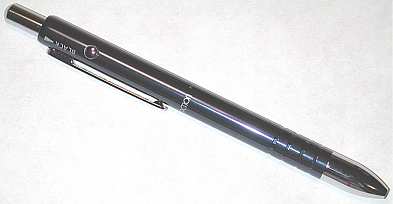
All the pen parts except for the stylus tip are made of metal. I think the pen looks pretty nice with its chrome accents. Even the finger grip is kind of cool. Due to the way it has been cut, rotating the pen barrel causes the grip to sparkle. Yeah, I’m a wacko….
:o)
The pen is shorter than most combo styli and although it is nicely balanced, it is still pretty light weight.
5.04 in x .374in (128mm x 9.5 mm)
.56 oz (16g)
The Zepher uses a gravity mechanism for selecting tips. Each available tip name is printed around the top of the stylus. To extend the desired tip, you
just rotate the pen until the correct name is on top and then you press the plunger. Tips are retracted by pressing the release button on the side.
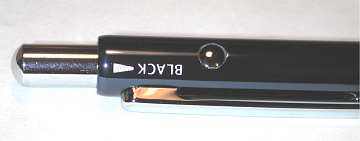
Although this stylus does rattle a bit when all the tips are retracted, it has almost
no rattle at all when one is extended.
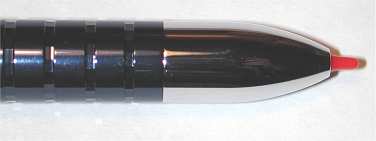
Both the black and blue ink tips write equally well. The stylus tip which is red, is easy to see and writes smoothly on all
of the touch screens that I tried it on.
The Platinum Pen Zepher Mini Trio is a nice pen / stylus combo that can go where
other similar full-sized pens can’t. It can fit in some zipper type cases. And of course it fits in almost any pocket.
Price: $22.99
Pros:
Small
3 tips
Cons:
Rattles a bit

ESR for MagSafe Wallet, 5 Card Holder with RFID Blocking, MagSafe Sticker Included, Slim Magnetic Wallet for iPhone 17e/17/16/15/14/13/12 Series and Selected Samsung Devices, Not for 13/12 Mini, Black
(as of June 8, 2026 18:53 GMT -05:00 - More infoProduct prices and availability are accurate as of the date/time indicated and are subject to change. Any price and availability information displayed on [relevant Amazon Site(s), as applicable] at the time of purchase will apply to the purchase of this product.)
KRTALS Stronger Magnetic RFID Leather Mag-Safe Card Holder for iPhone 16 Series, Mag-Safe Accessories Stick on Series of iPhone 17/16/15/14/13/12 and Pro/Promax, Black
(as of June 8, 2026 16:42 GMT -05:00 - More infoProduct prices and availability are accurate as of the date/time indicated and are subject to change. Any price and availability information displayed on [relevant Amazon Site(s), as applicable] at the time of purchase will apply to the purchase of this product.)Product Information
| Price: | 22.99 |
| Manufacturer: | Stylus Central |
| Pros: |
|
| Cons: |
|

Gadgeteer Comment Policy - Please read before commenting
Post your comments on the Apple iPod (30GB) Review.
http://www.the-gadgeteer.com/apple-ipod-30gb-review.html
Just click the POST REPLY button on this page.
Thanks for the excellent review, Julie. I really enjoy your photos…the glossed-up pics on the Apple site really aren’t an accurate representation.
You’re absolutely right on about the heft and build-quality of the newest iPod. I’ve held one in my hand and all my skepticism and disdain melted instantly – this IS an object of desire, an engineering marvel…almost jewel-like. Until one actually has a first-hand, tactile experience, you cannot emphasize enough about this point.
When iPod hits Target again in July, I think I’ll finally give in to temptation.
The reason why Windows users don’t get as much space on the iPod is because of the filesystem choice. The iPod typically uses HFS+ (the standard Mac filesystem; not very much compatible with anything else), and original iPod-on-Windows solutions would typically work with HFS+-on-Windows software to get things running.
When Apple decided to support Windows themselves, they decided against this, and instead set up the iPod so it could be formatted with the Win9x FAT32 filesystem instead, which is almost as universal as hydrogen but not as efficent as HFS+. So that’s why there’s a size discrepancy.
(for the record, nice review, though there’s absolutely no chance of my getting an iPod anytime soon as I encoded my CD collection in Ogg Vorbis ages ago and I’m not going to MP3; I can hear the difference and it drives me nuts. 🙂 )
Thanks for a good review, as always. One correction: you can very easily use Audible.com books with the new iPods and Windows. I do it all the time. You can either get the latest version of the Audible Manager software from the audible.com folks, and “activate” your iPod, or you can simply load audible books with EphPod. Works slick.
For the time being, bookmarks and your current listening point in an audible book do not survive connections to the PC, but everything else works well. And you can very quickly zoom to the correct hour/minute on an audible book on the iPod as long as you remember your place.
Lately, I have been looking into a digital audio device to play back sporting events and programs recorded from the radio. I tried downloading a lacrosse game to my MPIO DMK MP3 player. The download worked fine, but the DMK does not have a resume function so when the player powered down I would lose my place in a four hour long recording. Also, the toggle that moves through the tracks is very easy to activate so I could easily lose my place by accident.
I thought about the PoGo Radio Your Way player, but I was told that it doesn’t have auto resume! I can’t believe a player geared for radio programs would not have this feature.
I know that there are a number of players with auto resume, but my concern here is accidently moving to the next track while fast forwarding through commercials and halftimes. I imagine that your place would then be lost. I have four TiVos so I know how digitally recorded programs should be handled. When you switch from one program to another, it should remember your place in each of the programs. This is how TiVo works. If the players don’t have this feature, then they should at least make it more difficult to accidentally change tracks.
Does the ipod have a hold button? Do you think that the ipod would have a high chance of losing its place in a long audio program? You have already mentioned that the buttons can be pushed very easily. This may rule it out for one of my intended uses.
Sorry about the long winded post.
Axel
The new Ipod does have a hold button and you will have to use it often. The old Ipod had one too but I never used it. But the new Ipod buttons are VERY sensitive so you use the hold button pretty much all the time. I’ve used the new and old Ipod on both my Mac and PC. Musicmatch is awful. In fact I think every Windows MP3 player software I have ever seen or used was awful. However Apple is writing iTunes for Windows and it will be available toward the end of this year.I’m always amazed at how simple and elegant Mac software is compared to Windows software. One of the many reasons I own a Mac and a PC. The PC is for games and the Mac for everything else.
-Terry
I came across this FM tuner for the iPod from Griffin Technology:
iPod FM Tuner
Griffin also makes a slick looking FM transmitter:
FM Transmitter
Enjoy.
—
Manny
Both of those add-ons look pretty cool. I’m going to see if I can get them to review.
Do those work on the new ipod? I’m not sure. I bought the Belkin FM transmitter for my car from Apple. Works great for playing from your ipod to an FM station while driving. Lots better than listening to the dreck that passes for radio these days.
http://catalog.belkin.com/IWCatProductPage.process?Merchant_Id=&Section_Id=2062&pcount=&Product_Id=140984
According to the Griffin Techonology site, they are working on an updated version of their iTrip that is compatible with the newest iPod models.
I wonder which has the better sound, an FM transmitter, or a cassette deck adapter? Right now I’m using a cheapo cassette deck adapter. It works ok, but I usually have to turn the volume up on my stereo pretty loud for it to sound decent. Then when I turn my truck off, the adapter will pop out and the stereo will be blaring loud. EEP! :confused:
I had the Sony cassette adapter with my old ipod. Had to turn the sound way up too. The FM transmitter is much better plus you don’t have all the wires going everywhere.
The Griffin Tech iTrip looks like a very cool unit. It is reasonably priced and the nice part is that it is integrated with the iPod – as I understand it, the stations that you can select to broadcast to actually show up as tracks or albums on your iPod screen. Since Apple redesigned the plug layout on the new pods, they need to release a new version – but it looks like the unit to get.
Cassette adapters do a little better job passing the highs and lows of songs etc. but since the iPod doesn’t have an amplifier – you are forced to drive the sound from your car stereo – which leaves you with turning the volume up higher than you normally would. Apparently there are small AA powered amps you can plug into and then plug the adaptor into that, which can help the situation.
From some of the posts on iPodlounge.com – the best solution for linking your ipod with a stereo is to actually tap into the stereo wire harness itself. There is a company (I can get specifics if there is interest) that sells an adaptor for stereos that support an external changer (you know, those 6 disk jobbies for your trunk) – so you can plug it into there, and have a line-in port for the iPod. The nice part is, if you have an in-dash CD unit, you can control everything just like normal, but hitting the mode button, adds a 4th mode (AM, FM, CD and now Line Out). Prices seemed to run about $80 – and installation is fairly straightforward, as long as you can locate the changer plugin port.
Loved the review
(still waiting on my 30gb pod from Dell – ordered 5/15 – 2nd delay notice….shipping on 6/20 🙁 )
I’ve used both an FM transmitter (the iRock from CompUSA) and a Radio Shack cassette adaptor with my iPod. The cassette adaptor worked best at first. On a long road trip (Memphis to Yellowstone and back), the cassette adapter got worse and worse. I don’t know if it was wearing out or if it was damaging the heads on my cassette player. The problem with the FM transmitter was drift and the constant need to retune. Lots of interference.
Your best bet is to replace your car stereo with one that has an auxilliary in. You can get a decent one for less than $200. I did this in my truck and it is much better than an FM transmitter or a cassette deck adapter.
Or your local car stereo store might be able to install an aux input for you, depending on the model of your car and stereo.
Julie, you need to break down and get another Mac. I promise your, the joy you feel using the iPod is extremely enhanced by managing your music with iTunes and purchasing it on the iTunes Music Store. I’ve spent more than $200 is just over a month! That’s more than I’ve spent on CDs in the past two years! I used to buy a ton of CDs ( I have over 250), but I had gotten out of the habit. The iPod and the iTunes Music Store have gotten me excited about music again! Even if you just used the Mac for music mangement, it is great. But of course once you found out how easy it is to edit your videos and burn DVDs, you would love that, too!
Todd
Axel – try downloading the latest firmware for your DMG – i’ve been streadily going through firmware upgrades, for my DMG – (reviewed by the fine folks here) and they’ve been getting better and better.
Now mine does support resume where ever you leave off – even in the middle of a large file, as well as extra functions that were not included initially.
Check out http://www.mpio.com for their website and go to the firmware section for downloads.
Good luck!
forrman,
I already asked MPIO about the firmware upgrade. Unfortunately the DMK cannot be upgraded. It’s great otherwise.
Axel
Do the cassette adapters actually spin? I guess I didn’t think they did.
I’m not sure I can justify getting a new stereo for my truck. It’s a 1991 GMC Sonoma. It will be turning over 100,000 miles this week. It’s pretty much turning into a beater car…
I think I’d like to learn more about tapping into the actual wire harness for the stereo, as was mentioned above.
Yulelogger:
I keep thinking about the 12in Powerbooks… 😀
In the past, I tried both Ephpod and Xplay, and while I paid for Xplay, I eventually settled with ephpod. I have one of the original 10gig Ipods.
Since then, I changed over to Media Jukebox (musicex.com). They have an Ipod Plugin that works great. One of the main reasons I switched was because MJ is great for larger mp3 collections (I own over a 1000 cd’s, which I’m gradually ripping to my HD). MJ allows you to not only create regular playlists, but also “smartlists”, where you define parameters, and the list is created/updated for you. Any mp3 tag variable (or combination of) can be made into a smartlists- my favorite use is tagging the comment field w/ my wife’s name, so that she has one random playlist of music she enjoys. I also have smartlists that combine multiple genres, smartlists for tempo, etc.
If you go to the major Ipod fan sites (ipoding or ipodlounge, the equivalent of the gadgeteer for ipods), you’ll find most Windows users have migrated to Ephpod or Media Jukebox. Once you choose one or the other, it’s best to completely uninstall Music Match from your system- most people weren’t using it prior to their Ipod, and it only gets in the way.
Hope this helps.
I have been looking at the Creative Labs Zen model. I guess it is supposed to look somewhat like an ipod and it is quite a bit smaller than their JukeBox (and in Canada, quite a bit cheaper than the ipod). Does anyone have any comparison comments on the two products?
I was interested in the Zen too. They have a 60GB model coming out! WOW! Here’s a picture:
http://www.americas.creative.com/products/product.asp?campid=20028&category=2&maincategory=2&product=483
I’d like to test drive one.
Logjam Electronics sells an auxillary input converter which converts “the CD Changer data port of your factory or after-market radio to an auxiliary audio input with line level RCA jacks.”
Auxillary Input Converters
Unfortunately, they seem to be for later model vehicles since changer controls on factory stereos weren’t widely available 6-7 years ago. Although, you might be able to use the P.I.E. Multi-Purpose Source Switcher, if you have an aftermarket amplified system. Otherwise, there really doesn’t appear to be wire solution if your head unit cannot take inputs or you don’t have an external amplifier.
—
Manny
30GB! Who has the time to fill such a unit? I have had a 5GB iPod for some four months, and I have ca. 24 hours of music on it, not all of which I have listened to. 24 hours = 1.3GB. You can do the math. I can foresee a time when none of us will even need homes, as we will carry EVERYTHING with us. radleyp
Great review once again! I’ve had my 10-gig original iPod for over a year now, and it’s been on many trips with me. I love it! I used an iRock FM tranmitter for a while, then got a Transpod. The Transpod is great, and even though I haven’t yet, I like the idea that I can use it in any car.
I’ve looked at the new iPods lately, and when they make some screen protectors and a Transpod, I’ll move up to the 30GB. I am a little nervous with how sensitive the buttons are, but it’s not really a factor for me in the Transpod, and I usually use the hold switch anyway when working out once I’m running a playlist. Love the interface with my 17″ PowerBook, too hehe.:D
Another excellent review, Julie – great job!
Some comments …
I agree with you that being able to display album cover art would be a cool feature – I’ve been waiting for something like that for years now. I’m not sure what would happen to the battery life though if the Ipod had a good-looking color screen. I value small size and long battery life higher than a color screen … I think that’s why we haven’t seen a color-screen Ipod yet.
Musicmatch – I actually use this and kinda like it. There are some cool features in Musicmatch like “super tagging” that can auto-download album cover art and fix your tags for you. It also has “smart playlists” that can auto generate playlists based on your inputs (length of time, genre, artists, etc).
The best feature of all I think is Musicmatch radio – you can listen for free to streaming audio with near-cd quality sound (128kbit/s bitrate) … although their website says that the free cd-quality streaming is for a limited time. They’re probably doing this to get folks used to their service and later charge them for it. There are many kinds of “stations” you can listen to. Even if you don’t use Musicmatch to organize your music collection, you can still use it to listen to their radio service.
You can also get an iTunes skin for Musicmatch from here: http://www.deskmod.com/?show=showskin&skin_id=33876
> FireWire is faster than USB for transferring music to the iPod, and you can charge thru the same cable.
USB 2.0 (480 Mbit/s) is actually faster than the standard Firewire (400 Mbit/s) but slower than the newer Firewire 800 standard (800 Mbit/s). I’m pretty sure Ipod uses Firewire 400, not Firewire 800. Plus, I thought you can charge the Ipod thru USB as well…
Julie – here’s a question for you: how stable is your Ipod? There have been many reports of folks having to frequently reset their Ipods. Here’s an article that mentions this: http://www.boston.com/dailyglobe2/152/living/New_iPod_is_not_necessarily_improved+.shtml
While the listed theoretical speed of USB 2.0 is faster than Firewire, all real-world tests have proven otherwise.
For example:
DP-Now USB 2.0 vs. Firewire
As I understand it (and from the Apple website), the USB cable is a split cable. It plugs into the port on the dock, Then one part plugs into the USB port, and the other part plugs into the AC adapter that came with the iPod. You can see it here:
http://store.apple.com/1-800-MY-APPLE/WebObjects/AppleStore.woa/71308/wo/cu5tV125AoKb3fsf0lm1QMK7csU/2.7.0.5.1
[B]
I’ve reset mine a couple of times, but it was during my usage of MusicMatch. I’ve not had to reset while just listening to music away from a computer.
Have you had to reset your Ipod when sync’ing with EphPod?
My 15GB Ipod is arriving in a couple of days (almost a month after I ordered it!) and I’d like to use the most stable platform …
BTW, I just read at http://www.ipoding.com that there is an Ipod firmware update coming out soon that includes a “patch for the MusicMatch software that is used for Windows iPod syncing” – maybe that could help with your reset issues with Musicmatch
More on iPod resets.
http://www.boston.com/dailyglobe2/152/living/New_iPod_is_not_necessarily_improved+.shtml
I haven’t had to do any, but I use an iMac. radleyp
The only problem I had with ephpod was one time it crashed while it was closing the program. I took my iPod to work and was going to listen to music, and when I went to look for something to listen to, my iPod was totally blank!!! I freaked out. 😮
But when I got home and put it in the dock and started ephpod, it came up and said that it had crashed on a previous run and wanted to know if I wanted to ‘fix’ things (I can’t remember the exact wording). I clicked OK and it did some hocus pocus and my music was back…
Hi Julie – are you planning any more Ipod case reviews (for the 3rd gen ipods)?
The 4 case reviews that I found on your site are all for the previous generations.
BTW, the case at http://www.xtrememac.com/ looks interesting but they’re still working on updating their cases for the 3rd gen ipods.
This one seems interesting too: http://www.jrhillandcompany.com/ (Ipod “wrap”)
I actually received the iPod Armor case yesterday. Although it looks like it’s not for the latest versions, it works just fine. Review to be posted soon.
64 minutes to load? so the windows-firewire path is still much slower than the mac-firewire path? (I haven’t seen an explanation, I have seen 1900 songs load on a 15G unit in 16 minutes from a 12″pb…)
Apple just released firmware update 2.0.1.
It fixes many bugs like backlight timing, asian language support, and some other useful stuff like the On-The-Go playlist queing and track audio (there is no longer any clicking between the tracks). Big improvements-you guys should download it.
Get it here.
Better from a simplicity standpoint, maybe. But, not better from a sound standpoint. FM radio caps out at 15K Hz. Your ears hear all the way up to 20K Hz. So, you’re missing a fair amount of “highs” by using the FM transmitter.
They are easy to use, and less of a hassle. But, the music will still sound as tho you are listening to FM radio.
Hi there;
Nice to see a review centered around the Windows iPod expierence. I know there are some advantages having an iPod and a Mac. There is one advantage for Windows users, though. Have a look at http://iccnet.50megs.com/iPodSync/
They advertise their product as:
iPodSync is a tool for Windows users to keep your Microsoft Outlook calendar. contact, tasks and notes synchronized between your PC and your iPod.
It even does notes.
Looks very cool, and repairs one of your ‘worries’ in your review.
Jan van Arkel
[email protected]
Very cool! Thanks Jan 🙂 Now, you know what would make it even better? If it also synced your email. That would make it a great total Outlook backup solution.
Hi Julie,
Yeah, let’s make it a complete PDA! Sending and receiving email, including WiFi and Bluetooth… Read your email at every hotspot. Would be great!
But seriously, there is a limit you have to take in consideration. A note can only be 4 kb… the rest will be truncated. Details at http://developer.apple.com/hardware/ipod/ipodnotereader.pdf
BTW, another must have: the PocketDock from http://www.sendstation.com/
Jan
NOOOOOOOOO!!!
The entire reason I love the iPod (besides the fact that it carries all of my music) is that it has not evolved into a PDA. I love the simplicity of the iPod, its interface etc… The LAST thing I would want is it to evolve into a PDA with add-ons, wifi, etc…
That would be horrid. It’s aesthetic appeal would be lost to me, and to many other people. Keep it simple.
You misread my wishes… I don’t want the iPod to be a PDA either. It wouldn’t make a very good one as it is right now anyway… no method to enter data. I just think that program mentioned above could go a step further and make a copy the email too. I don’t need to read it on the iPod, just to have it there as a backup device. 🙂
Julie:
I was going OCD over fingerprints on the back of my shiny new iPod, so I used a jewelers “finishing stone” to put on a fine brushed finish. Looks pretty good and no longer shows finger prints.
I happened to have a “fine” finish stone handy (I break watches for a hobby) so that’s what I used. You can still see vague reflections, but the brushing hides fingerprints and minor scratches. Slightly shiner than the finish on a high-end fridge.
Cheers,
Bob
Bob:
That’s a very cool idea! Were you nervous about doing it? Did you do the sides also?
If you have a camera, try to take a picture for us. 🙂
I’m looking for a very small MP3 player that will sync with my PC so I can download books from audible.com for my wife. It needs to be simple to use with preferably the ability for her to hook it onto her arm as she walks around. The Ipod seems a little large.
1) Any suggestions for a PC user?
2) Is there a better source to download books than Audible.com?
Bob
The alarm is handy for when your working and listening to music. Example: Say your listening to music and you have lunch break at 12. Then the alarm is handy in that way.
hi, i don’t know if you’re ever going to get this post, so i going to post it again in the general discussions, where perhaps you will see it.. but i just recently purchased an iPod also, and you mention that you had difficulty w/ musicmatch and itunes not working well together? well i think this might help, what i do is.. create a playlist in musicmatch by just going through my song files and round them up on the playlist. then i save it as a playlist. then you can actually go into itunes and import that playslist into Itunes, i don’t think it makes a copy of the entire playlist, (making copies of songs you already have)… to do so. just go into the the file folder, (in itunes) then hit import. search through your C: drive where musicmatch is, then go into the MM folder. look for playlist and go into the “default” folder. on the ITUNEs search box, you have to let it read m3u? (i think thats what its called i might be wrong). then when you let the Itunes search box recognize that format, it will show you the playlists in MM. then click on the desired playlist and you should import it into Itunes. well.. i hope this is of some help and i hope i don’t sound assinine, but it worked for me.
p.
15gb iPod. (still have 12 gigs to fill =/ )
pookietharacer:
I’ve actually found a super simple way to sync my iPod with all my tunes. I use iTunes for Windows. I love it. I have a mixture of AAC files (only music I’ve purchased from the iTunes website) and MP3. I rip my physical CDs using a plug-in that I bought for Windows Media Player, and then import them into iTunes. If I ever want the AAC files to be converted to MP3, I’ll just burn them to an audio CD and then rip them to MP3.
Works for me! 🙂