
Product Requirements:
Device:
Win95, 98, NT, 2000, XP
This is a review of a mini PDA that is more of a novelty item than a real
productivity tool. The
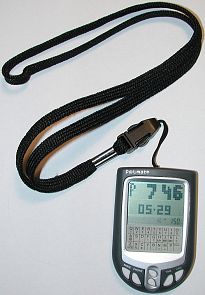
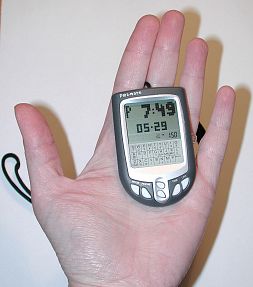
P@L-mate is a touch screen PDA (I use that term loosely) that looks like an
itty bitty Palm m100.
Made of plastic, the P@L-mate is available in red, blue and grey.
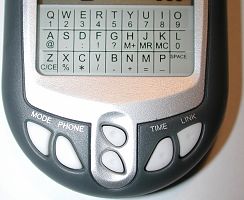
On the front of the device are 4 application buttons and separate up/down scroll
buttons which are made of soft rubber and have a dimple in the middle which
makes them easy to press with a stylus.
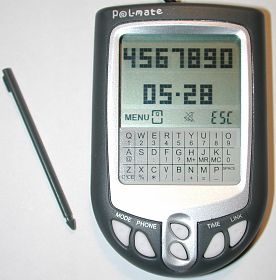
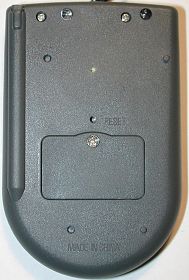
Speaking of styli, being a touch screen device, the P@L-mate has a stylus silo
and comes with 2 spares. Be warned, the styli are VERY tiny, thin and hard to
use if you have big hands.
The mono display on the P@L-mate is small and similar to that of the Palm m100.
The display is separated into three sections. The top section has 28 x 14 large
pixels, the middle section has smaller pixels and the bottom area is a silk
screened touch input panel. Sorry, no graffiti here folks ;o) Using the small
stylus, you can tap letters and numbers to enter phone book entries. It works
pretty well all things considered.
Pressing any button will turn the P@L-mate on. It will turn itself off after
2mins of inactivity. Or, you can press the Time button several times.
Powered by two AG13 coin cell batteries, this little guy comes with a mind
blowing 3KB of user memory that can store over 100 names, numbers and e-mail
addresses.
Built-in applications include:
Phone book
Clock and alarm
Schedule reminder
Calculator
Fortune Teller
Slots game
Car racing game
The Phone Book app is VERY limited. It lists all the entries in one long list
that you must scroll thru to find the entry you need. Luckily, you can tap a
letter key on the input pad to jump to the first entry that starts with that
letter.
The fields that you can enter for each phone book listing are:
Name: 12 character limit
Phone Number: 12 character limit
E-mail Address: 36 character limit
When an entry is displayed, the Name with the phone number under it will be
listed. Only the first 7 characters of the phone number are displayed… So, the
best way to enter them is without a ‘-‘. Otherwise the last number in a 7 digit
local number will be cut off.
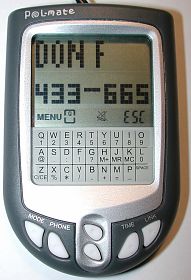
Tapping the screen with the stylus or pressing the up/down scroll button will
then scroll the corresponding email address underneath the name. Crude, but it
works…
The clock / alarm application is just a simple digital time and date display
with 1 alarm time that you can set. A song will play when the alarm goes off. I
have no idea what the song is, but it reminds of me of something from the movie
Titanic… The volume is loud and the song is annoying. It will continue to play
until you press one of the buttons on the PDA.
The Schedule reminder application allows you to set date / time alarms with an
attached memo of up to 65 characters. The memo will scroll and a melody will
play when the reminder time is reached. After the reminder has passed, you have
to go in and manually delete the entry.
The Calculator application is a simple easy to use program that includes a
% key and 1 memory.
The P@L-mate also has 3 games included. Hey, it’s not a PDA if it doesn’t have
some games! A simple fortune teller / biorhythm app that uses your birthdate to
tell you your current health, luck, and love life points, a simple slots game
with animation and a little race car game. The games are pretty crude and would
probably only appeal to kids. I liked the slots game the best.
Amazingly, you are actually supposed to be able to ‘sync’ the P@L-mate to your
PC using two LEDs on the back of the PDA. They can read flashes of light from a
monitor or NUM Lock LED on a keyboard. Unfortunately, I tried this several times
but was never successful.
If you have a friend that also owns a P@L-mate, you can beam a Phone Book entry,
a reminder, an animation and compare compatibility with the other person’s
fortune telling settings. I wasn’t able to test any of these functions due to
the fact that I didn’t have a 2nd unit.
Basically the P@L-mate is a toy PDA mainly suited for teens. It is too limited
for real use. Also, at $33, I think it’s a little too expensive for what it can
actually do. I don’t think I’d spend more than $5-10 on one…
Price: $33
Pros:
Very small
Supposedly syncs with a PC
Cons:
Expensive for what it does
Very limited
![[MINI SIZE. ULTRA PORTABLE CHARGER]: Roughly the size of an AirPods Pro case, this smallest power bank packs 10,000mAh of long lasting power into a tiny, nano footprint. Easily slide this ultra slim, credit card size charger into your skinny jeans, a...](https://m.media-amazon.com/images/I/41rATpm6dyL._SL160_.jpg)
INIU Portable Charger, Ultra Mini 10000mAh 45W Fast Charging with Detachable Cable, Flight-Safe Travel USB C Power Bank External Phone Battery Pack for Xiaomi iPhone 17 16 Samsung S26 Google iPad etc
(as of June 8, 2026 21:45 GMT -05:00 - More infoProduct prices and availability are accurate as of the date/time indicated and are subject to change. Any price and availability information displayed on [relevant Amazon Site(s), as applicable] at the time of purchase will apply to the purchase of this product.)
tomtoc 7L Sling Backpack Crossbody Bag for Men Women, EDC Daypack Chest Shoulder bag for 14-inch MacBook Pro M5 Pro/Max, 13" MacBook Air/Neo, 13" iPad Air M4/Pro M5, Organized, Daily Use, Work, Travel
(as of June 8, 2026 18:48 GMT -05:00 - More infoProduct prices and availability are accurate as of the date/time indicated and are subject to change. Any price and availability information displayed on [relevant Amazon Site(s), as applicable] at the time of purchase will apply to the purchase of this product.)Product Information
| Price: | 33.0 |
| Manufacturer: | Merconnet |
| Pros: |
|
| Cons: |
|

Gadgeteer Comment Policy - Please read before commenting
Ok… I have a new toy and I am thinking about a case for it. I’m not sure what to get, so I’d like some recommendations.
What’s the best case out there for the |T ? Which one is the most affordable? What is the one that most every |T user is getting..?
I tend to like billfold cases as opposed to fliptop cases. I’m looking for some sort of case that can sub as a wallet while holding the device.
Any ideas..?
Christopher Spera
I settled on the Tumi Zip Around Case for Tungsten|T.
The case is made of leather and is small and very unobtrusive. However, it has 2 problems:
1. Though the case is specifically intended for the |T, it uses Velcro to seat the device in the case. Since I refuse to put adhesive Velcro on the back of ANY PDA, I attached it to the plastic cover that comes with the device. The |T will sit in the cover, backwards, with the screen facing out while it is inside the case.
2. The case has 3 credit/ business card slots and 3 SD card slots; but no place to put cash, which is overwhelmingly disappointing.
Kind Regards,
Christopher Spera