
Program Requirements:
Device:
Most serial PDAs
Desktop:
Windows 98 or Macintosh computer with a USB port
1.9 Meg for Windows, 288k for Mac
What’s the biggest hassle when it comes to electronic gizmos like PDAs?
Trying to find a free COM port on your PC to hook it to! Keyspan
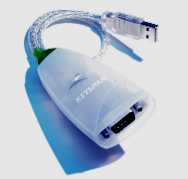
has come to the rescue with their USB PDA Adapter. This small adapter provides
one RS-232 male DB9 port for direct connection to a PDA cradle or
synchronization cable. It draws its power from the USB port on your PC so a
power adapter is not required.
This adapter will work with PDAs like the PalmPilots, Windows CE Palm-size
PCs and other serial devices. There is one thing you need to make sure before
buying this adapter. Make sure that the software that your device uses can be
set to connect to COM ports other than the standard 1 thru 4. Because once you
set up the Keyspan Adapter, it will become the next COM port in line. On my
system, it became COM5.
The adapter has a serial connector on one end and a USB connector on the
other. You plug the serial cable of your device into the serial end and then put
the USB connector into your PC or Mac. A CD comes with the adapter that includes
drivers for Windows 98 machines and Macintosh computers. Installation is very
easy and once done, you’ll have an extra COM port on your PC.
I tested this adapter with a Casio E-100 Palm-size PC and a Palm V PDA. In
order to use it with the Casio, I had to change the COM port it was connected to
the new COM port. I also had to make sure the serial speed on the PDA was set to
57,600kps. Anything higher and it would not sync. Sometimes at 57,600kps, it
would take several times before the PDA and PC would finally connect correctly.
I found that overall syncing was slower than using a regular COM port.
With the Palm V, I had to make sure that I had the installed the latest
version of the Hotsync software (v3.0). This newer version allows you to select
COM ports other than 1-4. This new version is available at http://www.palm.com
as a free download. I then had to set the port speed no higher than 57,600kps.
If I would set it higher, it would never sync and would even lock up my PC at
times.
Basically I found that the Keyspan USB Adapter works fine as long as you have
the port speed set pretty low. So, if you don’t mind that fact and you need more
COM ports, then this adapter should work well for you.
Price: $39
Pros:
Adds an extra COM port to your system.
Cons:
Have to set the port speed to no higher than 57,600kps for most
devices.
Anker USB C to USB C Cable, Type-C 60W Fast Charging Cable (6 FT, 2Pack) for iPhone 17 Series, iPad mini 6 and More (Black)
(as of June 8, 2026 03:43 GMT -05:00 - More infoProduct prices and availability are accurate as of the date/time indicated and are subject to change. Any price and availability information displayed on [relevant Amazon Site(s), as applicable] at the time of purchase will apply to the purchase of this product.)
USB Type-C to A Cable 5pack 6ft Braided Fast Charging 3A Quick Charger Cord, 6 Foot Compatible iPhone 17/17 Pro/16e/16/15 Pro Max,Samsung Galaxy S10 S9 S8 Plus, Note 10 9 8, LG V50 V40 G8 G7(Grey)
(as of June 8, 2026 11:30 GMT -05:00 - More infoProduct prices and availability are accurate as of the date/time indicated and are subject to change. Any price and availability information displayed on [relevant Amazon Site(s), as applicable] at the time of purchase will apply to the purchase of this product.)Product Information
| Price: | $39.00 |
| Manufacturer: | Keyspan |
| Pros: |
|
| Cons: |
|

Gadgeteer Comment Policy - Please read before commenting
Post your comments here on the Nite Ize MagLite Accessories.
http://www.the-gadgeteer.com/nite-ize-flashlights-review.html
Just click the POST REPLY button on this page.
Once again nice review ladies
Wasn’t it once said “you can’t be to rich, to thin or have to many flashlights” ?? (the same with PDA’S)
I saw these do-dads at comdex too and thought they where like way cool. My mind wondered to all of the times I held a mag light in my mouth while I tried to get that last nut off, or under the sink (plumbing yuk!)
I simply have to order the head band..
This guy will make a pile of money, but so did the guy that thought up pet rocks…
Laurence
Guess what? They have a mouth piece that you can buy that you can use to hold the flashlight in your mouth! Check it out:
http://www.niteize.com/lbite.html
I have used products like the head band. They are very satisfactory, nad fit either directly onto your head or slip over a hat.
“If you need another hands-free way to use your flashlight, you can always wear it around your head! I’ll warn you though, you’re going to look like an idiot… ”
Proverbial
Hey! 😎