
Product Requirements:
Device:
Windows XP or 2000, Mac 10.2 or higher
AM/FM radio. Sounds a little retro these days with XM and Sirius satellite
radio being all the rage. While satellite radio is undeniably cool, you still
can’t beat your local radio stations for community news, events, weather and
programming. Wouldn’t it be cool if you could somehow interface your PC or Mac
with a radio to listen and record shows like you can with a Tivo? Guess what?
You can with the radioSHARK from
Griffin Technology.
Griffin Technology has long been in the business of creating unique Mac and
iPod accessories, such as the iTrip and
iTalk that I’ve reviewed in the past.
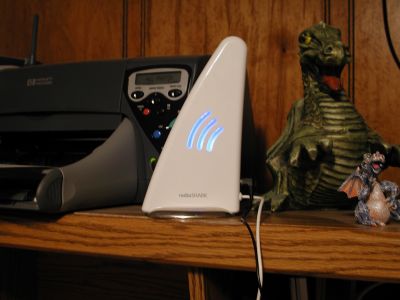
Their newest product the radioSHARK is a white plastic fin shaped module that
plugs into your USB port, giving your Mac or PC an AM/FM radio.
Hardware Specs
AM frequencies: 530 – 1710 kHz
FM frequencies: 87.5 – 107.9 MHz
Built-in AM/FM antenna
Earphone jack for external antenna or headphone listening
PC/Mac interface: USB
Package Contents
radioSHARK AM/FM radio
CD-Rom with PC and Mac application software
Manual
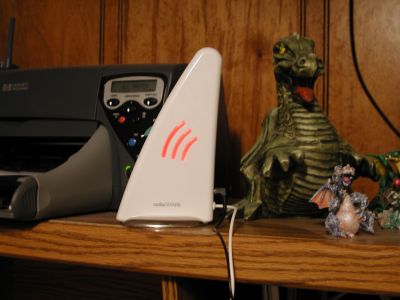
The white plastic and cool shape makes it easy to see that this is a Mac
inspired product. The radio stands 7.5 inches tall on a 2 inch wide chrome base
and has a 46 inch USB cable attached to the back of the ‘fin’. Above the USB
attachment point is a 3.5mm earphone jack. There are three curved lights on both
sides of the fin that glow blue whenever the radioSHARK is plugged in to your
computer it is powered on. The lights turn red when the module is in the process
of recording a signal.
Before you can begin surfing the AM/FM spectrum, you must first install the
application software on either your PC or Mac. After you do that and plug in the
radioSHARK, you’re good to go.
The radioSHARK application has a simple interface that is easy to use. Since
I have both a PC and a Mac (15in G4 PowerBook), I tested it on both computers.
The main window looks identical on both platforms, but there are some
differences between the two that I’ll point out as we go along.
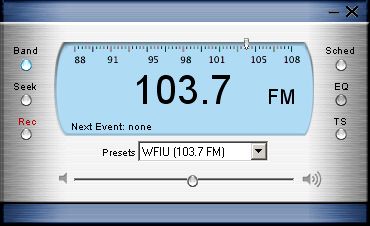
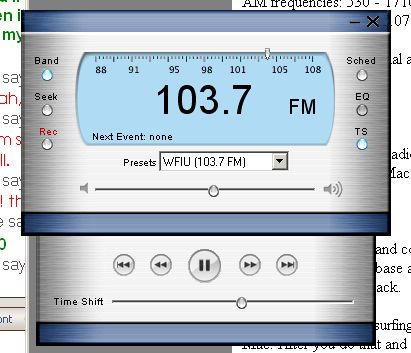
Looks like a digital radio right? Let’s take a look at the different buttons
and their functions.
The Band button is just a toggle from AM to FM.
The Seek button gives you one way for tuning to desired stations.
Pressing it will jump to the next strongest station. Setting the station can
also be accomplished by dragging the small pointer along the frequency scale. On
the PC, if you drag the station pointer, you’ll continue to hear the currently
tuned station until you let go of the pointer. On the Mac, you’ll hear the
stations as you drag over them.
You’re allowed an unlimited number of station presets, that you can name
however you wish. Using the pull down menu under the digital frequency display,
will allow you to choose a preset, add a new one or remove one.
Below the Seek button is the Rec button. Pressing it while listening
to a station, will cause the software to begin recording content. Recording will
continue until you press the Rec button again, or you run out of disk space.
Recordings made this way will be saved with the name Instant Recording in the
scheduled event dialog box.
Pressing the Sched button will bring up the event scheduler window.
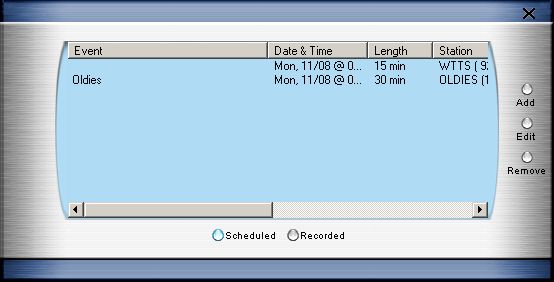
Clicking on the Add button will bring up a dialog box to setup a
scheduled recording event.
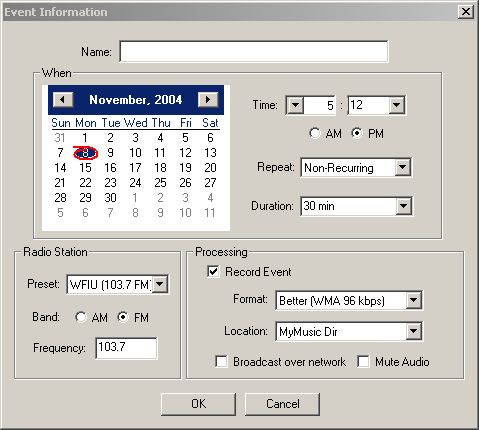
Windows version
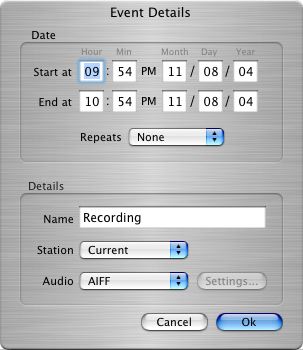
Mac version
Make sure you don’t forget to fill in the Name field in the PC version of the
software. Otherwise it’s really hard to edit or even listen to the recorded show
because you won’t be able to easily click on the title to select it. You can
always go into the saved recordings directory and manually listen to or delete
files though. This is a very annoying bug and will hopefully be fixed in a
future release.
For the Windows version of the software, you can record in either WMA or WAV
format. For Mac, you have the choice of AAC or AIFF.
You can even set the radioSHARK to record the same time slot hourly, daily or
weekly.
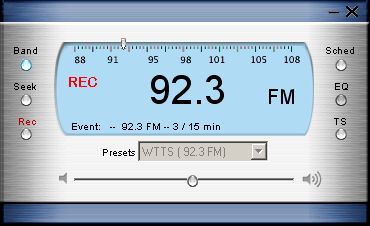
The radioSHARK application will need to be running (or in the system tray) in
order for timers to start the recordings. While content is being recorded,
you’ll notice a red REC in the digital window. At this point you’ll be
unable pretty much do anything with the application except clicking the Remove
button in the Event scheduler window. Doing so will just stop the recording and
will leave the file in the directory to which it was saved. It will also show up
in the recorded list window, but the time length will not match the actual
length of the program.
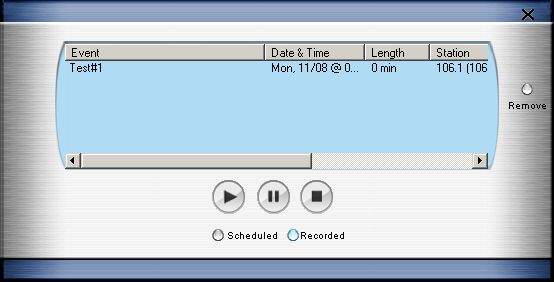
Just like a Tivo or a ReplayTV, you can listen to a recorded show while
you’re recording a new one. Pretty nifty!
Ok, on to the next button… The EQ button should bring up an
equalizer. But it doesn’t do anything… at least not in the Windows version. It
does in the Mac version though.
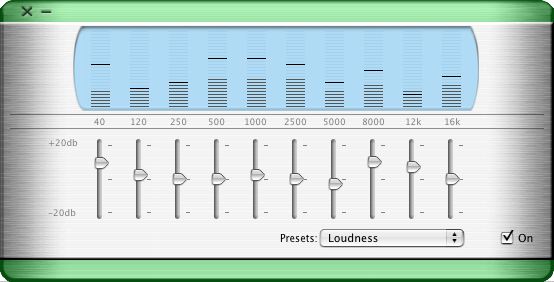
EQ in the Mac version
There are several EQ presets to choose from, or you can create your own and
save them.
The TS button brings up the Time Shift recording command drawer.
Here’s where the real Tivo-ish features come into play. Say you are listening to
the local news or a fave song, and your phone rings. You can just hit the Pause
button and take the call. When you’re finished you can click Pause again and
start listening right where you left off before the phone rang.
This works by using a buffer that you can customize. If you right click on
the application window, you can edit the preferences for the entire application.
The buffer settings are in this settings dialog.
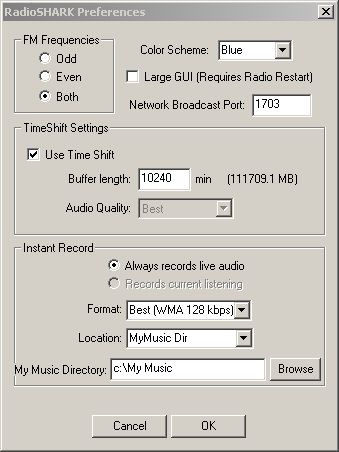
It’s important to note that the buffer is circular. That means
that if you set the buffer to say 30 minutes, and you hit pause for 35 minutes,
the buffer will have over written 5 minutes of the front of the recording.
Here’s another area where the Windows and Mac versions of the radioSHARK
application software differ. In the Windows version, you don’t really know how
much of your time shift buffer that you’ve used. There is a little round ball
that goes from right to left while you have the audio paused. That in itself
seems strange to me. I would think the ball would go from left to right instead
of the other way around. In the Mac version, you are shown the time in which the
pause started, and the progress bar of how long it’s been recording.
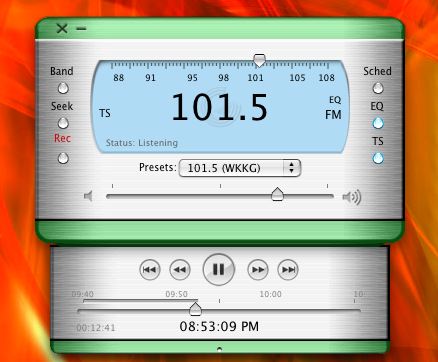
Time shift recording in the Mac version
What about the reception of this USB radio? It’s not bad if you don’t have
your computer room / office in the basement of your house like I do. Strong
stations were not a problem, but weaker ones tended to sound like I had the
radio in a bucket of water. Taking the radio and PowerBooks combo upstairs
resulted in much better reception.
You can improve the reception by plugging in an antenna extension into the
earphone jack on the back of the radioSHARK. Even plugging in a pair of
earphones can help.
The radioSHARK is a cool hardware / software gadget. But the problem is that
the Windows version of the software pretty much sucks. It’s evident that the PC
version of the software was rushed and that the Mac version was the main focus
for this product. During my testing, the PC software crashed on me many many
times while I was either trying to record something, aborting a recording, or
even when I’d just click the X button to exit out of the application. The audio
would also stutter occasionally when I would open other applications or pop
other programs into the foreground. I did not experience these same problems
while testing with the Mac version.
If you’re a Mac user and would love to have the ability to listen to FM radio
through your computer, then this is probably a gadget you’ll want to take a
closer look at. PC users should probably wait until the next revision of the
software comes out though. As is, this product is frustrating on a PC.
Price: $69.99
Pros:
Adds Tivo / VCR style functionality to an AM/FM USB radio
Cons:
Windows version of the software is buggy and crashes often
Windows version of the software lacks an EQ and other small tweaks that the Mac
version has
Pricey
![[MINI SIZE. ULTRA PORTABLE CHARGER]: Roughly the size of an AirPods Pro case, this smallest power bank packs 10,000mAh of long lasting power into a tiny, nano footprint. Easily slide this ultra slim, credit card size charger into your skinny jeans, a...](https://m.media-amazon.com/images/I/41rATpm6dyL._SL160_.jpg)
INIU Portable Charger, Ultra Mini 10000mAh 45W Fast Charging with Detachable Cable, Flight-Safe Travel USB C Power Bank External Phone Battery Pack for Xiaomi iPhone 17 16 Samsung S26 Google iPad etc
(as of June 8, 2026 21:45 GMT -05:00 - More infoProduct prices and availability are accurate as of the date/time indicated and are subject to change. Any price and availability information displayed on [relevant Amazon Site(s), as applicable] at the time of purchase will apply to the purchase of this product.)
tomtoc 7L Sling Backpack Crossbody Bag for Men Women, EDC Daypack Chest Shoulder bag for 14-inch MacBook Pro M5 Pro/Max, 13" MacBook Air/Neo, 13" iPad Air M4/Pro M5, Organized, Daily Use, Work, Travel
(as of June 8, 2026 18:48 GMT -05:00 - More infoProduct prices and availability are accurate as of the date/time indicated and are subject to change. Any price and availability information displayed on [relevant Amazon Site(s), as applicable] at the time of purchase will apply to the purchase of this product.)Product Information
| Price: | 69.99 |
| Manufacturer: | Griffin Technology |
| Pros: |
|
| Cons: |
|

Gadgeteer Comment Policy - Please read before commenting
Post your comment here on the Griffin Technology’s radioSHARK Review.
http://www.the-gadgeteer.com/griffintechnology-radioshark-review.html
Just click the POST REPLY button on this page.
Man, Windows is ugly. I’ve been thinking about getting one of these. Guess its time to take the plunge.
Yeah, I was thinking the same thing–Windows sure is ugly when it’s compared side-by-side to OSX. Trade-offs are made on both sides–it’s your choice which trade-offs are more important, I guess. I’ve always liked the look and feel of MacOS.
(this is a little OT, sorry)
This is a neat little gadget. I really doubt I’d ever use the recording feature, however, it doesn’t seem like something I’d ever need.
HAM Radio Guys would love a product like this that would work on bands that they use or even a wide band scanner for people that like to listen to local police and fire rescue.
I can tell you as one of those Ham guys that while this is good, we’ve had Echolink for quite some time and it has this (and so much more) functionality.
Thanks, Julie.
I’ve been thinking about this for awhile, and your review has helped a lot.
Still not sure whether I’m gonna get one or not…but this is informative.
Sorry if I missed this in the review…can you give some examples of files sizes on the Apple? For example, how large is a 1 hr file?
Thanks
A 1hr AIFF or AAC file at 128kbits would be about 610mb. In other words, very big 😉
Too bad it can not record in the mp3 format too.
Also, it would be nice if it supported RDS (Radio Data System) where it shows you the station’s name that you are tuned to and information about the song currently playing.
Supporting more bands besides AM and FM would be nice too, along with Digital Radio.
It isn’t meant to be everything a lot of you are talking about–it’s only meant to be a simple AM/FM Radio with which you can record radio programs. Nothing more, nothing less.
Kpr:
I agree with you about the RDS. I’ve been in the process of reviewing both the XM and Sirius satellite radio services, and am totally spoiled by seeing the current artist and song title. 🙂
I pre-ordered a RadioShark the day they announced them. I really only wanted to be able to record some specialty shows here on some stations and listen to them at my own convenience. It also just so happens that my boyfriend has a radio show on Friday and Saturday nights from midnight to 3.
Anyway, I set the timer and went to bed. When I woke up the next morning, my computer wouldn’t wake from sleep and it wasn’t really sleeping as every fan in my dual 2GHz G5 was running on full blast. It sounded like a vortex fan.
Come to read that the server app that runs in the background to watch the time and start and stop recording makes it so my Mac won’t go to sleep correctly. Kind of a bummer, but I’ll get around it.
I like it though, but I agree that the Radio Data Service info would be nice to have, but I’m not crying over it.
On a side tangent…I love reading this site, never jumped on the boards before, and here I find that you’re right in my back yard of Columbus (I’m in Indy and went to school in Bloomington, noticed that you had WFIU in the presets on your RadioShark).
girlieleep:
Hello and welcome to the discussion area! You can always find interesting tidbits here 🙂
Thanks for warning on the Windows pitfalls!
I just found your site and don’t know if you review software products as well. I have a weekly day time music show on wwuh.org (webcast and FM), and listeners often ask about ways to record it.
Could you suggest something better than radioShark?
Thanks.
Eugene
Eugene:
At the moment there are only two other solutions that come to mind. One is a software only package that can recorrd Internet radio streams. It is called Replay Radio:
http://www.replay-radio.com/
Then there is a hardware solution called Radio YourWay:
http://www.pogoproducts.com/radio_yourway.html
I’ve not had the chance to try either of these products, so your mileage may vary.
Julie
Thanks! – both solutions are very interesting! I’ll pass them along to my audience and ask for a feedback. If I hear anything, I’ll bring it back to this forum.
I was told about one more product – Total Recorder:
http://www.download.com/3000-2170-10024762.html?legacy=cnet ,
but its features are way below. And noise every 60 seconds – is it a joke?
Eugene
Eugene,
What you, and your listeners, are looking for is a Podcast. You need a way to record your show, which it sounds like you are already doing. Then you post the file as an mp3 to a RSS 2.0 feed. This allows people to subscribe to your feed and download your show and listen to it on their portable player or computer. There are 1000’s of programs out there that will record whatever plays across your speakers to a mp3 file, Podcasting is just a great way of distributing them. Adam Curry has a Podcast that now has 50k+ listeners and Podcasting is only 12 weeks old. You can start by checking out http://www.ipodder.org
Check it out and email me if you have any questions.
Chris Malatesta
chris AT Digital-Waves.net
Informative review; good to know about problems w/Windows. Any information available as to when a new Windows version will be available?
I am having several problems with my RadioShark. I am running Tiger on a Mini. My Shark is plugged into a USB hub. I am running RadioShark 1.0.5 (RS73).
The main thing I record is Howard Stern, a 5 hour show. I record with 64kbs AAC, with the lowest quality setting. I do make it bookmarkable.
My problem is that sometimes two shows are mixed into each other. For example:
Monday’s show is normal, 5 hours.
Tuesday’s show is short, 2.1 hours – with 1-10 minute chunks missing throughout.
Wednesday’s show is long, 7.9 hours – Wednesday’s show with the missing parts of Tuesday’s show randomly mixed in.
The above example is actually a little better than what actually happens. This week several shows overlapped… and Thursday’s doesn’t show up at all.
Thanks,
Chris
There’s some new recording software that works with the radioSHARK. It’s called Snaptune and it can record FM radio to your Windows PC. But it doesn’t just record, it can then find songs, talk segments and other ‘interesting’ bits and tag them automatically. You get a grid showing the songs playing on the radio and for NPR it will break apart the news shows into separate stories so you can listen to just the ones you want.
http://www.snaptune.com
Looking for an MP3 recorder for Radioshark.
I have tried both
Total Recorder http://www.highcriteria.com/
and
Snaptune http://www.snaptune.com
but no luck.
Does anyone out there have another peice of mp3 recorder/scheduler software that works with radio shark!!??
Thanks
Alex
If you use OSX, then you should be able to use GarageBand