
It is a known fact that home office floors are the perfect environment for
spaghetti breeding grounds. Not Italian spaghetti, but cable spaghetti! Just
look under your desk and you’ll see exactly what I mean. Need a real example?
Then check out these pictures of just a few of the items that I have in my
computer room at the moment. The scary thing is that I’m in the middle of a
remodel in this room and have only about 1/3rd of my hardware setup and plugged
in.
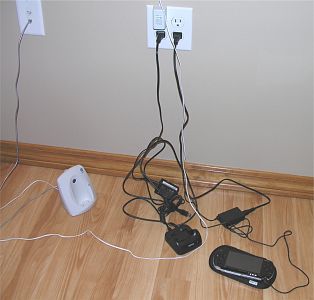
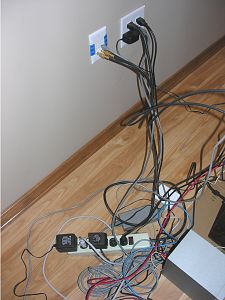
Have you ever tried to track down the plug for a PDA cradle or digital camera
charger in the tangle of wires under your desk? Not much fun was it? They say
that clutter is a cause of stress and stress kills… None of us want to die, so
what if
there was an easier way to keep your mess of wires neat and manageable? I think
I may have found just such a solution with CORDination Station PRO Series 1 from
Leap Technologies.
The CORDination Station is a plastic housing designed especially for
organizing and powering your collection of adapters, cables, and cords. It comes
in black with a black lid, black with a silver lid, white, and two different
styles of cammo for those of you that want to go with the Army look.
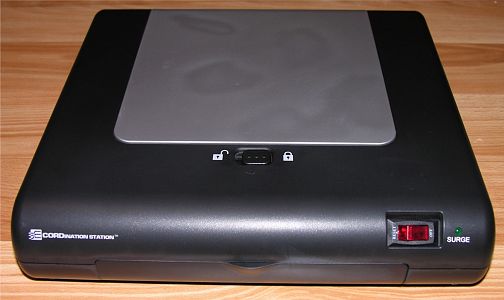
Hardware Specifications:
Size: 12"L x 12"D x 2.75"H
Weight: ~3.5lbs
Power:
10 outlets, grounded 110 volt,
3400 joules of surge suppression,
built-in 15-amp circuit breaker
Here’s how it works. The top of the CORDination Station has a lockable hatch
that pops open to reveal a 430 cubic inch cavity for storing your ‘mess’.
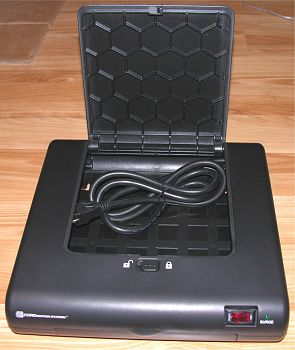
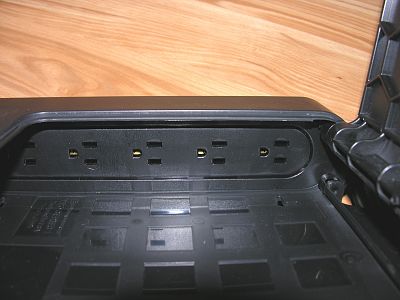
The left and right interior walls of the unit each have a 5 outlet power strip
built into them where you can plug in your various power adapters for PDAs, Cell
phones, printers, etc. The maximum clearance for an adapter is a little more
than 2 inches. This can be a problem for large power bricks.
The front and back of the unit have pass thru doors that you can use to route
your cables in and out of the box. The doors snap open/closed relatively easily,
but when closed there are no grooves for cables. Basically if you use these
doors to route your wires, you’ll need to leave the door(s) open.
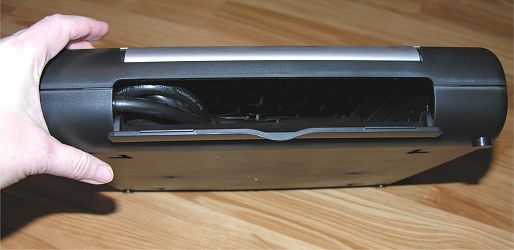
A heavy duty 4.5ft 3 prong cord is attached inside the CORDination Station
and must be routed through the back door in order to power the unit and the built-in
10 outlets.
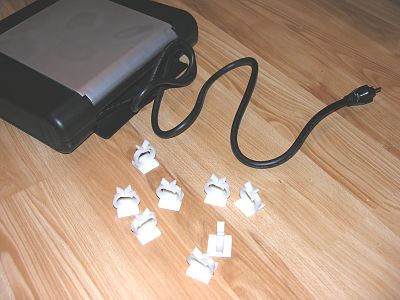
Also included with the CORDination Station are 10 self-adhesive plastic cable
holders. These holders have a square base that match the squares that are
stamped into the floor of the unit. Using the holders, you can layout how you
want to organize your cables.
Even though there are 5 outlets on each wall of the unit, you probably won’t be
able to use all 10 outlets. Why? AC adapters are so large that they tend to
cover adjacent outlets. As you can see below, I was able to plug in two adapters
and was left with only 1 open outlet on the very left.
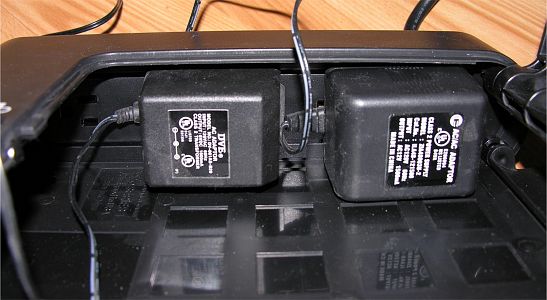
430 cubic inches may sound like a lot of room, but thick cables quickly fill it.
Of course, I could have crammed quite a few other cords into the space, but I
wanted to be at least semi neat. I ended up installing the AC adapter for my 5
port Ethernet switch, AC adapter for my speakers, power cable for my
Airport Express WiFi module and the big power brick for my Direcway satellite
broadband modem. I wanted to also add the small AC adapter for my Logitech
MX1000 wireless mouse, but the prongs of the adapter were oriented in such a way
that the adapter would not fit in the allotted 2in tall space.
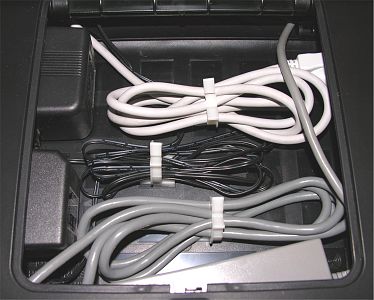
In the configuration above, I still had the ability to plug in 4 more items
into the right power strip.
With the lid closed, you can see the various cables protruding from the back
access door. Not quite as elegant as it could be if there were some grooves in
the door to route the wires through while still being able to close the door.
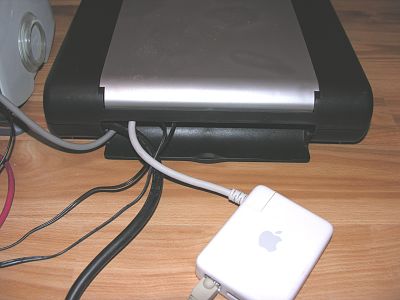
After everything was connected again inside and outside the unit, I plugged
in the CORDination Station’s main power cord into the wall and flipped the power
switch on the front to the ON position. I was half afraid that my lights would
dim or a breaker would blow, but everything booted up just fine!
From just moving 4 items into the CORDination Station, I was able to ditch my
power strip and declutter the floor behind my desk a bit (see pictures below). I
guess I could have stuffed all the CAT5 cables into the box too. Not sure how
well CAT5 can tolerate extremely close proximity to power cords though.
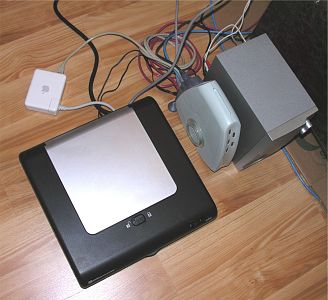
Left to right: Before and After
You don’t have to leave the CORDination Station on the floor. You can mount
it on the wall or even use it as a monitor stand on your desktop. The unit can
support up to 45 lb.
The CORDination Station is a product that will help you get your cable
problems under control. The unit is sturdy and well constructed. If it was
slightly larger in order to accommodate wider AC adapters, and had grooves in
the access doors, this would be almost a perfect product. As is, the CORDination
Station Pro Series 1 might already be perfect for you.
Update 07/21/17
I forgot all about this product until just a couple days ago when I was boxing up some hardware to send back to AT&T after having my T1 line disconnected. This glorified power strip has been sitting under my desk, powering routers, a printer, and other devices for over 12 years. It’s kept the cord clutter under control all this time while powering my gear. Now that I don’t need the Cisco router, a landline modem connected to the router, a WiFi router and some other devices, I no longer need to use this power “strip”, but I’m definitely keeping it in a cabinent for the next time I need to keep things neat, tidy, and powered.

2-Pack LED Video Light Kit, NiceVeedi Studio Light, 2800-6500K Dimmable Photography Lighting Kit with Tripod Stand&Phone Holder, 73" Stream Light for Video Recording, Game Streaming, YouTube
(as of June 9, 2026 04:52 GMT -05:00 - More infoProduct prices and availability are accurate as of the date/time indicated and are subject to change. Any price and availability information displayed on [relevant Amazon Site(s), as applicable] at the time of purchase will apply to the purchase of this product.)
ALTSON 60 LED Portable Selfie Light Video Conference Lighting with Clip & Camera Tripod Adapter Rechargeable 2200mAh CRI 97+, 3 Light Modes for Phone iPhone Webcam Laptop Photo Makeup
(as of June 9, 2026 08:49 GMT -05:00 - More infoProduct prices and availability are accurate as of the date/time indicated and are subject to change. Any price and availability information displayed on [relevant Amazon Site(s), as applicable] at the time of purchase will apply to the purchase of this product.)Product Information
| Price: | 59.95 |
| Manufacturer: | CORDination Station |
| Pros: |
|
| Cons: |
|

Gadgeteer Comment Policy - Please read before commenting
Post your comments here on the CORDination Station PRO Series 1 Review.
http://www.the-gadgeteer.com/cordination-station-review.html
Just click the POST REPLY button on this page.
Neat, but only “kind of” neat.
While it DOES help clean things up, it doesn’t go far enough to do it. It needs to be bigger if it really means to accept techie plug-ins. That means AC Adaptors, and as was shown, it doesn’t cut it.
The review was okay, but not critical enough of this product’s shortcomings.
Strider:
I recieved some comments back from the manufacturer regarding the review which may be of interest:
I would be interested in seeing the ‘pigtail’. I’ve left the CORDination Station plugged in as showed in the pictures. I may try to stuff even more stuff into it when I’m ready to move back into the office after the remodel is finished next week.
The pigtails they speak of are available commercially.
They allow AC Adaptors to be plugged into outlet strips without losing outlets to the bulkiness. Some of the nicer ones also have outlets on the back side of the plug, so that you not only reposition your AC Adaptor, but you don’t even lose the outlet! 😀
Looking at the review again I realize that I’m seeing this product through a fairly overequipped geek’s eyes, and that most regular folk would probably get good use out of this item.
SO while it’s not good for me, it doesn’t neccessarily mean it’s not good.
(Sorry if it was implied.) 😮
Great follow up!
🙂 🙂
strider:
Hey, we’re all entitled to our opinions right? 🙂 As for the pigtails, I’m not sure I’ve ever seen them. Do you have a picture so I can see what we’re talking about?
Jules – a pigtail is a mini (usually 6″ or so) extension cord that gets the bulky plug off the power strip, so that a full strip of regular plugs will fit. 🙂
Here’s a link to some:
http://www.cyberguys.com/templates/searchdetail.asp?T1=121+2529&dept=lch28&search=&child=
(try the more images button for application shots.)
And some other cool power stuff:
http://www.cyberguys.com/templates/searchproducts.asp?s=SP&dept=lch28&search=&child=
😀
The CORDination Station is an interesting premise but once you’ve used a few of those pigtails to relocate your power bricks/transformers outside the unit, you’ve kinda defeated the whole purpose of the box to conceal all of the muss ‘n fuss. By the time you get a cable modem or DSL box, a printer, and a pair of speakers, even novice users have at least 2-3 power bricks in their setup. Have an Ethernet switch? PDA? Got a cordless phone nearby? Paper shredder? Yup, those power bricks add up quickly!!
I’d recommend bypassing the CORDination Station and suggest instead bundling up your excess cords with zip ties. Take a deep breath, shut down your PC, disconnect cables and secure them one by one, and you can tame that rat’s nest in just a few minutes. You’ll acheive just about as tidy a look and have $60 spare to apply towards something really useful – like a DVD burner! 😉
The Power Strip Liberators (from Cyberguys) that strider_mt2k mentioned are indeed quite handy and well worth having a few spares on hand.
Also, if the door to the enclosure has to be open at all times, why not simply omit an essentially useless ‘feature’ that’s only likely to either get in the way or end up getting snapped off accidentally?
[INDENT]Review: Good! :)[/INDENT]
[INDENT]Product: Not so good :([/INDENT]
Rob
Another solution that I’m going to try out is a cable tray. I’m still in the middle of my office renovation, I had the contractor put the outlets 2.5ft from the floor and will mount some trays under the desktop at the back edge.
Something similar to this stuff:
http://cableorganizer.com/wire-duct/