
Product Requirements:
Windows Me/2000/XP/2003, USB Port, IBM
or Compatible Systems, Mac, a non-metal desk
Not too long ago, I got my first rechargeable wireless mouse. I absolutely
love the thing, but I have to admit that there have been several times where I
have forgotten to put in in its holster at night to charge. Inevitably, I’ll be
working on something important later, and the mouse will just die. Oops,
my fault!
As far as I can see, that is the only real drawback to using a rechargeable
wireless mouse. However, there is a product available that eliminates user
errors such as mine – the
NB30 battery free wireless optical mouse, by
A4 Tech.
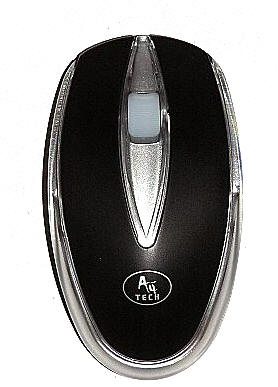
Instead of a package that includes a rechargeable battery driven mouse with its
charging holster, the NB30 includes a battery free mouse and its special
inductive mouse pad.
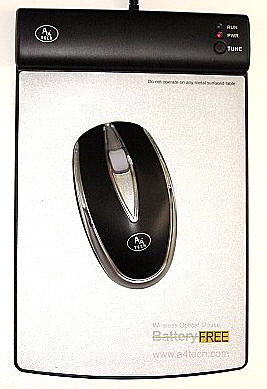
In the package is: the NB30 mouse, the inductive mouse pad and an instruction
manual. I thought it was amazing how simple and straightforward the manual was –
it would appear that there really isn’t much room for error, user or otherwise.
The mouse pad has a 5′ long cord that needs to be plugged into an available
USB port on the user’s computer. The unit is completely plug and play, but just
in case – there are Mac and PC drivers available on the A4 Tech
site.
Through the use of "electromagnetic induction technology", the mouse is
always able to operate so long as it is on the special pad. If your desk is
metal, or if it has a metal core, the mouse and pad will not function properly
(if at all) – unless you put something the approximate thickness of a book (1"
to 2") between the pad and the desktop.
The pad itself is approximately 9.75" tall x 6" wide and no more than 0.02"
thick for most of its body. The pad area is composed of a very lightly textured
silver plastic surface. At the black plastic top, where I presume all of its
electronic guts are situated, it measure 0.5" thick.
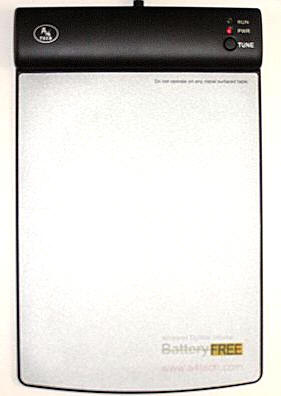
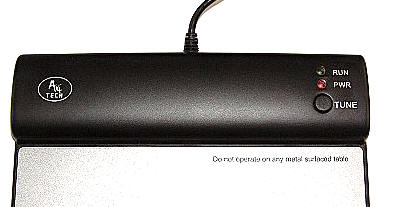
The top of the pad has two LED lights labeled RUN and PWR. Under those is a
button labeled TUNE. As soon as the pad is plugged into an available USB port
the power light will shine red. When the mouse is laid on the pad and
jiggled, the run light will shine green. The tune button is used
only if the mouse cursor does not move, is not moving smoothly, or when the red
power light blinks. Pressing the tune button adjusts the radio frequency of
the mouse to the pad.
The mouse is made of a combination of clear, black and silver plastic. It
measures 4.5" long x 2.25" wide x 1.25" thick and weighs just 2.7 ounces. The
right and left arms of the stylish black "V" on the top of the mouse are
actually the right and left click buttons. A red light glows from within when
the mouse is used, which lights up the wider than usual jog-wheel.
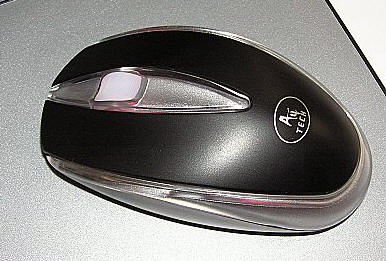
The mouse is a bit smaller and lighter than the rechargeable version I am used
to, most likely because of the absence of a battery. The NB30 glides across the
pad smoothly, and it is a real pleasure to use. Since it is the intuitive thing
to leave a mouse lying on its pad, the user will never have to worry about
whether the mouse is "charged" or not. It is ready to work when needed. If you
have been considering a wireless rechargeable mouse, then you owe it to yourself
to take a look at the NB30, too. Not only is it less expensive than most
wireless mice, you will never have to worry about whether it is ready to work or
not.
The A4 Tech NB30 battery free wireless optical mouse is available
here.
Price: $39.95
Pros:
Plug & Play
Runs from USB, does not require a power outlet
Simple to use
No batteries
Can’t forget to charge, as there is no need
Excellent price
Cons:
None
![[MINI SIZE. ULTRA PORTABLE CHARGER]: Roughly the size of an AirPods Pro case, this smallest power bank packs 10,000mAh of long lasting power into a tiny, nano footprint. Easily slide this ultra slim, credit card size charger into your skinny jeans, a...](https://m.media-amazon.com/images/I/41rATpm6dyL._SL160_.jpg)
INIU Portable Charger, Ultra Mini 10000mAh 45W Fast Charging with Detachable Cable, Flight-Safe Travel USB C Power Bank External Phone Battery Pack for Xiaomi iPhone 17 16 Samsung S26 Google iPad etc
(as of June 8, 2026 21:45 GMT -05:00 - More infoProduct prices and availability are accurate as of the date/time indicated and are subject to change. Any price and availability information displayed on [relevant Amazon Site(s), as applicable] at the time of purchase will apply to the purchase of this product.)
tomtoc 7L Sling Backpack Crossbody Bag for Men Women, EDC Daypack Chest Shoulder bag for 14-inch MacBook Pro M5 Pro/Max, 13" MacBook Air/Neo, 13" iPad Air M4/Pro M5, Organized, Daily Use, Work, Travel
(as of June 8, 2026 18:48 GMT -05:00 - More infoProduct prices and availability are accurate as of the date/time indicated and are subject to change. Any price and availability information displayed on [relevant Amazon Site(s), as applicable] at the time of purchase will apply to the purchase of this product.)Product Information
| Price: | 39.95 |
| Manufacturer: | A4 Tech |
| Pros: |
|
| Cons: |
|
