
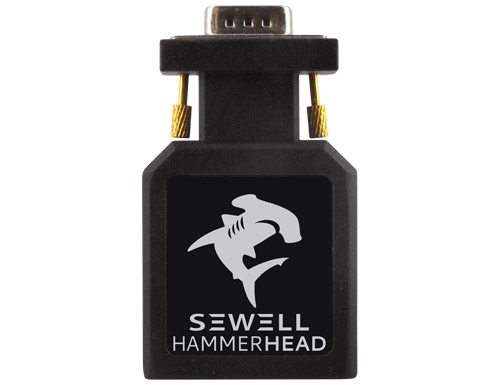
I have looked for a solution for a long time to connect my laptops to my various TVs. I have avoided buying converter boxes because I simply didn’t want the hassle of buying yet another device to go in my entertainment center and then have to fish the cables out when I wanted to move it to another TV. I just wasn’t interested, and the prices were always a little too high. So the Hammerhead VGA to HDMI converter from Sewell intrigued me. Could big things possibly come in small packages? Let’s find out.
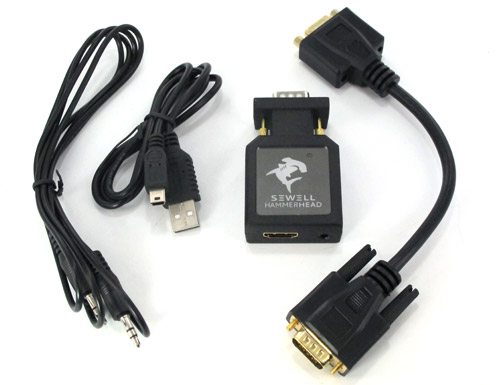
Let’s talk first about the specs of this little powerhouse. It comes in the box with a VGA cable, a 5 ft 3.5mm audio cable, a 2.5 ft mini USB cable (used for power from the PC), and a user’s manual. When I say ‘user’s manual’ I use that term loosely because the user’s manual is pretty much a joke. It not only didn’t help me figure out how to connect the device, I could barely read the text inside it because the text was so small. User’s manuals are not universally included anymore, but if you are going to include one you need to actually make sure it is useful.
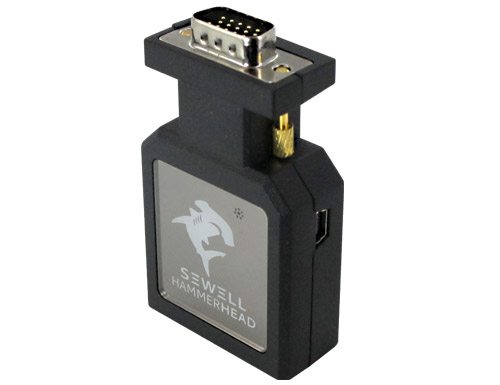
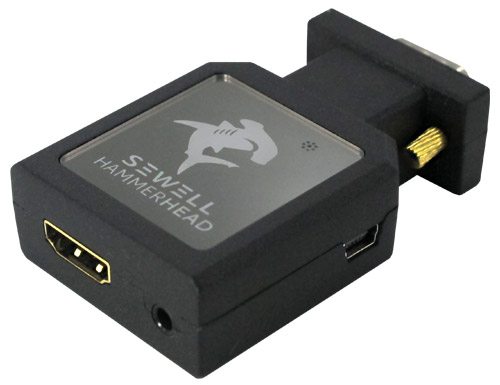
On the Hammerhead, you will find a mini USB connection on the side (used to draw power from the PC), a VGA input on one end, and the HDMI output and stereo audio input on the other end. I should mention that Sewell says that the power connection via USB may be required if the VGA port on the computer can’t push the video and/or audio signals strong enough. The only way you will know if the USB connection is required is if you try to use the Hammerhead and the audio or video signal won’t work. I did not need the USB connection in my testing. There is an indicator light on the Hammerhead that shows you when the Hammerhead is functioning, and the Hammerhead can support computer monitors up to a 1920 x 1200 resolution @60Hz.
I also wanted to post here the list of the computer monitor resolutions that the Hammerhead supports. This list is directly from Sewell’s website:
640*480@60Hz, 640*480@72Hz, 640*480@75Hz, 640*480@85Hz
720*400@70Hz
800*600@60Hz, 800*600@72Hz, 800*600@75Hz, 800*600@85Hz
1024*768@60Hz, 1024*768@70Hz, 1024*768@75Hz, 1024*768@85Hz
1152*864@75Hz
1280*720@60Hz
1280*768@60Hz, 1280*768@75Hz, 1280*768@85Hz
1280*800@60Hz, 1280*800@75Hz, 1280*800@85Hz
1280*900@60Hz
1280*1024@60Hz, 1280*1024@75Hz
1360*768@60Hz
1400*1050@60Hz
1440*900@60Hz
1600*1200@60Hz
1680*1050@60Hz
1920*1080@60Hz
1920*1200_RB@60Hz
1920*1200@60Hz
Performance
So how did the Hammerhead perform? Fantastic. I tried the Hammerhead on 3 of my HD TVs, each a different brand, and it worked superbly on all 3. The image is just great, and I couldn’t be happier. The first HDMI cable that I used would not transfer the audio signal – even with the help of the USB power cable, so I swapped the HDMI cable out for another HDMI cable and it worked just fine. The first cable was a 50 FT cable and it was old. I am not sure if the length or the age of the cable caused the audio signal problem, but the second 6 ft. cable worked just fine without the need to use the USB power cable.
The only other problem I had was that the gold screw posts on the side of the Hammerhead that you use to secure the Hammerhead to the VGA cable are not easy to use at all. My fingers couldn’t twist the posts to actually get them to connect to the VGA cable because they are awkwardly positioned. Or perhaps my fingers are just too fat. I eventually gave up. But that was not a deal breaker for me.
Bottom line
The Hammerhead is an excellent device that delivers an excellent video signal. Its construction is solid, and the small size makes it perfectly portable and easy to store. You’ll need more space to store the HDMI cable than the Hammerhead. And the list price of $65.95 is just right for my budget. I believe you can even find it for less than that online. I highly recommend this product.
Product Information
| Price: | $65.95 |
| Manufacturer: | Sewell |
| Pros: |
|
| Cons: |
|

Gadgeteer Comment Policy - Please read before commenting
The input/ouput configuration you describe sounds odd to me. It makes more sense for the audio to be an *output* from the computer, which is then combined with the VGA *output* from the computer. This would yield an HDMI *output* from the Hammerhead, which would allow it to supply both to a TV. Otherwise, where does the sound come from?
@AndyVan You are right. If I was unclear in my description (I will check and correct if so) then I apologize. That is exactly what happens… audio output and VGA output from the computer is combined to send the HDMI signal to the TV.
Would you happen to know whether the device works in the other direction? Specifically, to connect the HDMI output of an Apple TV to the VGA input of an overhead projector?
@AndyVan I change that one word “output” to “input”. Thanks for catching that.
@David Conrad No, it can’t go the other way. The VGA and Audio connections on the Hammerhead are input only and the HDMI is output only.
How well does text render? That’s the most common problem with converters like this – pictures look fine, but text is fuzzy.
@thsu I looked again today at the signal through the Hammerhead and the text looks good to me. It looks much better than with previous methods of connecting to TVs that I have seen. I do see what you are talking about in regard to the fonts looking a little fuzzy in some cases. I actually think that has to do with the font face used, as some fonts are clearer to me than others.
From the initial look of this adapter it seems to be ideal for what my company is trying to do. We recently got a 55″ led tv and sadly…no vga port on the back. We have a Polycom video chat system and originally we would plug in laptops to the main box and it runs across a 50ft VGA cable to the projector.
Now with the new TV there is no VGA so we need to convert the VGA to HDMI. I tried a simple vga to tv converter and the text was very difficult to read. I know this adapter is more centered around the visual clarity of images and so our main concern is the clarity of text. Especially for something like spreadsheets and power points.
We really dont intend to do any “HD” stuff so simple PC resolutions of 1024×768 or even 1280×768 is what we would be working with. Ultimately we are looking for a good way to use our polycom system with our new tv.
We can replace the 50ft vga cable with a high quality 50ft hdmi cable but i am really interested to know how the text looks using this adapter.
@Steve Baker As a previous user posted, these adapters have issues sometimes with text. As I mentioned, I don’t see a big issue with fuzzy text when I use the Hammerhead. At a price this low, my suggestion is to purchase one and try it. If it doesn’t provide you the results you want, then you could still use it inside your company somewhere, I am sure. You can then opt for a more expensive solution. And purchasing a higher quality HDMI cable is also something that you can continue to use, so you won’t be stuck there either.
Hey Steve,
I just got this adapter to hook up to my Panasonic Plasma and I can’t get any picture on the TV. I tried hooking it up with a really cheap HDMI cable so is it possible that’s the issue? Thanks for the help!
Steve Holt!
You forgot to say…. Steve Holt \0/
My first guess is that the cable is the problem. I have used cheap cables and expensive, and I feel like you get what you pay for. In my review I detailed that I had problems with a 50 ft. old cable that wouldn’t work. Wish I had more advice for you… maybe someone else will post a solution.
Steve,
I just got my HammerHead connected to my Panasonic TH-50PX60U plasma TV on HDMI-1, even with USB power cable connected. But I cannot see anything on TV. Should I press any key on my Laptop, such as F8 as in the case using presentation? The cable was ordered with the converter (6ft). I selected HDMI-1 on my TV after connected to HDMI-1.
Any comments will help.
Thanks,
Marcus
@Marcus I did indeed have to press a function key to get the signal to output from my laptop. All laptops are a little different in that regard. Also you need to make sure that your screen resolution and settings match one of the supported ones listed on this page.
If you don’t see any picture at all, try using a type II HDMI cable. It is capable of carrying the 1080P bandwidth, whereas the type I does not: it will carry lower resolutions like 720P. Also, on text, look at the advanced settings on the computer, after you set up the adapter as monitor 2. Some cards and programs have a setting to address shudder or jitter. Play with that control, and you may get a clearer text picture.
When first installing this device between my HP Elitebook 6930p PC’s VGA output to an HP ZR2440w monitor, got an excellent 1920×1200 display. However, upon reboot, the resolution reduced to 1280×768, which is now the maximum resolution, and there is no Advanced settings to change the type of display device or anything else I can see that will allow for increased resolution. The PC is running XP. Is there a driver or something that can be loaded on the PC, to have the PC recognize a device with a higher resolution? Thanks!
@John unfortunately I don’t know enough about Windows driver issues to help you. Anybody else??
What resolutions this device reports to the OS (Windows XP in my case)? If I try to connect my old notebook to my brand new 60″ LED Samsung TV using a VGA cable, the only resolutions availabe are 800×600 and 1024×768 (4:3 formats). If I connect the same notebook to a real 22″ LED Samsung Monitor, I got a lot more of resolutions available (4:3 and 16:9, like 1360×768). Connecting to this adapter, what are the resolutions that the PC sees? Any 16:9?
@James Well, basically the Hammerhead works like this… the PC pushes out whatever signal the PC can push out. You get to select that by adjusting your resolution settings. (You also have to keep in mind that you get to pick the Hz setting on your monitor and you may have to adjust among those available settings to get the best output.) Then the Hammerhead receives the signal, converts it to HDMI, and sends it to the TV. So you have to be concerned with what types of input resolution that your TV accepts. So I could be wrong of course, but I don’t believe that your OS will ‘see’ any resolutions on the Hammerhead. Your PC is what is driving the output resolution not the Hammerhead. As far as what the Hammerhead accepts…. there is a long list in my review above. The good news is that Sewell’s tech support is really top notch, and it is free to any domestic consumer. Just call 1-800-709-1345 between 8am-5pm MST. Good luck!
Hi my laptop screen is busted and am tired of using a 22″ as my screen. I am wondering, if it will automatically adjust to the resolution of my 32″ Philips HDTV before I make a purchase
@Tanner I am sorry, but I can’t say for sure. There is a list of supported resolutions in my review that came directly from Sewell. If your computer outputs in one of those resolutions, and your TV can accept that input resolution, it should work. But one of the great things about Sewell is their customer service. You should be able to call their sales line and they can probably tell you if it will work. Good luck!
Has anyone got vga from laptop to work with hdmi on panasonic tv? Info, My tv is panasonic viera p65st60y.
What specs need to be compared when shopping for a converter box? I have seen the resolution listings and transmission rate. What is a good transmission rate for video? Are there any other specs I should look at? thanks
@Joan I wish I knew more about the technical aspects of video, but alas, I don’t. I rely on Google to answer questions like this for me. This is a great technical resource for HDMI: http://en.wikipedia.org/wiki/HDMI
Good luck!