
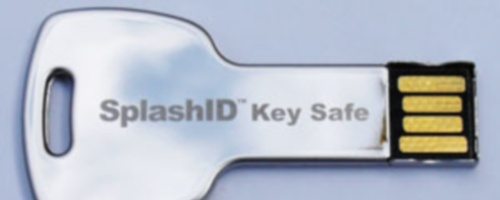
Lots of passwords and private information? Use a lot of different computers? Having trouble keeping them all straight and secure? Splashdata’s SplashID Key Safe may be your solution!
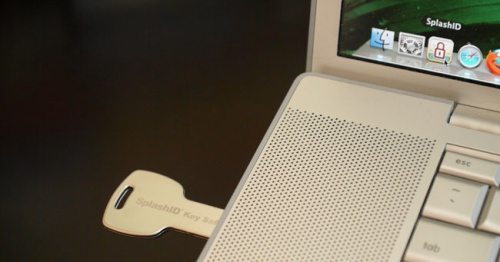
The Key Safe is a key-shaped USB thumbdrive with a dedicated copy of SplashData’s SPlashID 5 on it. We’ve reviewed older copies of Splash ID here and here. The key itself is about the same size as a regular key and should fit on a keyring well. It also seems reasonably durable. It can hold about 2Gb of data, and the native program only takes up about 17Mb, including a sample database.
When you plug the Key Safe into your Windows XP or better or Mac 10.4.11 or newer machine, you are taken through a quick set up to set a password, etc. It handily measures the security of your password so you can select a good one. From that point, every time you use the key, it prompts for your password and autoplays the SplashID program.
SplashID is, at heart, a database. Like any other database, you gotta set it up. This is a rather tedious process, but the better you do it, the better everything will work. You have several editing options, including ‘mask’ which hides data under a series of stars unless you unlock it.
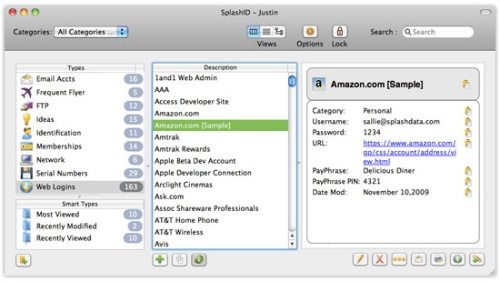
As in earlier versions, there is a password generator built in, and a web auto-fill option. Very handy! Your data is protected both by strong encryption and by the fact that it is on a removable USB drive that you can take with you, use on multiple machines, etc.
Key safe is portable, handy, secure, durable, and decently priced at $29.95. You can even use it as a thumbdrive, although you have to use the ‘explore’ option to bypass SplashID’s autoplay. (Note- items stored on the thumbdrive outside of the database are not protected.)
There is not really a downside here. The on-board manual is for SplashID5, not specifically for the Key Safe, so it includes registration data, etc. that is not applicable. Otherwise the biggest ‘con’ (other than database set-up) is just if you really need this with all of the other options available to us.
Product Information
| Price: | $29.95 |
| Manufacturer: | Splashdata |
| Pros: |
|
| Cons: |
|

Gadgeteer Comment Policy - Please read before commenting
…or the cheaper alternative that uses AES/Blowfish encryption on any hard drive or usb thumb drive of your choosing at a lower price (because you bypass the s/h cost and the snail mail delivery (most popular in PRO IT groups/teams):
http://www.roboform.com/php/pums/rfprepay.php?lic=default
Heck, if this was a technique article instead of a product review, I would have mentioned that I don’t use any of that stuff anymore. Instead, I use contacts on my Android and use a substitution cypher to encode my passwords and PINS. Free and easy for me, but I don’t have a lot of codes to worry about.
I use SplashID on my Mac, iPhone, and iPad and love it because the fields are user definable either by category or within a specific record, it’s incredibly reliable, syncs between my iOS devices and desktop, and works on Android, Windows Mobile, Windows, and Blackberry.
The Roboform thingy is web-based and the Roboform2Go thumb drive only works with Windows, that’s it.
If I weren’t going to use SplashID then I’d use 1Password, which is also great and like SplashID has web autologin and Blowfish encryption.
I’m traveling for a year so I’m going to get this puppy.
I highly recommend SplashId , because i have used it myself. Browser integration is fabulous. Also it is very easy to use. As soon as you create your account, you can actually set a pattern for splashid login, therefore you technically have to remember zero passwords. Extremely secure for USB usages as well. highly recommended.
It is a wonderful password management tool that i have ever come across. I like the draw a pattern feature for unlocking or locking your asset. It is much easier for me to keep track of my passwords and credentials (all at one place) now.
I have used the windows version of SplashID and found it really good. User friendly and the best password management tool i have ever used. All the passwords are categorized based on your use and it can also sync to your web passwords in the browser. awesome experience.
Being essentially a database, Splash ID Safe [www.splashdata.com/splashid] offers more benefit than just username-password management. In fact, they recently featured teams and enterprise editions that allow management and sharing of critical business records.
KeePass is free, open-source, and cross-platform compatible. I also use an ecrypted usb drive. One con I’m surprised I didn’t see mentioned is the $29.95 price tag (which will also entail eventual upgrade pricing of about $10 — which customers will be forced to pay when the current version of SplashID no longer works on their systems). Get a version of Keypass here: http://keepass.info