
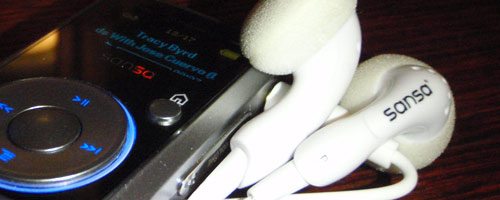
I have been using my second generation iPod Shuffle for years now. I primarily use it running and during tasks that would put my Touch in harms way. My Shuffle has truly been a trooper… I have dropped it, washed it, sweat on it, etc. It continues to keep putting along. That said, I tried out the third generation Shuffle for about a week when it first came out. My oh my, did it disappoint me. However, the experience did get me thinking about what was out there that could tempt me away from my trustworthy running companion. My searches led me to the SanDisk Sansa Clip, a small, lightweight mp3 player with a boatload of features, an actual screen and great bang-for-the-buck price point.
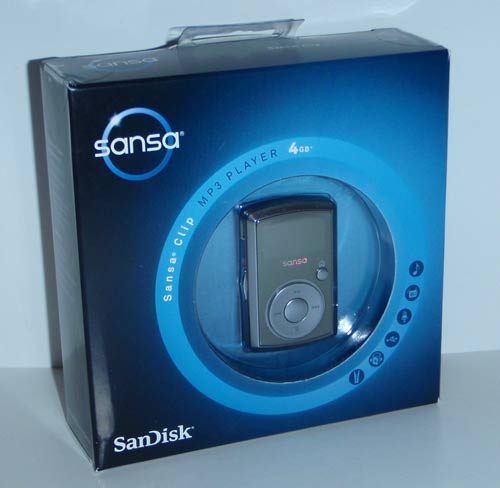
The Sansa Clip is relatively small, seems like SanDisk could have packaged it in a quarter the volume.
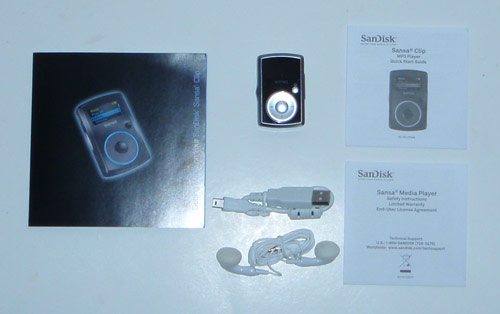
Package Contents
- Sansa Clip MP3 player
- USB 2.0 Cable
- Earphones
- Quick Start Guide
- Installer CD
- Clip Attachment
Hardware Specifications
| Capacity: | 1GB • 2GB • 4GB • 8GB |
| Colors: | Black, Pink, Red, Blue, Silver |
| Battery: | 15 hours of playback |
| Headphone Jacks: | standard 3.5mm |
| Radio: | FM tuner/40 presets |
| Recorder: | Built-in microphone |
| File Support: | MP3, OGG, FLAC, secure WMA & Audible files |
| Dimensions: | 2.17″ x 1.35″ x 0.65″ |
| Weight: | 0.92 oz |
| Screen Size: | 1″ landscape |
| Warranty | One year |
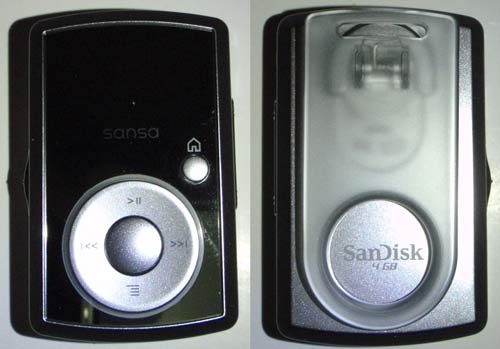
For a plastic device, the Clip is well made, a quality device. On the front of the Clip there is the main control wheel, center button, and a small home button. The control wheel looks like it should have scroll functionality (like on the iPod) but clicks in four directions; up for play/pause, down for the menu, and left/right for reverse/forward skip. The center button clicks whatever is selected on the screen. The home button is an excellent feature that allows you to quickly get to the main screen if you are lost in the sub-menus.
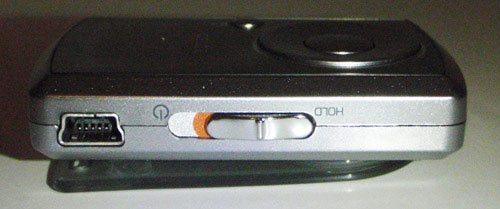
The left side of the device has the standard mini-USB port and power/lock control switch. Both of which are great features that SanDisk engineered into the Clip. The non-proprietary input/charging is a definite plus with all the mini-USB cables and chargers I have in my world. The lock function is also nice so that the device is not accidentally tweaked while I am running or working out.
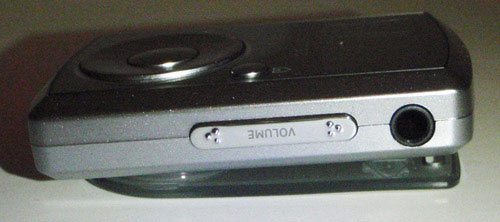
The right side of the device has the volume control and headphone jack.
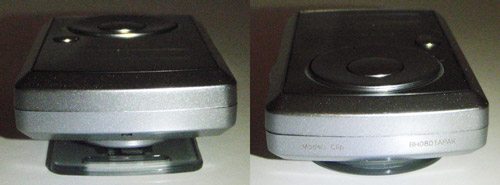
The only item to mention on the top and bottom of the Clip is the tiny microphone hole on the back-top of the device.
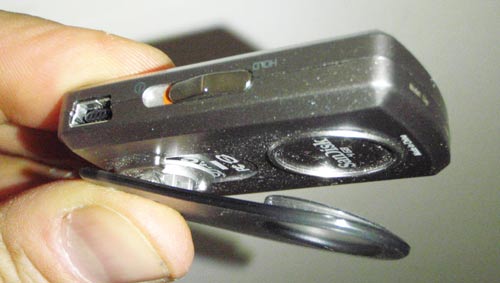
The Clip’s clip is made of plastic and the spring is stiff enough to keep the device attached to your clothes. The clip is the most breakable part of the little mp3 player. Thankfully, the clip is replaceable in the event that happens.
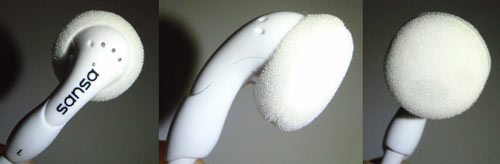
The earbuds SanDisk includes with the Sansa Clip are good enough for exercising and (at least) on par with the standard iPod earbuds.
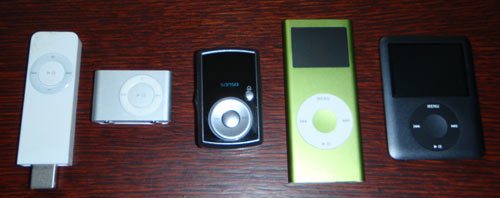
With its small but effective screen, large capacity, and great overall functionality, it seems like the Clip’s design could easily have been the evolutionary path of Apple’s 3rd generation Shuffle.
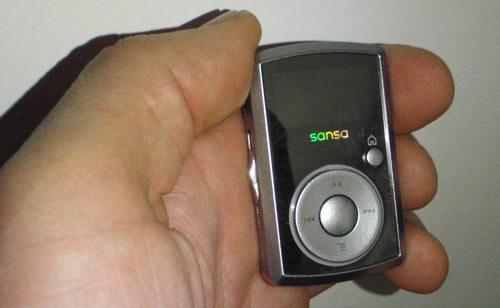
I am fairly certain I could not break the Clip by crushing it in my hand (although, I am not sure it would pass Julie’s creak test). The Clip probably could not take as much punishment as the Shuffle but is hardy enough withstand the riggers of most situations. While its not as tough as the 2nd & 3rd generation Shuffles, it more than makes up for this in features and functionality.
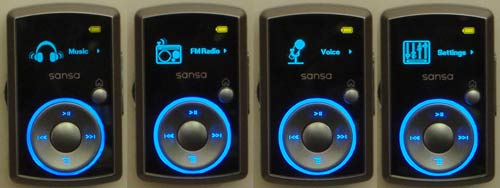
Considering its size and relatively low cost, the Sansa Clip is incredibly feature rich. The little screen does not support photo or video files but does provide you a great deal of information and control. The one inch screen is relatively large (considering the size of the device), bright, and very clear.
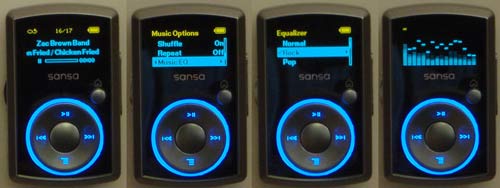
Along with its screen, the Clip has a built-in FM radio tuner with support for up to 40 preset stations, a built-in mike and voice recorder, ability to make on the go playlist, and an adjustable five-band equalizer.
From the Mac side of the house….
The Sansa Clip is both Mac and Windows compatible. On my Macbook, the device appears as a external hard-drive and allows you to easily drag & drop mp3 files into the Music folder. This makes getting files onto the mp3 player a snap but does not allow you to create playlists to keep the 4gb of music organized. I consulted the internet to see if there were any suggested applications that would enable me to make this happen.
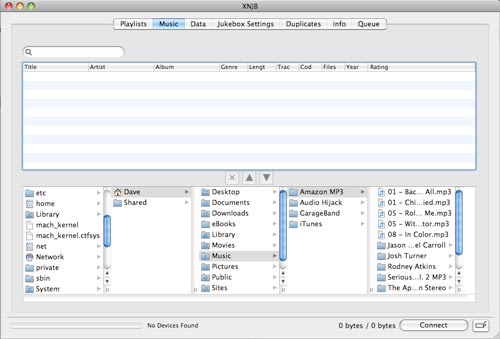
I tried XNJB and iTuneMyWalkman to name a few. Some of these applications got me part of the way to my objective and a few failed completely. I was becoming pretty frustrated with the whole process wishing for the simplicity of iTunes and my Shuffle.
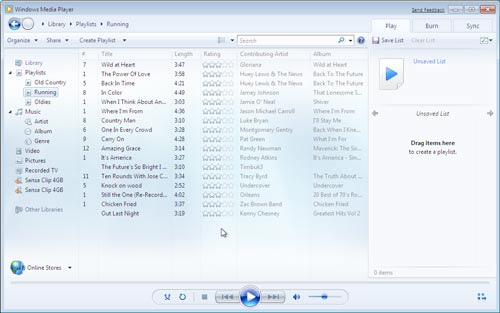
The only thing that saved me was trying to connect the Clip to Windows 7 running in Parallels and use Windows Media Player to manage my music and playlists. This worked relatively seamlessly. The music and playlists synced with the player perfectly.
Running with the Clip….
Now that I had all my running tunes on the Clip, it was time to take it out for a test drive. I prefer running with an extremely lightweight music player, so it is not noticeable and doesn’t bother me during my workout. I ran with a Nano for a while but definitely thought the Shuffle was an improvement in terms of weight and experience. The Clip meets my running preferences as well as any other player I have ever used. Plus, it has the huge benefit of being able to select which song I want to play next (via its screen) and keep music types organized (via playlists). Using the controls while running took a few outings to get used to, but after that they were as easy to use without looking as the Shuffle.
Overall experience….
Other than lack of AAC support, I have nothing but praise for the Sansa Clip. This feature packed, tiny little music player is an incredible bang for the buck. The 4gb version of the Clip can be found for three quarters the cost of the most recent Shuffle. The 8gb version (of the Clip) goes for the same $80 that Apple is charging for its button less, screen less player. If you are looking for a small, inexpensive mp3 player, I highly recommend considering the Sansa Clip.
Product Information
| Price: | $59.99 |
| Manufacturer: | SanDisk |
| Pros: |
|
| Cons: |
|

Gadgeteer Comment Policy - Please read before commenting
Dave, can you remove the clip if like me you never really listen to music whilst running/working out
Ten years later and I still have mine!!! 🙂
Hi Jake,
Yes the clip can be removed.
Dave
I have been using a Sansa e250 for the past few years that I absolutely love. Sandisk makes a great product and I’m sure this little guy is no different. The best part is the “drag and drop” option when transferring music files and the built in FM tuner.
Yea I love “drag and drop” mp3 players and the standard mini-usb is perfect!!
I’m picking nits, but it’s rigors and not ‘riggers’. Unless the Sansa is very heavy and needs a specialized crew to lift it. 😉
I agree 100% with your review. I’ve been using a clip for quite awhile and it is my constant companion at work and at the gym. The sound is great with upgraded earbuds. I use it with Rhapsody. For about $15 per month, I get basically unlimited access to any song that I could ever want.
David –
I also agree with your assessment. Bought my first Clip off Woot (2 gig), immediately jumped up to a 4gig, and when the 8 came out I grabbed that. I now listen to the Clip more often than my 160g Ipod classic. It goes whereever I do.
@dave Thanks I don’t really like those goofy clips on devices. but what they call it without the clip???
Mac syncronisation
I don’t know if it works but try it:
Open iTunes and the finder so you can see both of them on the screen.
Click the playlist on iTunes you want select all songs and then drag and drop the selction direclty into sansa’s folder on the finder.
(On my USB china mp3 player this works…)
This is my player of choice. I bought one for my wife and she loves it. Not having to use software to load tunes is great. I listen to NPR at work using the FM tuner. A dual MP3 player/foot scraper is a bonus (goodbye “The Egg”!) and I love the built-in mosquito repellent too! “Feature rich” is an understatement!
Your review was true to my experiences with this device.
I’ve purchased three sansa products; two of which have quit working… Have any of you had any problems? The clip comes on and says connected when I plug it into the computer, it acts like it is charging; but, when I unplug it and turn it on; nothing. Sometimes it will turn on, but it just stays on the SANSA screen. It won’t play music or change to the menu screen. It won’t do anything… it will sometimes turn the SANSA writing upside down. Help, I love these products when they work; I’m getting frustrated. The other is a SANSA Fuze. It won’t do anything at all… won’t charge, won’t turn on, nothing happens. I have tried to go to their website and troubleshoot, but to no avail. HELP!
Hi, my brother can’t seem to put songs on to his new Sansa Clip mp3 player. We try to drag and drop songs into the window with his player on it, but it only put about 10 songs on, and I don’t know how to put anymore on. We have an imac so I’m not really sure how to put anything else on. If you could contact me I would be very grateful.
Thanks
Hi, I got a question: does the player allow to put different folders on it and then play a whole folder? or does it organize the music according to the mp3 tags? I organized my music according to my taste so have different artists, different albums in a folder and want to play the folder as it is. i know about playlists and all but don’t want to create one for each folder.
Thanks
this thing sucks!!! it freezes and wont turn on. look it up…there are tons of people having the same problem! i wish i never bought this.
I would love to have tried this player out, but with no AAC support, Sansa won’t get my purchase. Add AAC support and we can talk Sansa!!!
This review is missing pictures of how the device looks when it is charging. I can’t seem to find that anywhere.
I am on my 3nd Clip; the first one stopped working for awhile but started working again mysteriously. I returned it to Wal Mart anyway just in case. The 2nd one worked great for a month until it got dropped in a cup of Grapefruit juice, D’OAH! It actually still worked after that but I couldn’t see anything on the screen and I think its stuck in voice record mode now. The 3rd one worked for a week and stopped working just like the first one did. The screen is black when playing so I didn’t know it was on (it was plugged into my truck dash and the radio was off) so I pushed the start switch up to turn it on and instead turned it off. It says GOODBYE at that point and IT MEANT IT! Never worked again!!!
Sansa Clip is truly a wonderful gadget. For the price the features it offers outweighs any other player out there
I got one for my son and it was great, i was able to get all the music he wanted on it. But….when trying to plug it in to the computer to charge it won’t. And now we can’t even update his playlist. I keep getting the (code10) error. I have never had any trouble like this with my ipod.
i need help, i can download music to my sansa clip, but it wont show or play them.
What format are the files that you’re saving to the player? Are they .mp3 files? Are you putting them on a microSD card? Can you listen to the music on your computer?
This is a crappy unit. I have owned a Muvo TX FM 1GB drive for 3 years with no problems it just is too small. I love the face that the case comes with a clip. nothing to buy just clip and go. That is why I got the sansa clip. THIS THING IS CRAP. I got the extented service from Best Buy and thank GOD. I am not on my 3rd clip!!! They work for a few weeks then just turn off right in the middle of my freaking work out!!! Doesnt charge doesnt turn on DEAD DEAD DEAD. Going back to Best buy 2moro to see if they will let me have something else.
This thing is great when it works. HOWEVER, after only using it a few times, it started to not ply the MP3 songs. You, hit play on any song in memory and nothing happens. And after reformating it and reloading music it started working again, it randomly just erases all the music in memory after about an hour or two of use. It makes this thing essentially useless. I have read that many other people have this same complaint. What a shame.
I had a clip since summer and its winter now. It was good untilthe screen never came up….. It just turns black……..
uh hey i dissagree today while listening to it in school i went to turn up the volume on it but then it froze and my music stopped now i cant seem to fix it my computer doesnt even acknowledge it and i cant find any way to get help unless it is waiting untill it dies and then recharging it. but if that did not happen then i guess that overall you are right nice review for a good mp3 player.
my sandisk mp3 the one that is shone in the pics, was dropped and will no longer turned on, but it will charge. I cant listen to any of my music or anything. It will charge but when I go to turn it on it will just not do it. if anyone can help me, contact me at [email protected].
i have an mp3 player, how should i charge it?, I mean when connected via USB whether i shold on my mp3player oroff it?
how could i know its charging ir not?
[email protected]
@ravi you should not need to turn it on. It should have some type of indicator to show you that it’s charging. Either an LED or something on the display. It all depends on the make and model of the player that you have.
Tweak your Sansa Clip player, create a custom welcome screen
http://www.youtube.com/watch?v=mLGHQLwslXs
Product breaks if any sweat enters it. Mine broke after one hour of exercise. I do not recommend this product.
I have been using mine on my Harley for about a year…I can’t find the driver software for it now though so I can’t load it with any songs and I’m frustrated. It’s worked out so well – the fact that it has an FM tuner in it is very cool too. Now that driver stuff…
I can’t find any way of uploading a playlist on my sansa. I’ve tried using Windows Media Player to sync the playlists but it never seems to work – the playlists never show up on the device. Is there any other way to make seperate playlists, or do I have to put up with all my music being in one list and just using the Go List?
I have had problems with mine for a little while now. Today when I turned it on it would not go to the music screen, it shows “sansa” or the symbol and stops. I am not sure what is going on. 3 or 4 other times, the thing has shut down and would not turn back on, so I left it on the charge and after like a week or so it would turn on. I would like to get it to work again.
Is there any way of increasing the volume on the Clip? I turn the control on the side as far as it can do but it’s still not enough in any kind of noisy environment -train, street etc. And I have pretty good hearing. Presumably there’s a volume limiter built in. Is it possible to override it?
I record a radio show daily on my device. When I listen to the recorded program, the music plays fine, however during commentary on the show the voices are distorted by a humming sound. This is the second device that I have purchased and I have had the same problem with both. Any ideas or suggestions on how this problem could be corrected.
Do not purchase this device! Like I said I have 2 and they are both trash!
I have a sansa fuze , bought about 4 years ago. It worked great and I used it a lot, But now after all this time the scroll wheel is frozen. I can’t get it to turn so that I can’t move to audio books, change the volume, of select different tracks. What can I do to get the scroll wheel working?
Thank you!
MaryAnn
guys to those of you who are saying it wont chrage
are you useing the original xcharger cable?
it doesnt seem to work with all mini usbs
with some itt charges but wont connect