
We use affiliate links. If you buy something through the links on this page, we may earn a commission at no cost to you. Learn more.
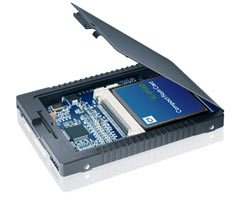
This 2.5 inch enclosure from Sans Digital allows you to replace a 2.5 inch SATA drive in a laptop with a solid state drive. Just pop in a compact flash card (up to 32GB) and you’re all set to enjoy the benefit of a system with less heat, less power consumption, noiseless and shock resistant.

Gadgeteer Comment Policy - Please read before commenting
Hi Julie,
Did you test this adapter yourself ?
@Remo Knops No, I just saw it and thought it looked interesting.
Another thing that would be useful for is setting up CF card boot devices for embedded systems/appliances. (Like my home-built firewall.)
A review might be useful…cough!
http://www.geekstuff4u.com/2-5-diy-ssd.html
twice the bang!
Actually I have that product but the dual CF one. Works great but you have to use UDMA CF cards. Mine is 2 x 32GB UDMA CF. VERY FAST.
If you need to pay around $200 for the dual compact flash, and then around 70*2=$140 for 2 32 GB CF drives… and end up paying $340… why not buy a 120GB solidstate drive for around $370, or less for a 60GB one? (Prices found on pricegrabber)
@Avaviel: I got that way before SSD was produced for consumer.