
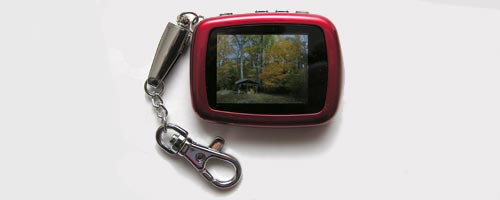
The days of carrying around your family photos in your wallet seem to be over. Now when we want to show someone a picture of our new baby, puppy or house, we whip out our mobile phone or laptop. But, not everyone has a mobile phone or laptop. That’s where the Insignia Digital Picture Keychain can help keep your snapshots ready for viewing.
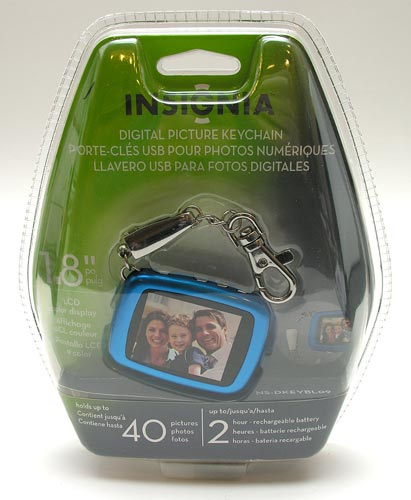
Hardware Specifications
Display: 160 x 128 pixels
Screen size: 1.8 inches (45.7 mm)
Capacity for up to 40 photos
File format: .jpg
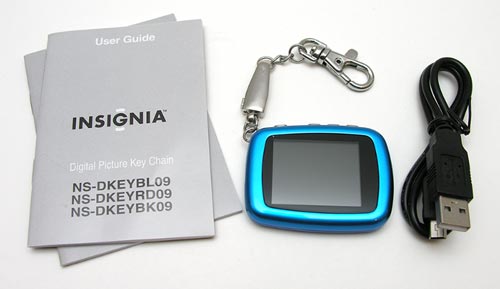
Package Contents
Photo keychain
USB cable
User Guide
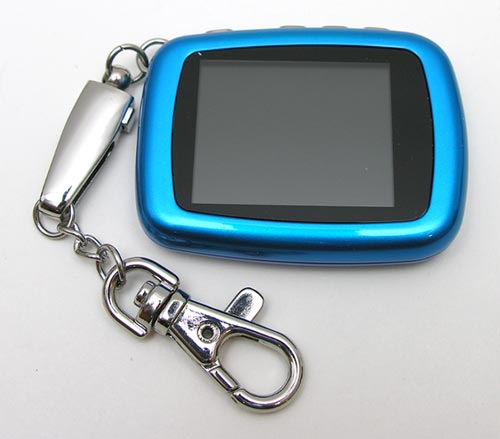
The Insignia keychain is a non-symmetrically shaped 2.3 x 1.7 x 0.4 inch plastic module that is available in Red, Blue and Black.
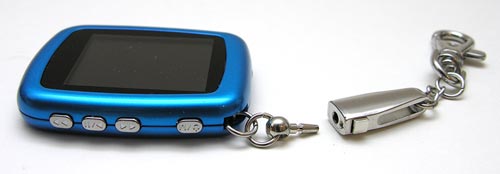
The metal keychain can be easily detached from the viewer. This makes it more convenient to let people view your photos without having your keys or other items hanging from the chain. It’s also nice to be able to detach the viewer when you need to charge its internal batteries with the USB cable.
Along the top edge there are four control buttons for the viewer that allow you to toggle power and cycle through your photos.
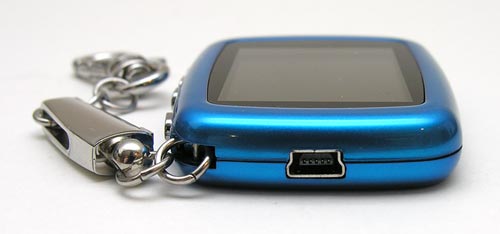
On the Left side, is a mini USB connector that is used for charging and transferring photos to the viewer from your PC.
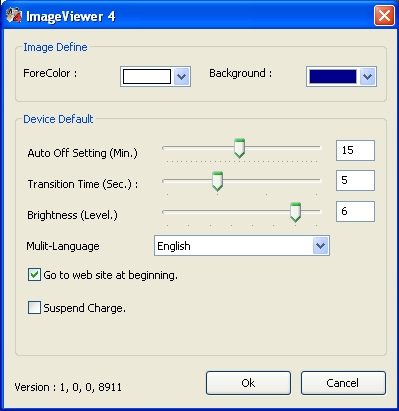
click thumbnail to see full sized screenshot
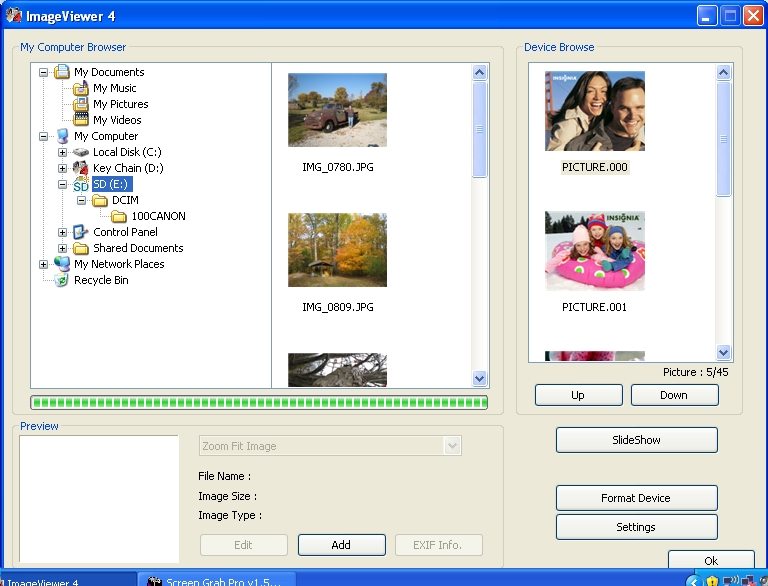
Putting your images on the keychain is an easy task. Just plug one end of the included USB cable into the keychain and the other into your Windows PC. Sorry Mac users, you’re out of luck. You can’t drag and drop photos to this device as you would a USB drive. The keychain contains software that will automatically run when you plug in the keychain to your computer.
The software allows you to see or delete the photos currently installed on the viewer and add new photos.
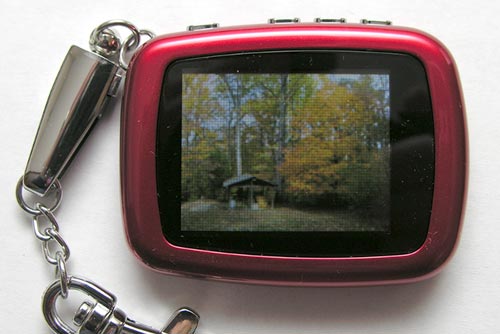
With a resolution of only 160 x 128 pixels, the image quailty for this little viewer is pretty ummm… how can I be kind here… crappy. I mean you can’t really expect to see much with that small of a photo, so don’t use the viewer for landscape type pictures. The images are also sort of fuzzy and I thought maybe it had to do with the way their software was resizing the original image before transferring it to the viewer. So I used Photoshop to resize some images down to 160 x 128 before copying them to the viewer. It didn’t make any difference in the image quality though.
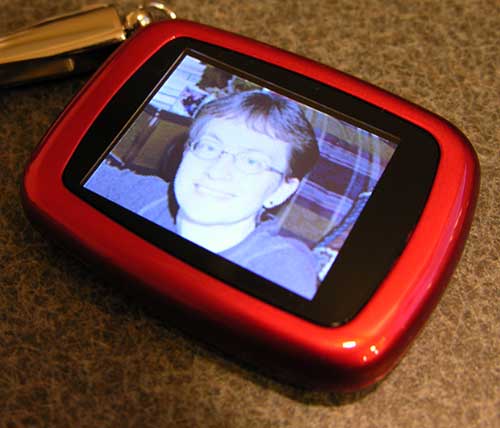
It does a better job of displaying close up face pictures.
When it’s all said and done, I would really only recommend the Insignia Digital Picture Keychain for someone that does not already carry a cellphone or a PDA and has a Windows based PC.
What do you use to display your personal photos?
Manufacturer: Insignia
Retailer: Best Buy
Price: $19.99
Pros:
Easy to use
Charges via USB
Software for copying images is stored on the viewer
Cons:
Low resolution
Can only hold up to 40 images

Belkin Apple AirTag Secure Holder with Key Ring - Durable, Scratch-Resistant Case with Open Face & Raised Edges - Protective AirTag Keychain Holder Accessory for Keys, Pets, Luggage, & More - Black
(as of June 8, 2026 04:43 GMT -05:00 - More infoProduct prices and availability are accurate as of the date/time indicated and are subject to change. Any price and availability information displayed on [relevant Amazon Site(s), as applicable] at the time of purchase will apply to the purchase of this product.)

Gadgeteer Comment Policy - Please read before commenting
I have one of these (received it as an xmas gift). While I agree, the resolution isn’t great, I think it displays the pics I’ve chosen to put it on nicely. It’s only a two inch screen, so I wouldn’t expect it to display landscapes in any meaningful way. Just face shots.
I think $20 is a bit much for this, but if you could find it under $15, you may want to consider it for your [grand]mother/father.
I’ve got mine running through a cycle of my kids pics — velcro’d to my work monitor.
John:
I was also going to suggest that it was a good choice for grandma or grandpa, but then they would need a computer to switch pics 🙂
I like your idea of sticking it to your monitor!
Hello and Happy New Year!
1) Love your new WordPress Blog layout.
2) Love your reviews (especially your very detailed close up pictures.. the BEST!)
3) Not loving the advertising links via keywords though. Will readers activate these without knowing so?
4) computer, pda, software, cable, mobile phone, code, picture, image quality, etc. If these links show up for me in my comment, I’ll gladly take 10% of the click-throughs 🙂
Geakz:
Those double underlined link ads have been on The Gadgeteer for years and years now 🙂 Sorry, but a girl has to make some money to keep a site like this going. I’m sure you understand.
Is it “Mac users”… or “Mac OS users” who are out of luck with this product? In other words, if you’re in Windows, running it through Bootcamp/Parallels/VMware, does this device work?
Q:
I don’t have Bootcamp or anything similar set up on any of my Macs right now, but my best guess is that the keychain would work just fine. It’s only that they have somehow blocked you from seeing the contents of the flash memory under OS X. And the fact that you have to use their application to copy files to the keychain.
I just bought a insignia picture key chain. When I connect it, I get the message (USB peripheric unknown) I get that same message either when working on my PC using XP or my new one using Vista.
doesnt work with vista
I have this keychain (christmas present) and loaded a couple of pics on it and now I’m getting this message TENX_ERR_WRITE_READ and it won’t do a thing. What do you think is wrong?
@Kody: Did you try reformatting the memory?
I can’t get the unit that I bought for my wife to work. I was able to charge it using her laptop which runs Vista but all of our pictures are on my laptop that runs XP. When I plug the unit into my laptop it just says, “Connecting….” on the screen. The software that is supposed to start automatically doesn’t start for me. I tried unsuccessfully to drag/drop a picture. I’m going to try to take it and the one that I bought for my daughter back. Looks like it’s another piece of chinese junk. Too bad, it’s a nice concept.
I had the same problem, I was getting the following message: TENX_ERR_WRITE_READ
It wouldn’t download my photo’s. I found out that if I open the Image Viewer 4 program, then, under My Computer Browser, I open the file that my photo’s are in and wait a few moments, until the green blocks in the long, narrow box between the Computer Browser and the Preview box fills up or stops, then I was able to download, edit and fill the photo keychain. Be patient, it seems to need to upload changes to the keychain every couple of pictures… If I continued to work during this upload, it would shut the whole program down.
Hope this helps!
My wife got one of these as a gift, and I was discouraged after reading here and in other sites that it doesn’t work on Macs (no Windows PCs at home). Happily, the manufacturer has just recently released a Mac driver. You can download it here: http://www.insignia-products.com/t-Digital_Keychains_Mac_Driver.aspx
I just tried it, and it works fine. The only problem is that when you click on a photo for previewing it (before uploading), it may fail if the path has uppercase characters, since it seems it assumes a case-insensitive file system. However, the actual upload of the photos to the device works fine.
With respect to my previous comment – I should clarify that the problem I mentioned happens only if you have your disk formatted as case-sensitive. The default is to format it as case-insensitive, in which case this problem wouldn’t occur.
is a fradue. I bought it for grandpa but doesn’t work. I loaded some pics and when we connected to my pc in order to update the pics I got the following message:
ITenxDevice Opt. Fail! errmsg(TENX_ERR_FATFAIL).
Does somebody knows what that means?
As Mike saiys: ‘ Looks like it’s another piece of chinese junk. Too bad, it’s a nice concept’
thanks
I have the same problem as “Chris”..When I first hooked the keychain to my laptop it loaded the program so I can add photos and it worked great, but then it shut off and I have been unable to get that same program back to edit. Everytime I try to click on it it just reads ITenxDevice Opt. Fail! errmsg(TENX_ERR_FATFAIL).
I have the same error. I assume FATFAIL is a failure of the FAT format on the device which may be an unrecoverable state.
I have searched the net and I’m not finding anything. FAQs and support on the manufacturers site was not at all helpful which is very bogus these days! A bit odd. Perhaps they don’t wish to acknowledge a major product flaw.
I should call support but the hours are west cost and not convenient to my job hours.
Anyone have a solid solution?
Eureka! I was getting the same TENX_ERR_WRITE_READ error message, then as a last ditch effort I took it to my work computer and got a new message that told me to reboot my computer (with the device still connected) in order for it to work – and it did!
BTW, the Insignia ‘help’ line was useless, as was Best Buy, for trying to resolve this problem. What a joke.
One issue we are having is when the battery went dead, after we charged it, it would no longer scroll thru the pics, nor turn off by itself, we can manually scroll thru, but it will not shut off either auto nor manually. this causes the battery to go dead real quick.
I had the same issue with this keychain. When i plugged it first time it started fine. Then next time it wasn’t starting at all.
The issue was ‘E:/’ was not accessible. I rectified it and its working fine.
Please try doing this if you are facing same problem.
I bought one last weekend and it works great on my system.
Just got this to download pics and send to a soldier friend in Afganistan. How long should it take for the battery to charge? I’m gonna load up some photos here, then send it with the USB cable so he can add some more of his own when he gets computer time over there.
question: can i still put pictures on my keychain if i dont have the disc for putting on my desktop? or do i need to get the disc?
Julie, is there an inexpensive digital photo keychain that is better than this Insignia one? Thanks.
@Angela There are a bazillion and one different companies selling them. I also reviewed these:
http://the-gadgeteer.com/2008/06/26/digital_photo_keychains/
My laptop was stolen a few months ago…and guess where the program for my digital keychain was loaded?! I think mine is Insigniw–the name sounds familiar. Unfortunately it does not say the name brand on it. I think I bought it at Walgreens though. It was about a year ago. Any suggestions anyone? (Besides the obvious–buy a new one!)
Julie,and Angela do you know where to find a cheap camera?I do!!!Go to BedBathandBeyond.com type in digital picture camera and it is not insignia,but it is 9.99,and it holds up to 60 pics.My brother is getting one,and i am getting something else!!!!!!!!!!!!!Oh i almost forgot my brother ask”Where can you get a cheap cellphone that can open sideways?”BedBathandBeyond.com is a link
or a touchscreen
UMM YEAH IM JESSICA’S BROTHER.I AM GONNA GET A DIGITAL PICTURE KEYCHAIN JUST LIKE JESSICA DESCRIBED!
I’m in Brazil, I bought mine in Orlando. I can not open the program appears only connecting … the computer is XP
Piece of sh*t dead out of the box and company will not replace.
When I connected it for the first time and run PictureViewer4 software it showed me the message TENX_ERR_FATFAIL. I’ve done all the procedures that I found at Insignia’s site but nothing. I think this is another chinese junk.
I bought a Insignia Digital Key Chain in 2009. Never had a problem until now I tried to download some additonal pictures and the Image Viewer 4 program doesn’t come up instead I get the message “Image Viewer 4 already running” . The company was no help to me.
Any suggestions ?
Thanks!
Just reboot the computer with the device plugged in. also make sure that you are using my picture folder to transfer the files to the keychain!
Insignia sucks..I had the same problem with my Keychain and they didn’t do anything!
I am a computer user and all AND I like this little keychain frame. I keep it clipped to my purse and can view / show it at any time. What do people expect from a little gizmo like this? Of course you won’t get great resolutions. After changing to windows 8 I too was getting the TENX_ERR_FATFAIL. error. I was patient and plugged, unplugged it until it added my pictures. All is well.