
Product Requirements:
Device:
Any computer with a standard sized USB port
I have a real weakness for widgets, doodads, thingamabobs and whatzits. I have drawers full of them. That’s the problem. I buy these little doo-hickeys thinking they will make my life easier somehow, when all they do is clutter up my drawers. When I saw the FlexUSB ‘thingy’ from Ideative, I tried to control my impulse to buy one. I was successful too! But then they contacted me and asked if I’d like to do a review. I couldn’t very well say NO could I? ;o)
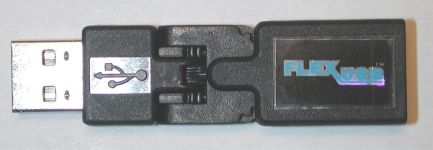
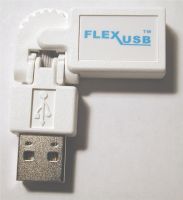
What exactly is the FlexUSB? It is a small (3.5 inch long) USB adapter that is fesigned to work on both Windows and Mac platforms, and with all USB devices that have a standard sized connector (including USB 2.0). It allows you to orient or position a USB device in the most optimal way for a cramped computing environment.
Notebook users will agree that they have unique challenges using USB devices. Typically their USB ports are limited, and are in an inconvenient location causing the USB device to be in an awkward orientation. Mobile users often have to work in a limited space such as an airplane tray table, small coffee shop table, or even their lap. This limits the user’s ability to effectively connect one or multiple USB devices.
The FlexUSB adapter comes to the rescue by giving you a +/- 90° horizontal hinge and a +/- 90º vertical hinge. The two bendable joints give you a variety of ways to manipulate the adapter.
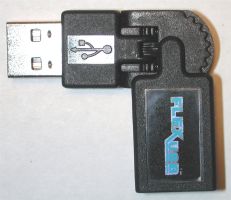
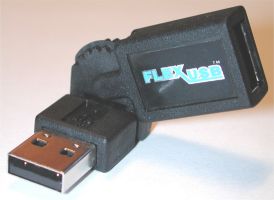
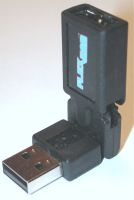
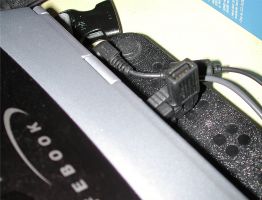
I gave this little adapter a good workout by using it with my Fujitsu Lifebook P2100. This notebook has 2 USB ports located on the back of the device. I find that I either need to stand on my head or completely flip the notebook around whenever I want to plug device into one of these ports. The FlexUSB solved this problem perfectly. By plugging it in and bending the extender straight up, I could then easily plug in anything I needed by closing the screen enough to see the extender.
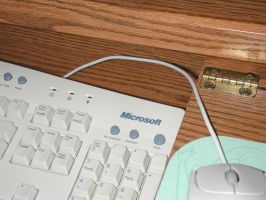
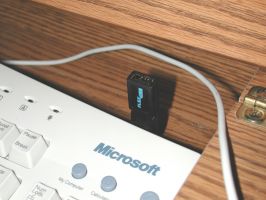
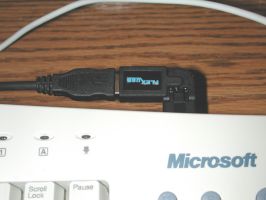
It even worked great for my desktop. I have a Microsoft Internet keyboard, that has 2 USB ports on the back. I’ve always had problems accessing the ports because I keep my keyboard in a drawer which doesn’t give me much room to maneuver. The FlexUSB allowed me to extend the port out to an area where I could access easier.
The FlexUSB is one of those little doo-dads that actually do make your life easier whether you are a notebook user or a desktop user. If you have a cramped computing area and find yourself plugging and unplugging USB devices on a routine basis, you will probably benefit from this product.
Update (4/6/2004):
The folks at Ideative were kind enough to send me an update to their original FlexUSB adapter, along with two other new products. The updated adapter looks identical to the original, but feels more robust. It can now bend a full 90 degrees (see 2nd picture at beginning of review) instead of really close to 90 degrees.
This adapter is now also available in white for Mac users (…and for users that happen to like white). The functionality and price of this adapter hasn’t changed, just the color.
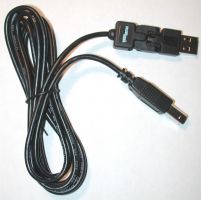
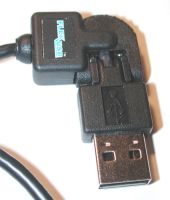
Also available are three new FlexUSB cables. They have the same basic FlexUSB adapter, but the adapter is attached to a 6ft length of cable. Available with a full-size male USB connector, mini USB connector or female USB connector on the non-FlexUSB end, these cables help keep your wires routed nicely. The also make great extension cables for your USB equipment.
Update 09/22/17
It’s been fourteen years since I posted this review and I am started using this little tool after switching to a 12″ MacBook. I have my 12″ MacBook connected to a monitor using an HDMI adapter that has one USB port. The cable that I need to use in that port is pretty stiff, so I use the FlexUSB adapter to help route it away for my keyboard. Works great! Too bad that these adapters no longer seem to be for sale.
Price: $12.99 adapters, $16.99 cables
Pros:
Makes USB ports more accessible
Simple to use
Cons:
Nothing
Product Information
| Price: | 12.99 |
| Manufacturer: | FlexUSB |
| Pros: |
|
| Cons: |
|

Gadgeteer Comment Policy - Please read before commenting
Post your coments on the FlexUSB Adapter Review.
http://www.the-gadgeteer.com/flexusb-review.html
Just click the POST REPLY button on this page.
Hello my name is laurence and as sister Julie pointed out
I have no impulse control and have boxas full of those labor saving gagets too. I suggest all of us in this big support gadget
group understand this fundamental weakness and strive to get ahead to support our habits.
Sister Julie can be thanked for making sure that our attention is focused on those gadgets that we could of missed and might become depressed over not buying.
Julie Thank you again for a great review, I sure I need one
Laurence:
Wow, I didn’t know I had a brother! I think I need to have a talk with my Dad… 😉
Glad you enjoyed (I think) the review.
I picked up some of these on the weekend discount sale, and kept a pair of them with me. They’re fun to fidget with… but after a little over two days, the wiring for one ripped completely out of the connector. I suspect the tolerances are a little close, the other one didn’t fail at that time.
Yes, this is obvious abuse, but that’s how we learn about long-term handling of these gadgets 🙂 I haven’t checked into replacing it (some places would consider that within the warantee just to get it back for forensics) but I’ll dig up pictures later…
It looked like a great little device, I got it based on the review. However, after three months of very light use (mostly stuck into the back of my docking station), the adaptor stopped working.
It appears that the wires had become strained in one of the joints (I can see the copper strands sticking out).
Disappointing.
-H.
You should write them and complain. I would bet that they send you a replacement. Maybe it was defective…
Hi Julie,
Yes, I have sent them an email about it asking for an RMA.
It does appear like the ribbon cable is defective– it looks like the insulation had been partially stripped in the wrong place during manufacturing.
-H.
Helix23:
Thanks for the update. Let us know if you get a 2nd one and it works better for you.
Hey that original one looks familiar! it is on my desk now!
(won it in the gadgeteer contest 😉 )