
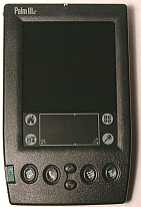
The Palm IIIc from 3Com / Palm Computing is their first PDA with a color display. It is also currently the smallest color PDA available. I’ve been waiting a very long time for Palm to come out with a color model so now that it’s here, let’s give it a good going over!
Hardware Specs:
Processor: Motorola EZ Dragonball 20mhz (Same as the Palm Vx)
Operating System: Palm OS 3.5
Memory: 8MB RAM, 2MB Flash
Display: 160×160 pixel, 8bit Active Matrix TFT Color display
Power: Lithium-ion rechargeable
Size and weight: 5.06″ x 3.17″ x 0.67″, 6.8 oz.
The first thing you notice when you see the Palm IIIc is its color. The case is black like the IBM Workpad instead of the traditional gray Palm color. Besides that change, the IIIc looks just like a III series unit only a bit longer (there are a few other subtle differences that I’ll mention as I get to them).
I’ve been using a Palm V as my main PDA for the past year so the IIIc does feel larger and heavier in my hand. I think this will be the hardest thing to get used to with the IIIc for me. My best friend uses a III so I did a little test. I made her close her eyes and would hand her the III or IIIc so that she could hold it and feel how heavy/large they both were. I then asked her which one she had in her hand. Each time she really couldn’t tell and thought they both felt the same. So, for someone that wants to upgrade from a III series to the IIIc, the extra length and weight probably won’t be noticeable to you.
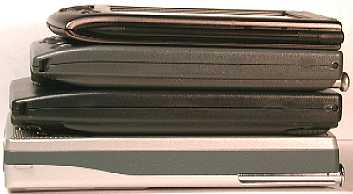
(Top to bottom: Palm V, Palm III, Palm IIIc, Casio E-100)
The IIIc feels more comfortable in my hand than the Casio E-100 because it is a bit thinner and the sides are more rounded. The IIIc feels solid and well made although squeezing it in my hand did make the casing flex a little along the edges where the two halves meet. Squeezing the case didn’t cause any creaking or cracking noises though.
The top of the IIIc has a small red LED that lights up when the unit is charging in the cradle. When the unit is done charging, the LED turns off. I am surprised and somewhat disappointed that the LED doesn’t blink when an alarm is sounded (hopefully someone will make a hack to do this). The top also has the IR port which is larger than the one on the III series. I had quite a bit of trouble beaming applications to my IIIc from my PalmV at first. I had the units separated by about 3-4inches and kept having interruption errors. I thought I had a defective unit until I separated the two PDAs by about 12 inches. I was used to beaming much closer together…
The IR range appears to be quite a bit stronger than previous units. I was able to use the OmniRemote software to control my TV and VCR from about 8-9ft away. One person wrote me an email saying that he could control his TV from 20ft away.
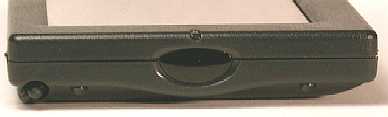
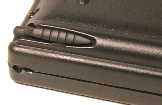
The stylus and silo on the IIIc are the same as the III except that the silo is rotated more towards the side of the unit. This placement makes it a bit more convenient because you can use the pad of your thumb to push the stylus up. The stylus is the same metal/plastic one that we’re all familiar with.
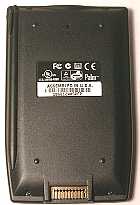
The hotsync port is on the back of the unit. The spring loaded cover is gone due to space restrictions inside the IIIc. The port is shaped the same though so it can sync in an old PalmPilot cradle or III cradle (although it will not charge the batteries while in these older cradles). The Palm III modem and other accessories that use the modem housing fit just fine on the IIIc.
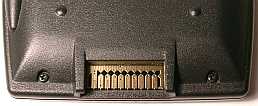
The IIIc cradle looks exactly like a III series cradle except that it is black. An AC adapter plugs into the end of the serial cable for charging the IIIc while it is in the cradle. I sure wish they would make the cradle heavier. It’s annoying that you can’t just pick the IIIc up from the cradle without the cradle coming along for the ride. You have to hold on to the base when you want to remove the PDA. I guess I could always Velcro the cradle to my desk 🙂
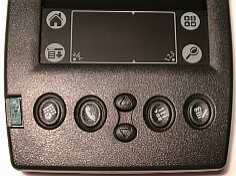
The buttons on the IIIc are indented and have good tactile feedback when you press them. They are also flush with the case so they don’t stick up and won’t get accidentally pressed. The up and down scroll buttons are now separate buttons. I’ve found a problem with the down button in that it sometimes requires more than one press to activate it. Or, it requires more pressure to activate it. At first I thought I was the only person having this problem, but I found others discussing similar problems on the comment area at PalmStation.com. This is an annoying problem for me because I rarely use the stylus to tap the onscreen scroll buttons. Instead I use the up and down hardware scroll buttons.
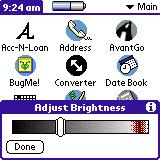
The green power button turns the IIIc on and off and also when held in for a few seconds will bring up the brightness control app. This onscreen control acts
just like the contrast control on the Palm V. There isn’t a manual contrast wheel on the IIIc.
The speaker on the IIIc is the same speaker that all the previous units have used. The speaker in my IIIc doesn’t seem as loud as the speaker in my Palm V. This is really disappointing. People have been complaining about the mediocre speaker quality since the PalmPilot was first introduced. The speaker is adequate for alarms but will not do DTMF tones.
The IIIc display is black when turned off. Even the silkscreen area is now black and white instead of green and black which I don’t like because it is very hard to see in the dark. It would have been much nicer if the white part of the silkscreen area lit up. The screen is very smooth and only indents a tiny bit when you tap it with a stylus. The display is really reflective. You can use it as a mirror when it is turned off. So far, this reflectivity/glare hasn’t bothered me too much but it might bother some people.
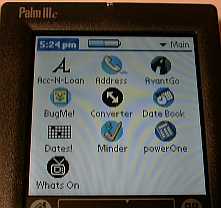
The display is an 8bit Active Matrix TFT that can display 256 colors at one time from a palette of 4096. The screen is very crisp and clear. It’s actually almost too crisp because you can see every pixel on the screen. Some people might find this distracting. Also, some of the colors seem more reflective than others. It’s strange but sometimes I feel like I’m looking at a painted mirror. After a few days of using the IIIc, I’ve gotten used to these issues and now I don’t seem to notice them. Don’t get me wrong, the color display is VERY nice. It is bright and clear and can even be viewed outside on a semi cloudy day if you turn the brightness all the way to the max. I was worried that I wouldn’t be able to use the IIIc outside at all but it is useable… sort of…especially if you shade the screen. It’s far from perfect but it is about 75% better than trying to use a Casio E-100 outside in the bright sun. Check out the pictures below showing a Palm V, IIIc and Casio E-100. The picture on the left was taken outside on a sunny day with clouds. The one the right was taken on a very sunny day with no clouds.
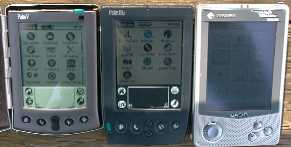
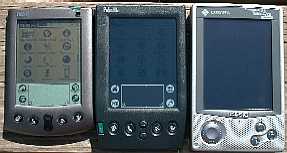
Of course, the Palm V’s screen was the best for outside viewing, but the IIIc was ok if there were some clouds. The Casio E-100 was pretty much unusable even on cloudy days. That said, if you use your PDA outside more than inside, a IIIc will probably not be the PDA for you. Also, turning the brightness all the way to the max really takes a bite out of the battery life.
Screen Dimensions:
| PalmPilot Professional | Palm III / IIIx | Palm V | Palm IIIc | |
| Height | 3.20″ | 3.20″ | 3.075″ | 3.15″ |
| Width | 2.35″ | 2.375″ | 2.242″ | 2.33″ |
I found that using a stylus on the screen required slightly more pressure than the screen on my Palm V. Maybe the digitizer isn’t as sensitive?
So, how does this new color screen affect the battery life? I got my IIIc on a Tuesday night and brought it home, put it in the cradle to charge and went to bed. The next morning I took it to work with me and have been using it the last 5 days without putting it back in the cradle to charge. I’ve been using the IIIc exclusively as my main PDA throughout these days. I’ve been hotsyncing and using it probably more than I normally would. I’ve had the brightness set at various
settings during this time, but it has mainly been set at about 30%. So far the battery gauge is showing 50% full. I’m pretty happy so far with the battery life and don’t have any real complaints about it.
What about the overall speed of the IIIc? Even though it is using the same processor as the Palm Vx, I can tell that the IIIc is somewhat more sluggish. My friend who has a Visor instantly commented that he thought the IIIc was slower. I notice the speed difference during screen refreshing. For example, if I press the To-do hardware button, I notice that it prints each entry as it goes down the screen to fill the page. On my Palm V this is quicker and on my Visor Deluxe, the screen is almost instantaneously painted. I installed Nowaitz.prc and it seemed to help the situation somewhat. Don’t get me wrong, the IIIc is still much snappier than a WindowsCE device, but it is slower than all my previous Palm OS PDAs.
Software Specs:
There aren’t too many changes or addition to version 3.5 of the Palm Operating system. The Palm Desktop is the same version and all the same built-in applications are there. The changes are:
Date Book
A new To-do view has been added that shows your tasks and appointments for the day.
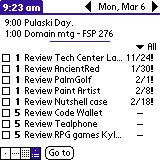
There is also now a snooze button when an alarm is sounded. When you press it, it snoozes the alarm for 5 mins. Unfortunately, you can’t set the snooze time. 5 mins is your only option…which is a little annoying. If they went ahead and added this feature why didn’t they go one step future and allow the user to also put their own time limit in if they wanted to?
Address Book
Some fields now use an auto-complete feature. If you enter several contacts in a row that use the same Company name, when you start entering the name, it will fill in the rest for you.
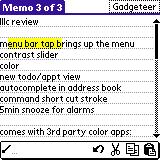
Other new features include the ability to tap the title bar to bring up the application menu. Another new feature is the shortcut popup bar. This bar will let you copy, cut, paste, delete, beam etc. depending on what application you’re in at the time. It is activated by doing the shortcut stroke in the graffiti area.
Included Software Bundle:
Calculator
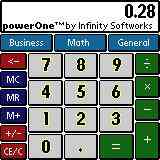
The built-in calculator is still there, but you also get a free copy of powerOne by Infinity Works that you can install. It is a typical calculator that includes some additional features:
Business functions – Sales tax, Markup/discount, and Percent change Math functions – %x, 1/x, power, x2, square root General functions – Tip, Calc Log, Calendar, Help
Chroma Gammon
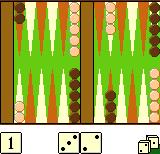
Color Backgammon game. No offense, but who the heck plays Backgammon? I would have rather had a color card game like Crazy 8’s by Seahorse Software.
Album To Go
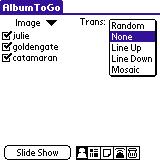
This application lets you carry pictures with you. A simple app that allows you to do slide shows or just view one picture at a time. Even includes a program that will convert .jpg pictures to a format that can be installed on your IIIc.
Actual picture quality isn’t too bad really…
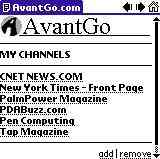
Avantgo
Web channel manager that allows you to download info from websites and news sites in color.
Overall Summary:
I am disappointed that there weren’t any major additions or changes to the OS. The main applications don’t even take advantage of color. It would have been really nice if the datebook app had allowed the ability to colorize the appointments. Or if the To-do app used red for items that were past due…etc. I’m sure that there will be third party programs that will do all these things and more, but who wants to wait for them? And things that people have been complaining about for years are still there. Like the 4k size limit on memos and the lackluster speaker.
The IIIc does make a fine PDA. The color screen is nice. I do like it. But, I am not sure at this point if I’ll be using the IIIc as my main PDA. Why? I think I still like my Palm V better. Its speaker is louder, it runs faster, I can use it outdoors anytime, and it’s smaller. The size issue is the biggest one for me. I’ve been carrying the Palm V in my back pocket for awhile now and can’t do that with the IIIc. I also wish that the IIIc did more. Color is exciting but at this point there aren’t too many applications or games that highlight it. Right now, I like my Casio E-100 better as a color entertainment PDA… it has a bigger color screen, great sound and a compact flash slot.
Should you upgrade to the IIIc? If you have a Palm V or Vx and love its size and screen then my answer is NO. If you need to use your PDA outside more than 50% of the time then my answer is NO. If you have an older Palm device and have trouble seeing the screen in different indoor lighting conditions then my answer is YES. If you currently have a color WindowsCE Palm-size PC and want a Palm unit that has color then my answer is MAYBE. I would check out a Casio E-100/105 first. Luckily there is a 30day money back guarantee so if you think you want the IIIc as your new PDA, you can try it out risk free.
I think Palm is on the right track but I am again looking forward to their next offering with hopes that it will hopefully address some of the issues I’ve mentioned here and also add some more features that take advantage of color.
Product Information
| Price: | $449.00 |
| Manufacturer: | Palm |
| Pros: |
|
| Cons: |
|

Gadgeteer Comment Policy - Please read before commenting
i want to know where do i found the Infrared in the palm? I don’t find it anywhere in the palm.Can you give me some hint????
The IR is located at the top of the unit, as depicted in this article.
i want to know how can i find cradle for my palm 3c..
Hi, I have a palm IIIC with serial cable. My problem is that I can´t sincronize because my computer doesn´t recognize it.
What software do I have?
I have installed Windows XP SP3, I try with Hotsync but nothing happen.
Could you help me with this issues please
Thank you
@rammstein to have your computer recognize your palm, right click the hotsync icon in the bottom right of your screen, right click it, and make sure local serial is checked.
Still using one I found in a pile of my dad’s old stuff.
I just unpacked my Palm 3C. Charged to full battery, and it is still on after a month. It’s still cool after 16 years. 🙂